Playwright MCP vs Claude for Chrome: compared


The core conclusion first: pick Playwright MCP when any agent needs its own browser for automation and testing, and Claude for Chrome when the task lives behind your logins and you're a Claude user. They're opposite architectures, not interchangeable tools, and that difference decides cost, login state, who owns your window, and which agents you can use.
Neither covers 'any agent + my logins + not my window,' the slot a standalone Chromium browser like ego(lite) fills.
Playwright MCP is a protocol server: it launches a browser for the agent and streams page structure back as text. Claude for Chrome is an in-browser extension: Claude moves into the Chrome you already use, sessions and all. Here's the honest comparison, plus the setup that combines what each route gets right.
What are the two routes, really?
The protocol route: Playwright MCP is an open-source MCP server from Microsoft that starts a browser, snapshots each page's accessibility tree as structured text, and executes the model's clicks and form fills. Any MCP-capable agent connects with one config line:
claude mcp add playwright npx @playwright/mcp@latestThe extension route: Claude for Chrome is Anthropic's browser extension, in beta on all paid Claude plans. Per Anthropic, it "can navigate, click, and fill forms in your browser" and works with Claude Code and Claude Desktop for end-to-end workflows; from Claude Code you attach it with claude --chrome. The operative phrase is your browser: it acts inside the Chrome profile you're signed into, with your cookies and sessions.
So the real question isn't which tool is better. It's whether you want the agent visiting the web as a stranger, or living in your house.
How do they compare on the five dimensions that matter?
Five dimensions decide the choice in practice. Read the table for the verdict, then the notes below for the evidence.
| Dimension | Playwright MCP | Claude for Chrome |
|---|---|---|
| Which agents can use it | Any MCP client: Claude Code, Cursor, Codex, VS Code, Windsurf. Can't serve agents without MCP support. | Claude only. Can't connect Cursor, Codex, or a custom agent. |
| Login state | Fresh profile by default: no cookies, no sessions. Auth is yours to script. | Full access to your signed-in sessions (Gmail, dashboards, CRMs) with zero setup. |
| Whose window it works in | Its own separate browser instance. Doesn't touch yours, but you can't lend it your logins. | The Chrome you're actively using. While it works, that tab is occupied territory. |
| Token cost | Heavy: full accessibility snapshots per action, 50K+ tokens on complex pages, 114K reported on one Salesforce tree. | Lighter per action in independent testing, but still bounded by your plan's usage limits. |
| Price | Free, open source under Apache-2.0. | Requires any paid Claude plan; the extension itself has no separate price. |
Two receipts worth naming. On tokens: ayyaztech's February 2026 hands-on test of all three Claude Code browser tools found Playwright MCP's per-action snapshots "can be 50,000+ tokens on complex pages," while the extension sent the lightest per-action payloads. On login state: the same test called Claude in Chrome the only one of the three that handles authenticated workflows out of the box.
Even the baseline footprints differ before any work happens: that test counted 33+ registered tools for Playwright MCP against 16 for the extension, with tool definitions alone taking roughly 6.8% and 7.7% of the context window respectively. Neither number is fatal; the per-action snapshot cost is what separates them at step twenty.
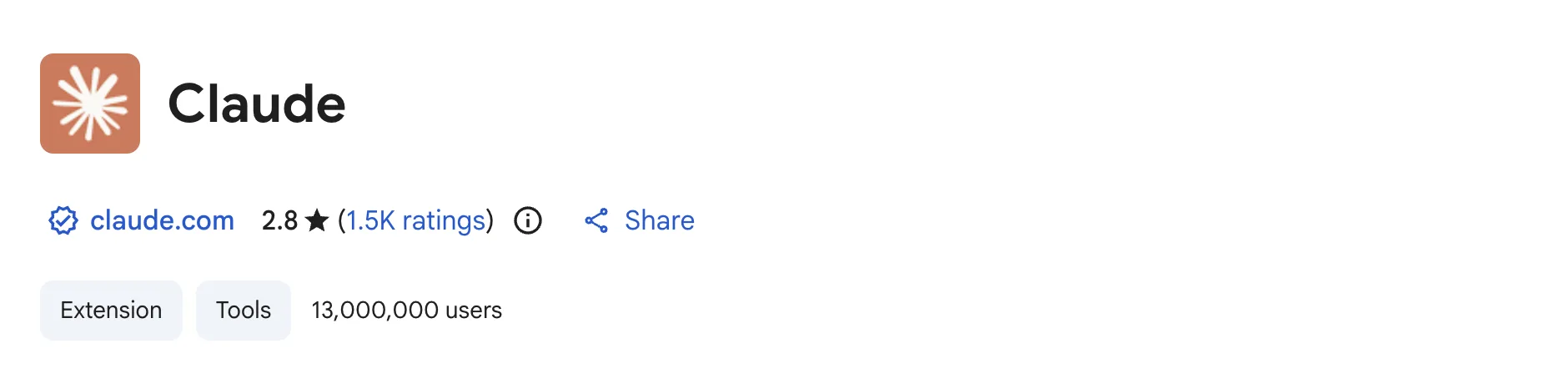
One more data point the marketing page won't show you: the extension's Chrome Web Store listing sits at 13,000,000 users and a 2.8-star average across 1.5K ratings. Massive adoption, mixed reviews. That's what beta software at scale looks like, and it's worth knowing before you hand it your signed-in browser.
What happens when a site shows a CAPTCHA or bot check?
Neither tool should bypass a CAPTCHA, Cloudflare challenge, identity check, or rate limit. Treat the challenge as a stop condition, preserve the page, and hand the browser back to a human or use the site's documented API and support path.
Playwright MCP can leave its separate browser open for a manual handoff; Claude for Chrome can pause in the tab you already use. Reduce retries, record the URL and failure state, and never rotate fingerprints or automate a challenge because an online post suggests it.
Is Playwright MCP useful for creating and maintaining tests?
Yes, as a test-authoring and debugging assistant, not as a substitute for a reviewed suite. It can inspect a page, exercise a flow, and draft locators or assertions; deterministic fixtures, explicit waits, stable selectors, and human review still belong in CI.
Start with Playwright codegen or a trace from a known scenario, then tighten the generated code. Check every locator against the DOM and accessibility tree, assert the visible outcome, and run against a seeded environment. A green exploratory run proves one path, not coverage.
How do you make an agent reliable on a React SPA?
Observe state transitions instead of racing initial HTML. Wait for a user-visible landmark, verify the URL and selected navigation state changed, and re-read the form or table after every action that triggers a render. Fresh contexts help reproducible tests; signed-in tabs help account workflows but need the same checks.
Prefer roles, labels, and stable test IDs. If an accessibility snapshot cannot find a control because the site omitted an accessible name, inspect the DOM and fix the label rather than guessing coordinates. Fill complex forms one logical group at a time and save a trace when the agent stops.
How can you control the cost of Playwright and Claude automation?
The main cost is model context and agent decisions, not the browser binary. Playwright MCP snapshots can be large on complex pages, while independent hands-on testing found lighter action payloads for Claude for Chrome. These are directional observations, not a universal price benchmark; model, page, plan, and task shape change the bill.
Scope observations to the fields you need, reuse results, and move deterministic loops into a script. Set step or time budgets, stop on repeated failures, and measure cost per completed task. Our token analysis explains why snapshot-heavy flows grow; it does not claim a fixed cost for every run.
Which forms and business workflows are good automation targets?
Choose work that is repetitive, observable, and reversible: drafting a support form, copying approved values between a CRM and spreadsheet, checking a dashboard, or preparing a job application for review. Define inputs, success, and stop conditions before starting, and keep sends, purchases, deletions, and permission changes behind confirmation.
Claude for Chrome is convenient for account-bound work in your existing browser; Playwright MCP is easier to isolate and schedule against a test environment. Neither should send unreviewed outreach, invent data, or keep retrying after a flow changes.
How should you scrape JavaScript-heavy pages and PDFs?
Use a real browser when data appears only after JavaScript runs, a button changes the route, or a permitted session is required. Wait for a content-specific signal, extract only needed fields, and save the source URL and retrieval time. Prefer a publisher API or static fetch when available.
For a public PDF, download the documented URL and parse the file. If a security layer blocks it, request an authorized export rather than replaying challenges. Compare Firecrawl, Playwright, and an LLM on completeness, citation quality, latency, and cost on your own corpus.
What should you check when Playwright MCP will not connect?
Start with the client's stderr and exact command. Verify the Node version, package name, browser installation, and whether the server launches outside the client. The official Playwright MCP repository is the source of truth for flags and connection modes; pin a known version in CI instead of debugging a moving latest tag.
In Docker, check browser binaries, required libraries, sandbox policy, and stdio or transport reachability. Proxies, TLS inspection, and antivirus tools can interrupt an extension handshake; test a minimal local page and inspect settings with an administrator. Do not disable security controls globally, and keep private actions on an allowlist.
How do you choose between Playwright MCP, Claude, and another agent framework?
Choose by the control plane. Pick Playwright MCP for an open MCP surface, isolated contexts, reproducible automation, or cross-browser testing; Claude for Chrome for a quick signed-in task in a human-visible tab; and a framework such as LangChain or a coding agent such as Codex when orchestration or repository changes surround the browser.
For a fair comparison, fix the model, site, login state, task definition, retry policy, and success judge. Report completion rate, human interventions, latency, context or token use, and cost per completed task. Community posts and short demos are signals, not universal rankings.
Which route fits which scenario?
Split by task type and the choice mostly makes itself.
Pick the protocol route for automation and testing. Say you're wiring browser checks into a workflow: run against staging, run headless in CI, run on Firefox and WebKit, keep every step reproducible. Playwright MCP is built for exactly this, and a fresh profile is a feature in testing, not a bug: you want the logged-out, deterministic view.
Pick the extension for daily web chores inside your accounts. Say the task is "pull this week's numbers from the analytics dashboard and draft the update": that data lives behind your login, and Claude for Chrome walks in without any credential scripting. Anthropic's own example list (dashboard metrics, Drive cleanup, CRM logging) is all this shape.
The friction shows up when one person has both shapes, which is most developers. You end up paying the protocol route's token bill for automation, then losing your browser to the extension for account tasks, and neither config transfers.
A concrete week: Monday you're running regression checks against staging, so Playwright MCP earns its keep. Wednesday you need last month's invoices pulled from three vendor portals you're signed into, so you switch to the extension and surrender your browser while it clicks through. Thursday you want both at once, and now the seams show.
What does neither route cover?
Line the two architectures up and a hole appears between them: an agent-agnostic browser that has your logins but isn't your window. Playwright MCP gives any agent a browser, minus your sessions. Claude for Chrome gives you sessions, minus every non-Claude agent, and it borrows the browser you're working in to do it.
ego(lite) fills that hole. It's a free Chromium browser where you and your agent share the same logged-in state: every site you've signed into stays signed in, the agent inherits it, and you decide how much of that state to open up.
Any agent that can run a shell command can drive it, so it isn't tied to one vendor. And nothing gets installed into the browser you are already using, so your current tab and window focus stay yours.
The token model borrows from the CLI school rather than the snapshot school: the agent writes a short script, the whole multi-step workflow runs outside the model, and only the result returns to context. In our published benchmark that combination finished the same tasks in 44% fewer execution rounds, 35.5% fewer tool calls, at 21.6% lower cost versus command-at-a-time execution, the round-by-round pattern tools like agent-browser use.
Here's the split made concrete, from a recorded ego-browser session against Hacker News: the agent asks for exactly the fields it needs, and only those come back.
ego-browser nodejs <<'EOF'
const task = await egoBrowser.newTaskSpace('evidence-egobrowser-hn')
console.log({ taskSpaceId: task.id })

await task.page.goto('https://news.ycombinator.com/', { waitUntil: 'load', timeout: 20000 })
const title = await task.page.title()
const topStory = await task.page.locator('.athing .titleline > a').first().innerText()
const points = await task.page.locator('.subtext .score').first().innerText().catch(() => null)
console.log({ title, url: task.page.url(), topStory, points })
EOF

# real output
{
  "taskSpaceId": 13
}
{
  "title": "Hacker News",
  "url": "https://news.ycombinator.com/",
  "topStory": "Qwen 3.8 27B",
  "points": "412 points"
}
About 150 characters come back to the agent. For the other school's cost on the identical page: a 38,285-character take_snapshot we measured via Chrome DevTools MCP, a different server but the same snapshot-per-action design Playwright MCP uses. That's the shape of the difference between the two schools.
Character counts are the mechanism; finished tasks are the outcome, and there the Playwright route has an end-to-end number. Real-World Bench ran a 31-task suite against live sites through five tools with the same model (gpt-5.6-sol, max effort) and the same independent judge. The measured tool on the Playwright side was playwright-cli, the official CLI route, not the MCP server itself: it finished 71.0% of 31 tasks perfectly at $3.42 average model cost per task, and since the meter runs whether a task lands or not, that works out to $3.42 ÷ 71.0% = $4.82 per completed task. ego(lite) finished 93.5% across 31 tasks, or $1.64 ÷ 93.5% = $1.75 per completed task. Claude for Chrome was not among the five tools measured, so no head-to-head number against it exists.
What it doesn't replace: Playwright MCP's cross-browser testing matrix and headless CI runs, or the extension's zero-install path for non-technical Claude users. It isn't the two routes' benefits added together; it's a trade at the position between them, carrying your logins without taking over the window you're using and without tying you to one vendor's agent.
Where Claude for Chrome stops, and where ego(lite) fits, or download ego(lite) for Mac and try one logged-in task. It's free.
FAQ
Can I use Playwright MCP and Claude for Chrome together?
Yes, and it's a common setup: the extension for tasks inside your accounts, Playwright MCP (or Chrome DevTools MCP for debugging) for testing work. They don't conflict; they just each bill you in their own currency, tokens for one, plan limits and your window for the other.
Does Playwright MCP work with the Chrome extension?
They're separate products that don't talk to each other. Playwright MCP does ship an --extension mode for attaching to an existing browser tab, but that's Playwright's own bridge extension, not Claude for Chrome.
Is Claude for Chrome free?
The extension costs nothing to install, but it's in beta and only works with paid Claude plans, and its browser actions consume your plan's usage. Playwright MCP is free software; its cost arrives as token consumption. ego(lite) is free and works with agents you already pay for.
I searched "claude mcp playwright": which one is that?
That phrase almost always means adding Playwright MCP to Claude Code, which is the one-liner claude mcp add playwright npx @playwright/mcp@latest. It's unrelated to the Claude for Chrome extension; the extension installs from the Chrome Web Store and attaches to Claude Code with claude --chrome instead.
Is there head-to-head benchmark data for these two?
Not directly. Real-World Bench (the ego-browser-benchmark-framework repo) ran a 31-task suite against live sites with one model and one judge across five tools, and the Playwright route appears as playwright-cli, the official CLI, not the MCP server: 71.0% of 31 tasks perfect. Claude for Chrome was not one of the five tools, so any number you see pitting the extension against Playwright MCP task-for-task is invented. Independent hands-on write-ups like the February 2026 three-tool test remain the best extension-specific evidence.
Which is safer for accounts I care about?
Playwright MCP is safest by construction because it never sees your sessions; that's also why it's least useful behind logins. With Claude for Chrome, follow Anthropic's guidance: site-level permissions on, confirmations on, and keep it away from financial actions. With any shared-session approach (ego(lite) included), give the agent scoped tasks rather than blanket freedom, and keep its work in a Space so it never drives the tabs you're on.