ego (lite) is just a browser, ego is your personal agent across devices.

Join waitlist
ego lite vs Claude Chrome extension

The Best Claude Chrome extension Alternative

Claude's extension gives the agent your current Chrome tab. ego (lite) gives it a browser workspace of its own.

Trusted by developers from
GoogleAmazonShopifyTikTokHarvardStanfordUSCUCLA

Why ego lite is better than Claude Chrome extension

The extension is useful when Claude should act in the page you are already viewing. ego (lite) gives Claude a full browser surface for any web workflow, from search and research to forms and testing, while your active tabs, focus, and session remain yours.

Keep the agent's browser separate from yours

Because each task gets its own Space (a separate workspace inside the browser), you can watch it, stop it, or step in without putting unrelated active tabs in the agent's context. Several tasks may run in parallel, subject to the browser and agent limits; keep sensitive accounts in their own Space.

Claude Chrome extension works differently: it acts inside the connected Chrome window and live session, so your browsing surface and the agent's context overlap. Anthropic's published browser-use testing shows that prompt-injection attacks can succeed in some setups, and its mitigations are not a safety guarantee for any individual task.

Fewer round trips, clearer recovery

Claude Chrome extension works through one click, keystroke, or read at a time. On a long task, the model must reason between each step, and a missing permission prompt or a safety stop can leave the workflow half done.

ego lite gives the agent a compressed Snapshot and lets it batch several actions in JavaScript before reading the updated state. The result comes back to the CLI with a visible Space and a clear stop point. This is a workflow distinction, not an unsupported head-to-head speed claim.

Run several tasks at once, in any agent you pick

Claude Chrome extension requires an eligible paid Claude plan and shares the connected browser window; concurrency and background behavior depend on the current Claude product and account.

ego lite is a free app, can run supported tasks in separate Spaces, and works with Claude Code, Codex, Cursor, Gemini CLI, or other compatible agents. Switching agents still depends on each agent's documented integration.

Works from Claude Code's terminal, but shares your window

The current Claude Code docs support the extension from a terminal: launch claude --chrome, complete the one-time setup, and ask Claude to use the browser. The integration requires a direct Anthropic plan and /login; API-key and third-party-provider sessions do not enable it.

That removes the old desktop-only distinction, not the shared-window cost. ego lite works from a terminal or desktop app too, but gives the agent a browser of its own in an isolated Space.

ego lite Chrome profile import: the same setup whether Claude Code runs in a terminal or as a desktop app

ego lite vs Claude Chrome extension

Feature comparison between ego lite and Claude Chrome extension.
Featureego liteClaude Chrome extension
Where the agent worksIn its own Space: separate from your active tabsIn the connected Chrome window and tabs
Keep working while it runsYes: agents run in parallel Spaces, you browse in yoursThe connected window remains the agent's working surface; concurrency depends on the product
Agents supportedClaude Code, Codex, Cursor, Gemini CLI, and other supported CLI agentsClaude only
Logged-in sites (SSO, 2FA)Import selected browser state; some sites may require re-authenticationUses the connected Chrome profile; site login and permissions still apply
Prompt-injection exposureAgent acts in a separate headful Space you can watch or stopAgent acts in your connected session; Anthropic warns mitigations are not foolproof
Extension reliabilityN/A: no extension to crash or disconnectUser reports and vendor guidance describe occasional failures; responses are probabilistic and may misinterpret instructions
How the agent acts on pagesSnapshot input plus batched JavaScript: several actions per turnClicks and types through the extension like a user, step by step
Credential and profile boundarySeparate browser Space with only the login state you explicitly provisionAgent operates in the signed-in Chrome profile covered by extension permissions
Session persistenceSpaces keep task state separate; reopen the same Space for review or takeoverSession remains tied to the extension and active Chrome window; re-authenticate if it expires
Multi-account workflowsUse one Space per account or role and run approved tasks in parallelSwitch Chrome profiles or tabs and manage extension permissions per session
Social and consequential actionsRead permitted data, then pause for human approval before replies, outreach, or changesConfirmation gates apply in the active browser; page content remains untrusted
Task evidence and recoverySnapshot input, batched actions, and a visible stop point in the SpaceStep-by-step actions in the active Chrome session
Reusable skills (coming soon)Distills successful runs into reusable skills for repeated tasks (limited beta)No built-in equivalent
PriceFree app; agent, model, or network costs may still applyGenerally available on paid Claude plans; Claude Code plan and /login requirements apply
Works from Claude Code's terminalYes: /ego-browser works the same in a terminal or a desktop appYes: claude --chrome from the CLI, with a direct Anthropic plan and /login
PlatformsmacOS (Chromium-based browser)Chrome Web Store extension; check current OS and rollout requirements
Last updated Aug 30, 2026

Make it a seamless transition

You don't have to uninstall anything. If what you want is Claude doing browser work (not just chatting about the page), test the separate-Space path on a non-sensitive workflow first.

  1. Download ego (lite)

    Download ego lite and import only the browser profile or login state needed for the task. Some sites may still require normal sign-in, SSO, 2FA, or CAPTCHA review.

  2. Run your first task with /ego-browser

    Paste into your agent

    /ego-browser Open ego.app and join the waitlist

    Run /ego-browser inside Claude Code. No extension install, no MCP server, no config files.

  3. Watch it work
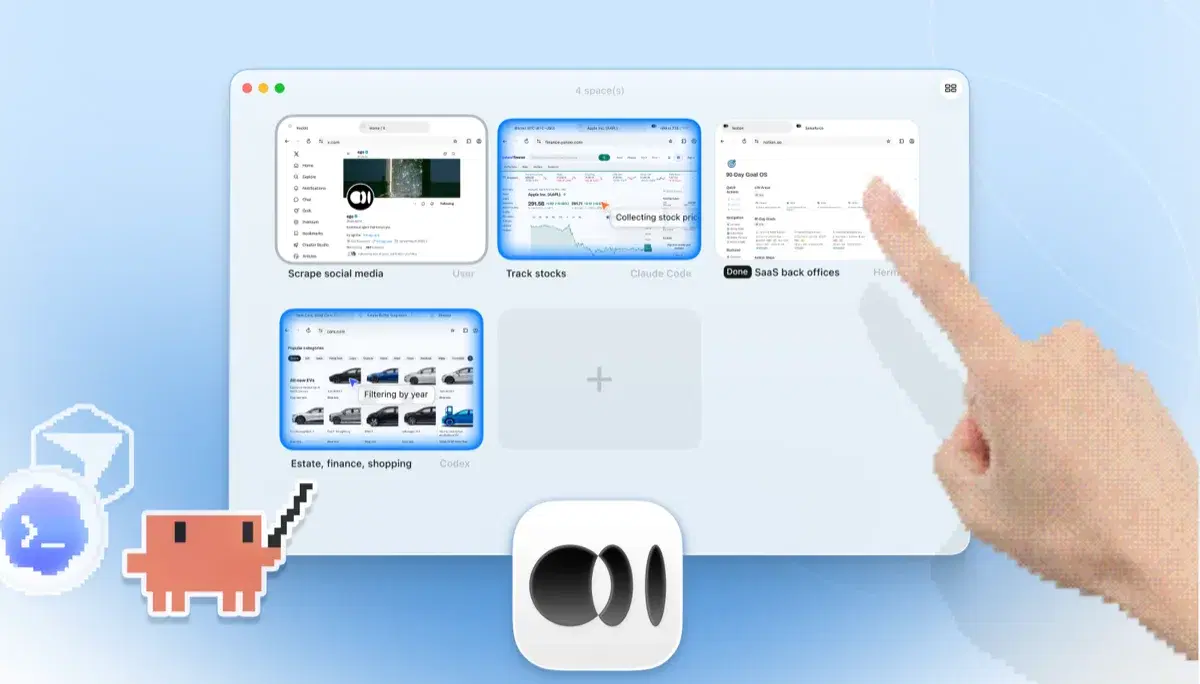
    ego lite Spaces overview with four browser tasks running side by side: Claude Code tracking Apple stock on Yahoo Finance, Codex filtering cars by year on cars.com, Hermes finishing a SaaS back-office task, a user scraping X, and a hand tapping + to open another Space

    Give Claude a bounded multi-step task and watch it work in its own Space while you keep browsing; keep consequential actions paused for review.

Keep the Claude Chrome extension if you like it for summarizing and Q&A on the page you're reading. ego lite replaces the take-actions-in-my-browser part, not the chat.

When to use each tool

Choose ego (lite) when

  • You run Claude Code from a terminal and want a separate browser Space instead of the connected Chrome window. Run /ego-browser after checking the current agent integration.
  • The tasks are multi-step and logged-in, and you'd rather they run in a separate Space than in the tab where you're mid-session.
  • You want several bounded tasks in parallel Spaces while you keep browsing. The extension uses the connected window as its working surface.
  • You want a free browser app and a cross-agent path; model, agent, network, and site-access costs still depend on your setup.

Choose Claude Chrome extension when

  • You want Anthropic's official Chrome integration from the desktop app or CLI and accept that it works in your active window.
  • You're a claude.ai user who wants light automation (a form filled, a page acted on) without installing any dev tooling.
  • You already use a direct paid Claude plan and /login, and do not need a separate browser Space.
  • You want Anthropic's official, safety-tested path, with its published prompt-injection mitigations built in.

Give your agent a real browser

Free, runs on your Mac, imports your Chrome profile in one click. Works with Claude Code, Codex, Cursor, and any CLI agent that writes code.

Still weighing your options? See how Claude Chrome extension compares with the other tools in the same space.

FAQ

Claude Chrome extension is Anthropic's official way to give Claude control of Chrome (clicking, filling forms, and navigating) using the signed-in browser you connect. Anthropic describes Claude in Chrome as generally available on all paid plans. Claude Code connects from the desktop app or CLI with claude --chrome, provided you use a directly supported Anthropic plan and authenticate with /login rather than an API key; check the current documentation for plan and platform changes. The durable trade-off is window ownership: the agent operates in the connected Chrome window, while ego lite puts explicitly provisioned browser state in an isolated Space.

Anthropic's current Claude in Chrome page describes it as generally available on all paid plans. Claude Code can use it from the desktop app or the CLI with claude --chrome, but the CLI path requires a direct Anthropic Pro, Max, Team, or Enterprise plan and /login authentication; API-key and third-party-provider sessions do not enable Chrome integration. It operates in your active Chrome window, so choose a separate browser Space when you need to keep your own tabs free or run several tasks in parallel.

Yes. Install the Claude in Chrome extension, sign in to Claude Code with /login, and launch claude --chrome. Anthropic's current docs say the integration works with direct Pro, Max, Team, or Enterprise plans; an API key, claude setup-token, or third-party provider such as Bedrock or Vertex does not enable it. The extension still drives the Chrome window you are using. ego lite also works from the terminal, but runs the agent in its own logged-in Space instead.

If your goal is an agent that does browser work (research, form filling, testing, back-office tasks), it can be a good fit. ego lite runs supported tasks in Spaces with browser state you explicitly provision, works with Claude Code (terminal or desktop) and other compatible agents, and the app is free; model or network costs may still apply. If your goal is chatting with the page you're currently reading inside claude.ai's experience, the extension is built for that and ego lite isn't trying to replace it.

No agent browser is, and you should distrust any page that claims otherwise. Anthropic's published testing on browser use showed why this matters: hidden instructions on pages can steer an agent, and mitigations reduce but don't eliminate the risk. ego lite's structural difference is that the agent acts in its own Space rather than inside the tabs and session you're actively using, everything is headful, and you can watch or take over at any moment.

ego lite itself is a free app with no ego subscription. You bring your own agent, so Claude Code still needs the plan or API access required by its current integration. Model, network, and other usage costs are separate from the browser app.

It can use browser state that you explicitly provision during onboarding. A selected Chrome profile import may carry some cookies, sessions, or extensions, but individual sites can require re-authentication and policies may limit what transfers. It does not bypass CAPTCHA, 2FA, SSO, or any site access control; pause for a person when verification appears.

You cannot safely remove every confirmation. Use Anthropic's documented site-level pre-approvals only for trusted, low-risk work, keep confirmation before irreversible actions, and narrow the site scope. If a custom date picker or dynamic page is failing, capture the last visible state and retry the specific step rather than granting broader access. ego lite avoids the extension's per-site pairing prompts by running in its own Space, but sensitive actions still need your approval.

It can help collect permitted public mentions or prepare a keyword report, but replies, likes, follows, outreach, and customer-record changes are account actions. Keep them paused for a human, follow each platform's terms and rate limits, and use an official API or export when available. An isolated ego (lite) Space is useful for read-and-review work, not for bypassing restrictions or running unsupervised engagement.

An isolated Space can reduce accidental exposure to unrelated tabs, but it is not a complete security certification. Use least privilege, a separate work profile, redacted prompts, approved models, and audit logs. Treat page content as untrusted and never place passwords, refresh tokens, or MFA codes in prompts or source files. Review Anthropic's and your organization's policy before enabling either tool on regulated data.

Claude Code's current integration uses claude --chrome after the extension is installed and the CLI is authenticated with /login on a supported direct Anthropic plan. Check Anthropic's current platform and rollout notes for your operating system. ego lite is a separate local Chromium browser and works from a shell-capable agent, so it is the fallback when the vendor extension or desktop bridge is unavailable.

Use separate browser profiles or one ego (lite) Space per account and role, and label each task before it starts. Do not copy cookies between accounts or let one Space inherit a broader profile than needed. Re-authenticate through the normal provider flow when a session expires, and revoke the browser state when a contractor or project no longer needs it.

Do not assume that extension history, cookies, or browser sessions are permanent or synchronized across devices. Session lifetime depends on the vendor, browser profile, site, and organization policy. For continuity, record the task state and source URLs, use a dedicated profile or Space, and re-authenticate through the normal flow when required; never copy cookies or refresh tokens between devices.