ego (lite) is just a browser, ego is your personal agent across devices.
Join waitlist
ego lite vs Codex Chrome extension

The Best Codex Chrome extension Alternative

Codex's extension shares the Chrome window you connect. ego (lite) gives Codex a browser workspace of its own.

Trusted by developers from
GoogleAmazonShopifyTikTokHarvardStanfordUSCUCLA

Why ego lite is better than Codex Chrome extension

The extension is the direct path into a tab you are already using. ego (lite) gives Codex a full browser surface for search, research, extraction, forms, testing, and other web work while your active tabs stay available.

Keep the agent's browser separate from yours

Because each task gets its own Space (a separate workspace inside one browser), Codex can run bounded tasks without sharing the active tabs you are using. Spaces still have their own limits and site permissions, so review the Space before granting access to a sensitive account.

The Codex Chrome extension works differently: it acts inside the Chrome profile you have chosen to connect. OpenAI describes per-website approval and domain controls for that integration, so a workflow can pause for permission when it reaches a new site.

Fewer round trips, clearer evidence

A browser extension that clicks through a live tab can make a long workflow feel opaque: the model asks for one action, the page changes, and you have to inspect the tab to know what happened. Repeated permission prompts or a safety stop can leave a partially completed task with no clean handoff.

ego lite gives the agent a compressed Snapshot and lets it batch several browser actions in JavaScript, then return the result to the CLI. The task remains visible in its Space, and the agent can show what it read, what it changed, and where it stopped. This is a workflow difference, not a head-to-head speed claim.

Works with Codex, and with everything else, in parallel

The extension is designed for Codex in the official Chrome workflow described by OpenAI; support for other Chromium browsers, terminal-only sessions, or an unavailable desktop pairing should not be assumed.

ego lite supports code-writing CLI agents such as Codex, Claude Code, Cursor, and Gemini CLI, and can run several supported tasks in parallel. You can switch agents while keeping the browser setup, subject to each agent's compatibility.

Works from Codex's terminal: the plugin doesn't

The Codex Chrome extension only works through the Codex desktop app. OpenAI's own GitHub issues confirm that a terminal-only Codex CLI session can't reach the extension at all. The request fails immediately with the error "Browser is not available: extension."

ego lite works the same whether Codex is running in a terminal or as a desktop app: run /ego-browser, and the agent gets a real browser of its own either way.

ego lite Chrome profile import: the same setup whether Codex runs in a terminal or as a desktop app

ego lite vs Codex Chrome extension

Feature comparison between ego lite and Codex Chrome extension.
Featureego liteCodex Chrome extension
Where the agent worksIn its own Space: separate from the active Chrome tabsIn your signed-in Chrome, taking over existing tabs
Keep working while it runsYes: parallel Spaces, you browse in yoursNot really: it's driving the browser you're in
Agents supportedCodex, Claude Code, Cursor, Gemini CLI, and other supported CLI agentsCodex only
Browser requiredNone: ego lite is the browser (Chromium, macOS)Official Chrome workflow; check current release notes for browser support
SetupInstall the app, run /ego-browser inside CodexCodex desktop app, then install the extension from its Plugins menu
Logged-in sites (SSO, 2FA)Import a selected Chrome profile; some sites may still require re-authenticationUses the connected Chrome profile; site access still depends on login and permissions
Permission modelProvision a selected login state; watch or take over any SpacePer-website approval prompts, domain allowlist/blocklist
Credential and tab boundarySeparate browser and Space; your active Chrome tabs are not agent contextAgent acts in the signed-in Chrome profile and can see the tabs allowed by its permission scope
Token and action flowSnapshot input plus batched JavaScript, with a reviewable result in the CLIInteractive extension actions and page reads in the desktop workflow
Extension reliabilityN/A: no native-messaging pairing between an extension and a desktop appOpenAI's GitHub issue tracker includes reports of empty tabs, missing runtimes, connection-state mismatches, and native-host or handshake failures
How the agent acts on pagesSnapshot input plus batched JavaScript: several actions per turnStep-by-step browser actions in your tabs
Cross-site data captureRead permitted pages in a Space and return Markdown or structured results for reviewRead and act in the Chrome tabs covered by the extension's permissions
PriceFree app; agent, model, or network costs may still applyIncluded with eligible Codex access; plan and usage limits apply
Works from Codex's terminalYes: /ego-browser works the same in a terminal or a desktop appNo: the CLI can't reach the extension backend at all ("Browser is not available: extension")
Last updated Aug 30, 2026

Make it a seamless transition

Already running the Codex Chrome extension? You can keep Codex and choose a separate browser for tasks that need isolation. Test the new path on a non-sensitive workflow first; no extension uninstall is required.

  1. Download ego (lite)

    Download ego lite and import only the Chrome profile or login state needed for the task. The selected context the extension borrows from Chrome can then be available in a browser Codex can call its own; verify any site that asks you to sign in again.

  2. Run your first task with /ego-browser

    Paste into your agent

    /ego-browser Open ego.app and join the waitlist

    Run /ego-browser inside Codex. No desktop-app plugin, no extension pairing.

  3. Watch it work
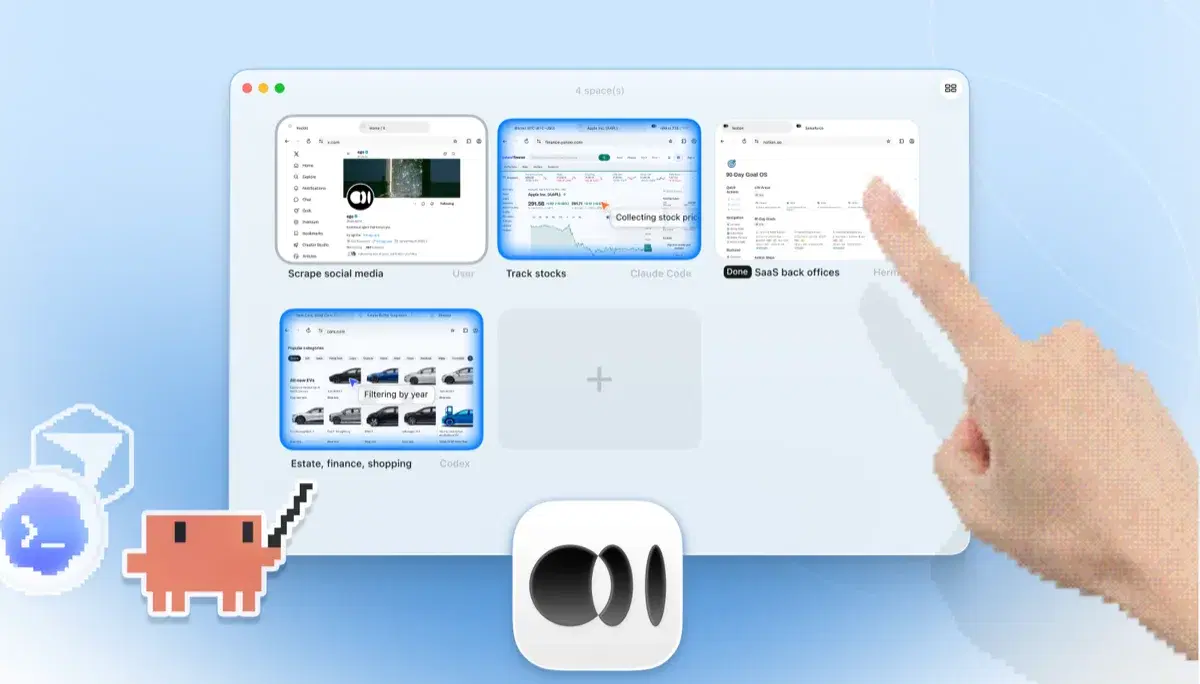
    ego lite Spaces overview with four browser tasks running side by side: Claude Code tracking Apple stock on Yahoo Finance, Codex filtering cars by year on cars.com, Hermes finishing a SaaS back-office task, a user scraping X, and a hand tapping + to open another Space

    Re-run a task you'd normally hand the extension (a dashboard read, a form workflow, a multi-tab test) and keep using your own browser while it executes in its Space.

Keep the extension for workflows that depend on it. Run both paths separately while you compare, and do not assume that cookies, extensions, or permissions are shared between browsers.

When to use each tool

Choose ego (lite) when

  • You run Codex from a terminal, where the extension's backend isn't reachable from CLI sessions at all. Run /ego-browser and the agent gets a browser regardless.
  • You want Codex running longer, multi-step tasks in its own Spaces, in parallel, while your tabs stay yours.
  • You'd rather provision a selected login state up front than click through per-website approval prompts mid-task; some sites may still require re-authentication.

  • You use other agents too: the same /ego-browser setup works with Claude Code, Cursor, and Gemini CLI, not just Codex.

Choose Codex Chrome extension when

  • You're already running the Codex desktop app, and the extension is right there in its Plugins menu, with no extra install.
  • You want a quick action on a page you already have open: handing Codex your live Chrome session is the shortest path.
  • You value OpenAI's official guardrails: per-website approval prompts and domain allowlists wrapped around every action.

Give your agent a real browser

Free, runs on your Mac, imports your Chrome profile in one click. Works with Claude Code, Codex, Cursor, and any CLI agent that writes code.

Still weighing your options? See how Codex Chrome extension compares with the other tools in the same space.

FAQ

The Codex Chrome extension is OpenAI's official way to give Codex a browser, launched in May 2026 and installed through the Codex desktop app's Plugins menu. It lets Codex act in your signed-in Chrome for tasks that need logged-in context (reading dashboards, filling forms, testing sites across tabs) with a careful permission model: Codex asks before touching each new website, and you manage domain allowlists and blocklists. If you're all-in on Codex and official Chrome, it is a well-scoped tool.

Yes. OpenAI shipped it in May 2026 as part of the Codex desktop app's plugin system, and it rolled out to the EEA, UK, and Switzerland in June 2026. It lets Codex act in your signed-in Chrome for tasks that need logged-in context, with per-site permission prompts.

If you want Codex doing browser work without occupying the browser you're using, it can be a good fit. ego lite gives Codex its own Spaces and can import a selected Chrome profile, while the app itself is free; model, agent, or network costs may still apply. The extension wins if you specifically want the official, single-vendor path inside Chrome with OpenAI's approval-prompt guardrails.

Install ego lite, import the selected Chrome profile or login state needed for the task, then run /ego-browser inside Codex. The agent reads pages as compressed Snapshots and executes batched JavaScript in the browser. No extension, MCP server, or plugin configuration is required for that path.

OpenAI's documented integration is for official Chrome; do not assume Brave, Arc, or Edge are supported without checking the current Codex release notes. ego lite is its own Chromium-based browser on macOS, and you can import a selected Chrome profile, although individual sites may still require sign-in.

As currently documented and reported, it is bound to the Codex desktop app rather than a terminal-only session. OpenAI issue reports show a CLI attempt failing with "Browser is not available: extension." Check current Codex release notes because this integration may change. ego lite does not make that distinction: install ego lite and run /ego-browser inside Codex, terminal or desktop app, and verify the browser connection before a sensitive task.
There are current reports in OpenAI's tracker of the extension appearing connected while tabs are empty or interactive control is unavailable, as well as Windows runtime, native-host, and handshake failures (for example issues #41090, #41408, #41592, and #40923, checked August 30, 2026). First verify that the official Chrome profile, extension, and Codex desktop app are on compatible versions; then restart or re-pair the extension, confirm the plugin/runtime is present, and check the current release notes or issue tracker for a platform-specific fix. Do not copy tokens or disable browser security controls to work around an error. ego lite removes the extension-to-desktop pairing step, but it still needs a healthy browser process and the permissions you grant it.

They can be used side by side because the extension lives in Chrome and ego lite is a separate browser, but keep profiles, permissions, and account roles explicit. A common split is the extension for quick actions in an existing page and ego lite for longer tasks in an isolated Space.

Yes, for authorized browser-visible workflows. The extension can act on the Chrome tabs covered by its permission scope, while ego lite can open a separate Space for each bounded task. Give the agent a clear source and destination, keep account-changing actions under review, and use an API or export when a service provides one instead of scraping around its controls.

Both paths can read data that the permitted browser context exposes, but the export step still needs a defined schema and review. For dynamic pages, wait for the relevant content or an explicit load-more state instead of assuming that the first DOM read contains every row. ego lite is useful when you want a separate Space to collect public or authorized product details, reviews, or table rows and return Markdown or structured output to the CLI. Deduplicate records, preserve source URLs, and do not collect private data or bypass a site's access controls.

An isolated browser can reduce the blast radius because unrelated active tabs are outside the agent's context, but it is not a substitute for least-privilege accounts or review. The Codex extension has an explicit advantage when you want per-site approval and OpenAI's official domain controls in your existing Chrome. With ego lite, provision only the login state required for the task, use one Space per account or role, and never place passwords, refresh tokens, or MFA codes in prompts or source files.

Keep the task scoped, ask for a structured result, and avoid repeatedly sending the same page or screenshot after every click. ego lite gives Codex a compressed Snapshot and supports batching several actions in JavaScript before reading the updated state. The extension can be the shortest path for one quick action in an existing tab; for longer workflows, measure the whole task and keep evidence rather than optimizing one step in isolation.