Playwright MCP token problem: why snapshots eat your context

The core conclusion first: Playwright MCP's token cost is architectural, not a config mistake. Every action returns the page's accessibility tree into your context (~3,800 tokens for a login form, ~12,000 for a dashboard, 114K reported for one Salesforce page), so the durable fixes change the execution model rather than trim settings.
The furthest of those fixes is out-of-process execution: the whole workflow runs outside the model, and page data never enters context.
On the official microsoft/playwright-mcp repo, issue #889 reports something that sounds like a billing error: the same task, on the same site, started costing 6x more tokens after a minor version upgrade.
It wasn't a bug. Tool outputs got richer, and every byte of that richness flows through your model's context window. This article traces where the tokens actually go, then ranks the three ways out by how much they save.
How bad is MCP token usage, really?
Numbers from three independent sources, so you don't have to take any single one's word for it.
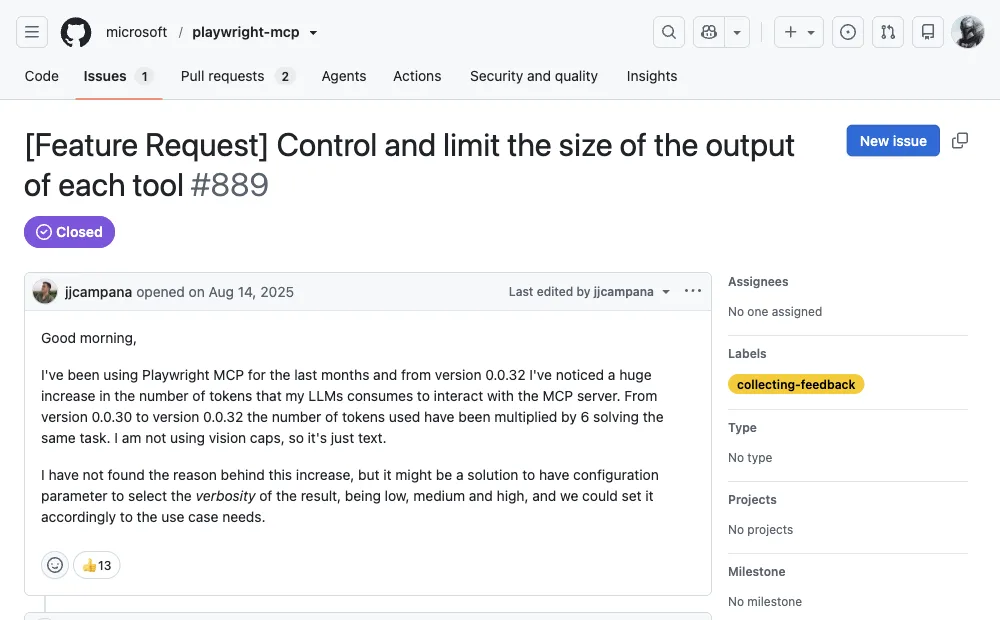
For scale: Claude models give you a 200K-token context window, GPT-4o 128K. One heavyweight enterprise page through Playwright MCP can eat more than half of the smaller window before your agent has reasoned about anything.
And users feel it. The r/ClaudeCode field reports: one or two browser tests trigger context compaction, some sites won't load at all because "the snapshot is too big," and more than one developer calls the output "unusably verbose."
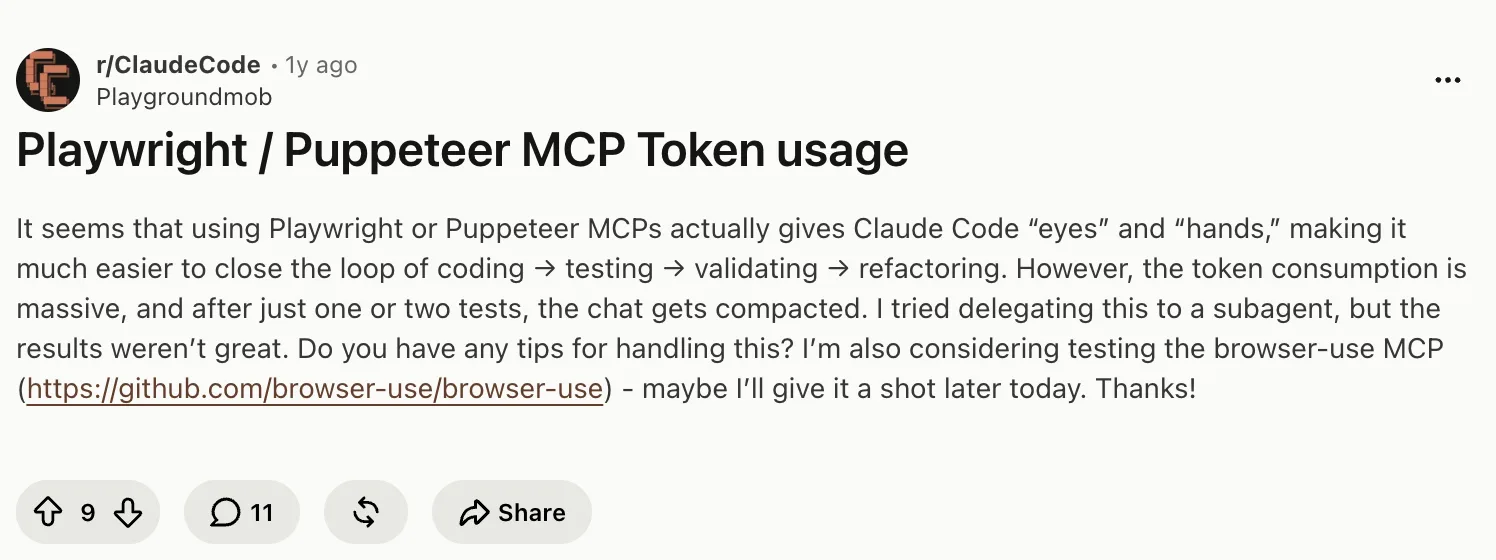
This is the normal case, not the horror story.
Why do snapshots cost so much?
Playwright MCP's core design choice is also its best feature: instead of screenshots and vision models, it sends the model a text snapshot of the page's accessibility tree, with every element labeled and referenced (ref=e5, ref=e6, ...). The model can act on structure it can actually read. Deterministic, auditable, no GPU vision required.
The bill has two parts. The fixed part: the server registers two dozen-plus tools, and their JSON schemas (~4,200 tokens in one itemized measurement) load into context at session start, used or not. The variable part: each action returns a fresh snapshot, and snapshot size tracks page complexity, which you don't control. A minimal login form measured ~3,800 tokens. A data dashboard, ~12,000. Salesforce, 114K.
We measured this ourselves rather than take the published numbers on faith: a real Chrome DevTools MCP session, via the official mcp Python SDK, against a page nowhere near Salesforce's complexity, Hacker News's front page. One navigate_page call, then one take_snapshot call:
navigate_page chars: 123
take_snapshot chars: 38285
## Latest page snapshot
uid=1_0 RootWebArea "Hacker News" url="https://news.ycombinator.com/"
  uid=1_1 link url="https://news.ycombinator.com/"
  uid=1_2 link "Hacker News" url="https://news.ycombinator.com/news"
    uid=1_3 StaticText "Hacker News"
  uid=1_4 link "new" url="https://news.ycombinator.com/newest"
    uid=1_5 StaticText "new"
  uid=1_6 StaticText " | "
  uid=1_7 link "past" url="https://news.ycombinator.com/front"
    uid=1_8 StaticText "past"
  uid=1_9 StaticText " | "
  uid=1_10 link "comments" url="https://news.ycombinator.com/newcomments"
    uid=1_11 StaticText "comments"
  uid=1_12 StaticText " | "
  uid=1_13 link "ask" url="https://news.ycombinator.com/ask"
...
38,285 characters, roughly 9-10K tokens, for a single snapshot of a simple link list, one navigate call ahead of it costing another 123 characters. That's the same mechanism behind the 114K Salesforce figure, just on a page an order of magnitude simpler.
Notice what's absent from that bill: the agent's actual reasoning. Nearly all of the spend is page description, most of which the model reads once and never needs again.
You're paying rent on furniture descriptions.
How does the cost compound across steps?
Single actions are survivable. The problem is that conversations accumulate, and every snapshot stays in the transcript after the page it described is gone.
Context carried by an MCP session, by step count
From the itemized 8-step smoke-test measurement (login, dashboard, report, screenshot)
The measured failure mode at the top of that curve is worth quoting precisely: around step 12-15, carrying 60-90K tokens of stale page state, the agent "referenced a login-page element that no longer existed." Past snapshots don't just cost money, they actively mislead the model about what's currently on screen.
So the token problem is really two problems: cost that scales with step count, and accuracy that degrades with it. Any real fix has to attack the accumulation, not just the per-step size.
Fix 1: Trim the snapshots (smallest change)
Playwright MCP ships real levers for this, and most teams never touch them. If you're staying on MCP, start here:
| Lever | What it does |
|---|---|
--snapshot-mode none | Stops attaching the full accessibility tree to every response; you request snapshots explicitly when needed. |
browser_find | Searches the page for one element instead of capturing the whole tree; the docs call it cheaper than a full snapshot. |
filename parameter on read tools | Writes snapshots, console logs, and network dumps to disk instead of into context; the agent reads back only what it needs. |
--caps / --image-responses omit / --mobile | Loads only the tool groups you use, drops image payloads, and requests lighter mobile pages. |
--output-max-size | Caps tool response size and evicts oversized output to disk post-response. Added in v0.0.76, it's the one flag that sets a hard ceiling rather than asking the agent to avoid large pages. |
--snapshot-boxes | Adds element bounding boxes to snapshots globally (v0.0.79). Useful when the agent needs coordinates without taking a screenshot. |
Best case, these flags turn a runaway bill into a manageable one. What they can't change: the agent still works through model-mediated tool calls, one round trip per action, so long tasks still accumulate context. This is a diet, not a cure.
Fix 2: Switch to the CLI route
Microsoft's answer to its own token problem is the official Playwright CLI: the agent runs shell commands (playwright-cli open, snapshot, click e15), snapshots land on disk as files, and context stays clean. The figures published with the launch: 114K tokens per test over MCP, 27K over the CLI. Roughly 4x. Even the MCP README now points coding agents toward the CLI for token efficiency.
The requirement is the same one it's always been: your agent must be a coding agent with shell access. Claude Code, Cursor, and Codex qualify; a chat-only client doesn't. And one gap survives the switch: the CLI still launches a fresh browser profile, so anything behind a login is still your problem.
We measured this route in more depth in the Playwright MCP vs CLI comparison, including where the 4x comes from.
Fix 3: Move the whole workflow out of context
The CLI route still pays per action: every command is a round trip through the model. The third fix batches the actions themselves. The agent writes one short JavaScript program describing the whole workflow (open, wait, loop, extract), pipes it into a local runtime as a heredoc, and the program runs to completion outside the model. Page data never enters context; only the final result returns.
ego(lite) is built around this pattern. It's a free browser for AI agents; any agent that can run a shell command drives it through the ego-browser skill:
ego-browser nodejs <<'EOF'
const task = await egoBrowser.newTaskSpace('collect dashboard numbers')
await task.page.goto('https://app.example.com/reports', { waitUntil: 'load', timeout: 20000 })
// loops, waits, and extraction all run here, outside the model
const rows = await task.page.locator('.metric').allInnerTexts()
console.log(rows.join('\n'))   // only this line returns to the agent
EOF
In our published benchmark of this execution style, batching work into heredoc programs finished the same browser tasks in 44% fewer execution rounds, with 35.5% fewer tool calls, at 21.6% lower cost than command-at-a-time execution.
That is the boundary worth naming: if your task is a single scripted page fetch, the official CLI is the lighter tool, but once a workflow runs long enough that snapshots pile up in context, moving it out of the model loop is the step that actually changes the bill, and that is where ego(lite) fits.
The difference also shows up on an end-to-end benchmark. On Real-World Bench (a 31-task suite against live sites, same model, same judge; the measured Playwright tool was playwright-cli, the official CLI route, not the MCP server), ego(lite) was 63% faster than playwright-cli and finished 93.5% of 31 tasks perfectly against 71.0% across 31 tasks. The billing consequence: $1.64 average cost per task divided by 93.5% completion is $1.75 per completed task; $3.42 divided by 71.0% is $4.82. A failed run isn't free. Runs and judging code are public in the ego-browser-benchmark-framework repo.
Here's what "only the final result returns" actually looks like on a real run, minutes apart from the MCP session above, same target page:
ego-browser nodejs <<'EOF'
const task = await egoBrowser.newTaskSpace('evidence-egobrowser-hn')
console.log({ taskSpaceId: task.id })

await task.page.goto('https://news.ycombinator.com/', { waitUntil: 'load', timeout: 20000 })
const title = await task.page.title()
const topStory = await task.page.locator('.athing .titleline > a').first().innerText()
const points = await task.page.locator('.subtext .score').first().innerText().catch(() => null)
console.log({ title, url: task.page.url(), topStory, points })
EOF

# output:
{
  "taskSpaceId": 13
}
{
  "title": "Hacker News",
  "url": "https://news.ycombinator.com/",
  "topStory": "Qwen 3.8 27B",
  "points": "412 points"
}
One JSON object with four fields, roughly 130 characters, for the same class of task that cost 38,285 characters through a snapshot-based MCP tool above. Nothing about the page's DOM or accessibility tree ever entered context; only the four fields the script asked for came back.
Download ego(lite) for Mac and run your most token-hungry task through it once; the difference shows up in your usage dashboard the same day. Free.
How do MCP tool schemas inflate context before a task starts?
Tool schemas are input too. Every MCP server advertises names, descriptions, argument types, and examples before the agent calls a browser action, so connecting many servers can consume thousands of tokens even when most tools are irrelevant. The exact cost depends on the client and server, but the pattern is consistent: unused definitions compete with page evidence for the same context window.
Filter tools by task, disable unused servers for the session, and keep descriptions concise in servers you own. Leave a context reserve for the model's answer and error recovery; a tool list that fills the window before navigation starts is already a reliability problem.
When should you use a direct API instead of MCP for scraping?
Use a direct, documented API when the site offers the fields and authorization your workflow needs. JSON responses are usually smaller and easier to validate than repeatedly sending browser snapshots through an MCP server. Keep the source, timestamp, rate limit, and response schema in your record so a compact API path remains auditable.
Use a browser when the task genuinely depends on rendered JavaScript, a user-visible interaction, or an authorized session that the API does not expose. Do not replace an API with scraping to bypass permissions, and do not send raw secrets or private tokens into an agent context.
How do you keep raw HTML and browser junk out of agent context?
Extract only the fields needed for the next decision: title, price, status, link, error, or a small accessibility subtree. Remove scripts, styles, hidden tracking elements, duplicate navigation, and boilerplate before returning data to the model. A structured object or short Markdown table is usually more useful than a full page dump.
Keep the original URL and a local evidence artifact when provenance matters, but do not paste the entire artifact into every turn. Summarize once, cache stable state outside the prompt, and re-fetch only the region that changed after an action.
How do you control context growth in multi-step browser tasks?
Treat context as a budget per phase. Read a compact state, perform dependent actions in one bounded script where possible, and return a small result rather than appending every intermediate snapshot. After navigation, discard stale references and request the new state instead of carrying the old tree forward.
For forms and dashboards, checkpoint the route, completed assertions, and fixture ID outside the chat transcript. If the task reaches a login, challenge, or irreversible action, stop and ask for a human decision rather than spending more context on retries.
How many MCP servers can you connect before context runs out?
There is no universal safe number: the client, model context window, schema verbosity, and page size determine the limit. Measure the token footprint after each server is enabled, keep a reserve for browser evidence and recovery, and disable servers that the task will not call. A smaller, purpose-built tool set is usually more reliable than a large catalog.
If you need several integrations, split work into phases or separate agents and pass a structured result between them. This keeps browser snapshots, database schemas, and unrelated tool definitions from competing in one context window.
FAQ
Why does Playwright MCP use so many tokens?
Because every action returns the page's accessibility tree as text into the model's context, plus ~4,200 tokens of tool schemas at session start. Snapshot size follows page complexity: ~3,800 tokens for a simple form, 12,000 for a dashboard, up to 114K for a heavyweight Salesforce page.
How do I limit token usage in MCP tools?
For Playwright MCP specifically: set --snapshot-mode none, prefer browser_find over full snapshots, use the filename parameter to write outputs to disk, load only needed capabilities with --caps, and omit image responses. For MCP servers generally, the biggest lever is the same shape: keep bulk data out of the response payload.
Is there a token-saver MCP that fixes this automatically?
Community projects exist that filter or compress snapshots before they reach the model, but they inherit the same architecture: page state still travels through context on every step. The durable savings come from changing the execution model (CLI or out-of-process scripts), not from compressing the snapshot.
Does high token usage also make the agent less accurate?
Measurably yes on long tasks. In the published 8-step measurement, sessions carrying 60-90K tokens of stale snapshots by step 12-15 started referencing elements that were no longer on the page. Old page state doesn't just cost money; it competes with the current page for the model's attention.