Claude Code browser login: how to automate sites behind auth


The short answer, before anything else: three routes get Claude Code past a login wall, and the steadiest is giving the agent a browser that is already signed in. Storage state injection covers CI and test accounts; extension takeover covers occasional supervised tasks. On every route, passwords should never pass through the agent.
ego(lite) is that first route as a product: a free browser built for sharing your logged-in browser state with AI agents. Import from Chrome once, every site you've signed into stays signed in, and the agent works in its own Space with your window untouched, credentials never typed by anyone.
The task was "pull this week's numbers from the analytics dashboard." Claude Code opened a browser, navigated perfectly, and delivered a beautiful summary of the login page.
Every browser route's default is the same: a fresh profile, signed in to nothing. Your dashboards, portals, and internal tools all live on the other side of that wall.
Why does Claude Code get stuck at login screens?
Because authentication lives in browser state, and automation browsers start stateless on purpose. Cookies, localStorage tokens, and session identifiers are what make you "logged in"; a Playwright MCP profile or an agent-browser session has none of yours, by design, since isolation is a feature for testing.
The naive fix (tell the agent your password and let it type) fails twice: your credentials enter the model's context and transcript, and modern auth (2FA, device checks, SSO redirects, CAPTCHA-gated logins) breaks scripted sign-in anyway. Even the Playwright team's own public demos hit this wall: their walkthrough of logged-in testing with the Playwright MCP browser extension opens on exactly this pain, the choice between "logging in every time or, worse, handing over your credentials to an LLM," with GitHub as the example site and a human completing the sign-in before the agent works. The real routes all share one idea instead: authentication happens once, by a human, and the agent uses the resulting state.
Auth is state; give the agent state, not secrets.
And the wall isn't an edge case; it's where the useful tasks live. Of the 31 tasks on Real-World Bench, a benchmark we run against live production sites, five need a logged-in session to complete at all: pulling a week of engagement metrics from x.com/OpenAI, estimating the monthly payment on a $500-600K Austin listing on Redfin, pricing a nonstop JFK-to-MIA flight on Expedia with taxes included, checking an OpenTable reservation from Yelp, and running a used-Camry payment estimate on cars.com. Dashboard-and-portal work, exactly what agents get asked to do first. ego(lite), route 1 below as a product, finished 93.5% of 31 tasks perfectly on that run at $1.75 per completed task, first of the five tools on completion, cost and efficiency score and 47% to 63% faster than the other four; the runs and rubrics are public in the ego-browser-benchmark-framework repo.
The three routes at a glance, before the details:
| Route | Credential exposure | Persistence | Best for |
|---|---|---|---|
| Reuse a signed-in browser | None; logins happened before the agent existed | As long as your real sessions last | Daily tasks on your own accounts |
| Storage state injection | A secret file to guard | Until the site expires the session | CI and test accounts, headless runs |
| Extension takeover | None, but full-profile blast radius | Your browser's own sessions | Occasional supervised tasks |
Route 1: Reuse a browser that's already signed in
Principle: the agent operates in a real browser where you completed every login normally, so sessions simply exist. Three implementations, in ascending order of comfort.
Minimal: run Playwright MCP headed, ask Claude to open the login page, sign in manually yourself, and let the session's cookies persist for the rest of the run (a pattern Simon Willison documents); it works but resets when the browser closes.
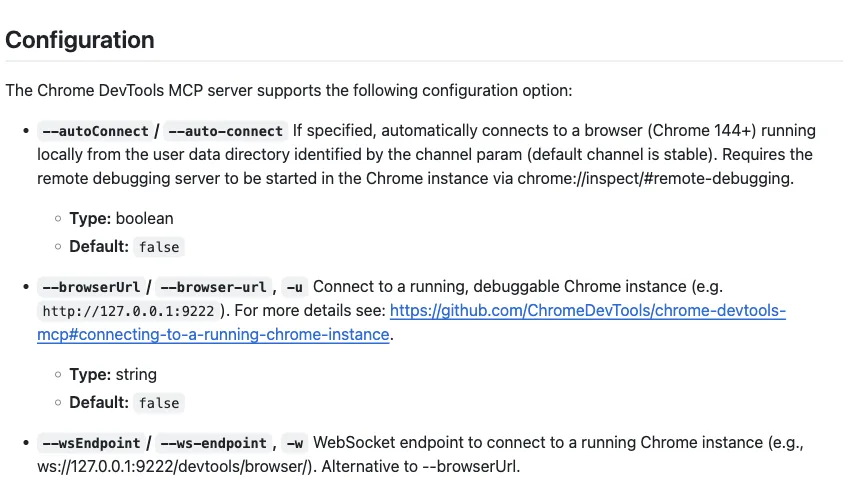
Middle: Chrome DevTools MCP with auto-connect (Chrome 144+) attaches the agent to your actual signed-in Chrome after a permission dialog, with the trade that it's your window being driven.
Full: ego(lite), a free browser built for sharing your logged-in browser state with AI agents: import from Chrome once, and every site you've signed into stays signed in, with the agent working in its own Space (isolated tabs, your window untouched) and driving through the ego-browser skill.
Risk profile: strongest of the three routes, because no credentials are ever typed, stored, or scripted; the exposure is scoped to what the agent can do inside sessions you granted, which is why per-task scoping (route it to the site the task needs, nothing more) is the discipline that matters here.
It's also the route that survives contact with real auth stacks, because nothing about it looks like automation to the site: the session is simply a session.
Route 2: Inject storage state
Principle: log in once, save the browser's storage (cookies plus localStorage) to a file, and load that file into fresh automation browsers. Playwright's storage state tooling makes this a two-call pattern:
// once, after a manual login in a headed browser
await context.storageState({ path: 'auth.json' })

// every future run
const context = await browser.newContext({ storageState: 'auth.json' })
This is the CI route: headless-friendly, repeatable, no human at runtime. Its costs are maintenance-shaped: sessions expire on the site's schedule and the file goes stale; some sites bind sessions to device fingerprints and reject transplanted state; and auth.json is now a credential-equivalent secret you must store like one (never in the repo, never in the agent's context).
Use it for test accounts and staging systems; think twice before bottling your personal accounts this way, since route 1 does that job without creating a secret file at all. And rotate deliberately: a stale auth.json that half-works produces the most confusing failure mode in this whole topic, an agent that's logged in on one subdomain and anonymous on the next.
Route 3: extension takeover

Principle: an extension puts the agent inside the browser you're already using, sessions included. Claude for Chrome is the official version (beta on paid Claude plans, attached to Claude Code via claude --chrome, with site-level permissions and confirmations); Browser MCP is the free community version (extension plus MCP server, using "your existing browser profile, keeping you logged into all your services").
It's the fastest route to a working logged-in task, and the trade is possession: the agent acts in your window, on your whole profile, while you wait or watch. Anthropic's own guidance draws the sensible lines: pre-approve sites, keep confirmations on for irreversible actions, and keep it away from financial transactions and password managers because prompt-injection defenses "aren't foolproof."
Right for occasional supervised tasks; wrong as the daily default, because the window cost compounds and the blast radius is everything you're signed into.
Where should credentials never go?
One rule survives all three routes: passwords and tokens must not pass through the agent. Not in the prompt ("log in with hunter2"), not in scripts the agent writes (they land in transcripts and logs), not in files it reads.
Each route above honors this when done right: route 1's logins happened before the agent existed; route 2's state file is loaded by the runtime, not read into context; route 3's sessions were established by you in your own browser.
How should you handle CAPTCHA and anti-bot walls?
Stop at the wall; do not try to solve, evade, or repeatedly retry a CAPTCHA or Cloudflare challenge. Preserve the page and hand the browser to a human, or use the site's documented API and support path. A challenge is an access boundary, not a flaky selector to tune.
The handoff can happen in a headed Playwright window, an extension-controlled tab, or an ego(lite) Space. Record the URL and the state that triggered the check, reduce retries, and resume only after you have completed the verification yourself. Never rotate fingerprints or disable security controls to make an automation run continue.
How do you persist a browser login session across runs?
Use a browser profile or Playwright storage state only when the account and environment are yours to control. A real signed-in browser keeps its own cookies and local storage; a storage-state file serializes them for a fresh context. Both expire on the site's schedule, and a file containing session cookies must be protected like a password, excluded from source control, and kept out of model-readable workspaces.
For CI, prefer a dedicated test account, short-lived credentials, and a deliberate re-authentication job. For personal daily work, reusing a browser you already control avoids copying secrets into auth.json, but it still requires scoped tasks and a human confirmation before sensitive actions.
Why does OAuth keep looping or asking for an API key?
OAuth loops usually mean the callback cannot reach the waiting client, the browser is using a different profile, or the provider rejected the redirect, scope, or device session. Confirm the exact callback URL, finish the flow in the same browser context that started it, and read the CLI's stderr before trying another login method; repeatedly pasting an API key can hide the real redirect failure.
Clear only the affected provider's stale session, check system time and proxy or TLS settings, and retry once in a clean test profile. Do not paste client secrets into a prompt or commit them to a config file. If the provider requires an interactive consent or device check, complete it manually and let the authenticated session return to the CLI.
What is the fallback when automated login times out?
Make timeout a planned human handoff: pause navigation, show the live login page, wait for you to complete the sign-in, and resume only after an authenticated landmark appears. Set a finite wait and a clear cancel path so a job cannot sit forever or submit while the page is half-authenticated.
After the handoff, verify the account name or a page that requires authentication, then continue with the original task rather than replaying the login steps. If the page returns to a challenge or asks for an unfamiliar permission, stop again and leave an audit note with the URL and timestamp.
How do you recover from an expired session or a 401?
Treat a 401, redirect to /login, or missing account control as session expiry—not as permission to forge a request. Stop the task, refresh the session through the site's normal sign-in flow, and verify the authenticated page before retrying the failed step. A storage-state run needs a newly captured state; a real browser run needs the human to sign in again.
Limit recovery to one deliberate attempt and record where it failed. If only one subdomain is authenticated, do not assume the cookie is valid everywhere; check each origin explicitly and scope the agent to the sites required for the task.
How do you navigate multiple sites with shared browser state?
Keep origins and permissions explicit when a task crosses sites. Start each destination in a known tab or Space, verify its own signed-in landmark, and pass only the fields needed from one site to the next. Shared browser state is convenient, but it also increases blast radius; an agent that can see Gmail, a CRM, and a billing portal should not receive an unrestricted instruction to browse everywhere.
Use separate profiles or Spaces for unrelated accounts, and keep destructive or financial actions behind confirmation. If a redirect crosses an unexpected origin, pause and ask for approval rather than carrying cookies or form data into a site the task did not name.
How should an agent handle 2FA and SMS verification?
Use 2FA as a human checkpoint. The agent may wait on the verification page and then continue after you enter the code in the live browser, but it should not request, store, or forward one-time codes through the model context. SMS and authenticator prompts are proof of your presence, not data to automate around.
After approval, verify that the session is bound to the intended account and device, then resume the bounded task. If the provider asks for recovery codes, a new device, or a permission broader than the task needs, stop and handle that decision outside the agent.
How do scheduled jobs keep a browser session available?
Scheduled automation should use a dedicated, least-privilege test account or an approved service integration—not a personal browser profile left unlocked. Persist only the state the job needs, check expiry at the start, set a maximum runtime, and send a failure notification instead of attempting to defeat a login or CAPTCHA overnight.
If a scheduled run needs a human login, mark it blocked and request an explicit handoff; do not keep a desktop session running as a substitute for access control. Rotate storage state deliberately, audit who can read it, and keep the job's site allowlist narrower than the browser profile's full history.
How do you handle 2FA and CAPTCHAs?
Don't automate them; hand them off. These challenges exist to require a human, and the sustainable pattern is a control handoff: the agent works until it hits the challenge, the human completes it in the same browser, the agent resumes in the now-authenticated session. Real-World Bench applies the same logic from the judging side: tasks blocked by a CAPTCHA or an access denial are held unjudged rather than scored as failures, because the challenge is a request for a human, not a bug in the agent.
ego(lite) builds this in as a first-class flow: the agent hands the task's Space to you, you complete the login or code entry in that live page, and the agent takes back over with the session intact, no state export, no re-navigation.
And because sessions persist in a real daily browser, the challenge happens once per site rather than once per run, which is the quiet reason route 1 setups feel calm: Chrome-imported sessions mean agents aren't re-triggering the walls fresh profiles hit.
Download ego(lite) for Mac, free, or read all five ways to give Claude Code a browser for the wider map.
FAQ
Can I just give Claude Code my password?
You can; you shouldn't. It lands in the transcript and context permanently, and modern auth breaks scripted logins anyway (2FA, device checks, CAPTCHA gates). Every route in this guide exists so that no credential ever needs to pass through the model.
Does Playwright MCP support logging in at all?
Yes, two supported patterns: run headed and complete the login manually while the session lives (route 1's minimal form), or capture storage state once and reload it per run (route 2). What it doesn't have is your existing sessions; its profile starts clean by design.
What happens when a session expires mid-task?
Route dependent: storage-state setups fail until you re-capture the file; extension and shared-browser setups surface the site's own re-login page, which is a handoff moment: you sign in once in the live page, the agent resumes. In a real daily browser this is rare, since normal sites keep you signed in the way they keep any regular user signed in.