How to handle selectors breaking in browser automation


When a selector breaks, ego(lite) offers an Agent a visible browser route to inspect the current page and reconsider the task path; a fixed test still needs a corrected locator or assertion. The element may have changed, the page may be in a different state, or the workflow may have changed altogether. Timeouts, ambiguous matches, and stale element references can all look like selector failures, but they point to different problems and require different fixes.
ego(lite) fits the case where a changing page calls for an Agent to inspect the current state and choose a new path to the task goal. In the recorded GitHub issue-search case below, the Agent encountered a logged-out interstitial and used the visible search route to return issue URLs and dates. That observation does not mean every broken selector will recover, and a stable test suite still needs deterministic locators and assertions. The original browser screenshots show the specific run.
Playwright locators are well suited to handling changes at the element level. They can resolve elements again after a page re-renders, remain resilient to small changes in the DOM or surrounding containers, and avoid relying on brittle CSS classes that may change frequently.
What locators can’t tell you is whether the original workflow still makes sense. If a button now leads to a different flow, an extra confirmation step has been added, or the path to the expected result has changed, rewriting the locator won’t solve the underlying problem. At that point, it’s the workflow that needs to change, not the selector.
If you’re maintaining a test suite rather than a scraper focused on data collection, the differences between Playwright and Cypress also come down to factors such as test reliability, debugging workflows, and migration costs.
Some issues that look like stale element references can also be related to browser sessions. Persistent browser sessions across agent runs explains how browser state can persist beyond a single task and why that matters for subsequent automation.
This is where ego(lite) takes a different approach. Instead of repeatedly executing a predefined sequence of steps, it starts with the task goal and decides what to do next based on the browser’s current page and state. If the original path is no longer available, the agent can adapt to what it sees and find another way to complete the task.
That doesn’t make deterministic browser automation obsolete. When a workflow is stable, the steps are well understood, and the same actions need to run repeatedly, Playwright remains a strong choice for repeatable automation and regression testing. The boundary is straightforward: if the element changes, fix the selector; if the workflow changes, replan the path.
Whether a headless browser can faithfully reproduce the browser environment you use during debugging is a separate question. For a deeper look at that distinction, see Headless vs. real browsers for AI agents.
What a broken selector is actually telling you
Three error classes cover almost everything people call a broken selector, and they point in completely different directions.
A timeout waiting for the element means the query resolved to nothing. The page did not render it, it rendered it inside a frame your locator never entered, it is still behind a loading state, or the identifier genuinely changed. Treating this as a naming problem is the most common diagnostic mistake, because a missing element and a renamed element produce the same symptom.
A strict mode violation means the opposite: the query now matches more than one element and the tool refuses to guess. Playwright resolves locators in strict mode by default and throws as soon as a query matches several elements, without waiting. That matters diagnostically, because an ambiguity error and a timeout have nothing in common, even though both arrive as a failed step.
A detached or stale reference failure means you held on to an element from an earlier point in the run and the page has since replaced it. The element node was discarded during a re-render, so the reference is gone even though the control is still on screen and still correct.
The mechanism is documented in the locators guide, the Locator API reference, and the actionability checks. Reading the error class before touching the query is the whole first step, and it is the step most people skip.
Three classes of selector failure
Once you know which error class you have, the next question is which assumption failed. Sort the failure into one of three layers, and the correct response follows from the layer rather than from the symptom.
| Failure class | What actually broke | Correct response |
|---|---|---|
| Durable identifier failure | The attribute you matched on was an implementation detail: a generated class, a positional index, a deep CSS path. | Fix the locator. Move to a role plus accessible name, a test id, or a stable container scope. This is the only class where a selector fix is the right repair. |
| Page-state failure | The query is reasonable, but it ran before the page reached the state it assumes, or against a responsive variant with different markup. | Fix the wait, the frame scope, or the viewport assumption. Changing the selector leaves the real cause in place. |
| Workflow-assumption failure | The step itself is wrong. The control moved into another flow, the task now needs an extra confirmation, or the route to the outcome changed. | A person updates the workflow. No locator change is correct here, and a patch that makes the step pass anyway is the most dangerous outcome. |
The practical value of this table is that two of its three rows should stop you from editing a selector. In public test-maintenance surveys, brittle selectors are typically blamed for roughly a quarter to a third of failures, with timing and interaction problems accounting for a comparable or larger share. That ratio is the tell: if almost every failure in your suite is filed as a selector problem, the classifications are wrong somewhere.
What should you inspect before changing the selector?
Capture the failure before editing code. A screenshot answers what the user could see; the current DOM or accessibility snapshot answers what the automation could address; console and network evidence explain why the expected state may never have appeared. If you only keep the timeout message, three different root causes collapse into the same ticket.
| Evidence | Question it answers | Do not conclude |
|---|---|---|
| Screenshot plus URL | Was the run on the expected route, account state, modal, and viewport? | That a visible label proves the element is uniquely actionable |
| DOM or accessibility snapshot | Did the element exist, under which role/name, and were there multiple matches? | That the workflow still means the same thing |
| Console and failed requests | Did rendering or data loading fail before the locator ran? | That a longer timeout will repair the application state |
After capturing those three layers, reproduce once on a clean page load. Only a stable identifier failure should produce a locator edit. A page-state failure changes the wait or setup; a workflow failure changes the task. This distinction is also why the planned browser-automation-breaking-fixes URL is consolidated here: the live Google US SERP on 2026-09-24 already ranked this canonical page for that exact troubleshooting task.
Why a locator survives what a handle does not
A locator is not a cached reference to an element. It is a query description that stays unresolved until the moment it is used, and it re-resolves against the live page before every action. A handle is the opposite: it points at one specific node captured at one specific moment. This single difference explains most of the surviving-versus-breaking behaviour people attribute to selector quality.
// Brittle: stores a node from an earlier render. A later re-render detaches it.
const button = await page.$("div.toolbar > button:nth-child(2)");
await button.click();

// Durable: re-resolves before every action, and survives a re-render.
const button = page
  .getByRole("navigation", { name: "Issue actions" })
  .getByRole("button", { name: "Close issue" });
await button.click();
Two documented details are worth knowing before you rewrite anything. First, role locators query the accessibility tree, which is why they survive wrapper elements and renamed generated classes: they match what the control is and what it is called, not where it sits. Second, strict mode applies to locators but not to the querying methods, so a fix that swaps a locator for a raw query may look like it worked while quietly removing a guardrail.
What a durable locator still cannot do is decide that the step is no longer the right step. A renamed class is a locator problem. A control that moved into a different flow is a task problem, and the difference between those two is exactly where most selector debugging goes wrong.
Five failure cases you can reproduce
Each case below is reproducible on any page you control. The point of working through them is to separate what a locator fix genuinely repairs from what only a person can repair.
1. A generated class name changes
Rename the class on a button and anything matching the old class stops resolving. A role locator with an accessible name is unaffected, because the class was never part of the control's identity. This is the case a locator fix fully repairs, and it is the one people generalise from when they conclude that stable locators solve UI change.
2. A wrapper element is added
Insert a div around the control. Any descendant or child combinator path breaks, and any positional selector shifts. A role locator or a test id still resolves. This is the same class as case one, and the fix is the same, which is precisely why the first two cases are a misleading sample of the problem.
3. The component re-renders and replaces the node
Force the component to unmount and remount. A code path holding an element reference from before the re-render fails with a detached reference; a code path that re-resolves its locator at the moment of use continues. Actionability checks handle the closely related timing case by waiting for the element to be attached, visible, stable, enabled, and receiving events rather than failing immediately, which is why some timing problems disappear when you move to locators even though nothing about identity changed.
4. The accessible name changes
Change a button from Save to Save draft, or add an icon that alters the computed name. A role locator matching the old name now fails, and the failure is more informative than a class rename because it usually reflects a real product change. If the label is owned by content or translation and will keep moving, a test id is the honest choice here, not another text match.
5. The control moves into a new flow
Require an extra confirmation step, or move the action behind a menu it was not behind before. Every locator technique fails here for the same reason: the old step is no longer valid. You can point a correct locator at a correct element inside a step that should not exist, and the run will still not complete the task. A person has to change the workflow, and a supervised agent can often complete the task anyway by reading the current page and choosing a different route.
One more case behaves like the fifth even when the interface never changed: the page is a third-party site you do not own. Its maintainers can restructure it without warning, and no amount of locator quality protects you, because the contract you were relying on was never yours.
The same task, run three ways
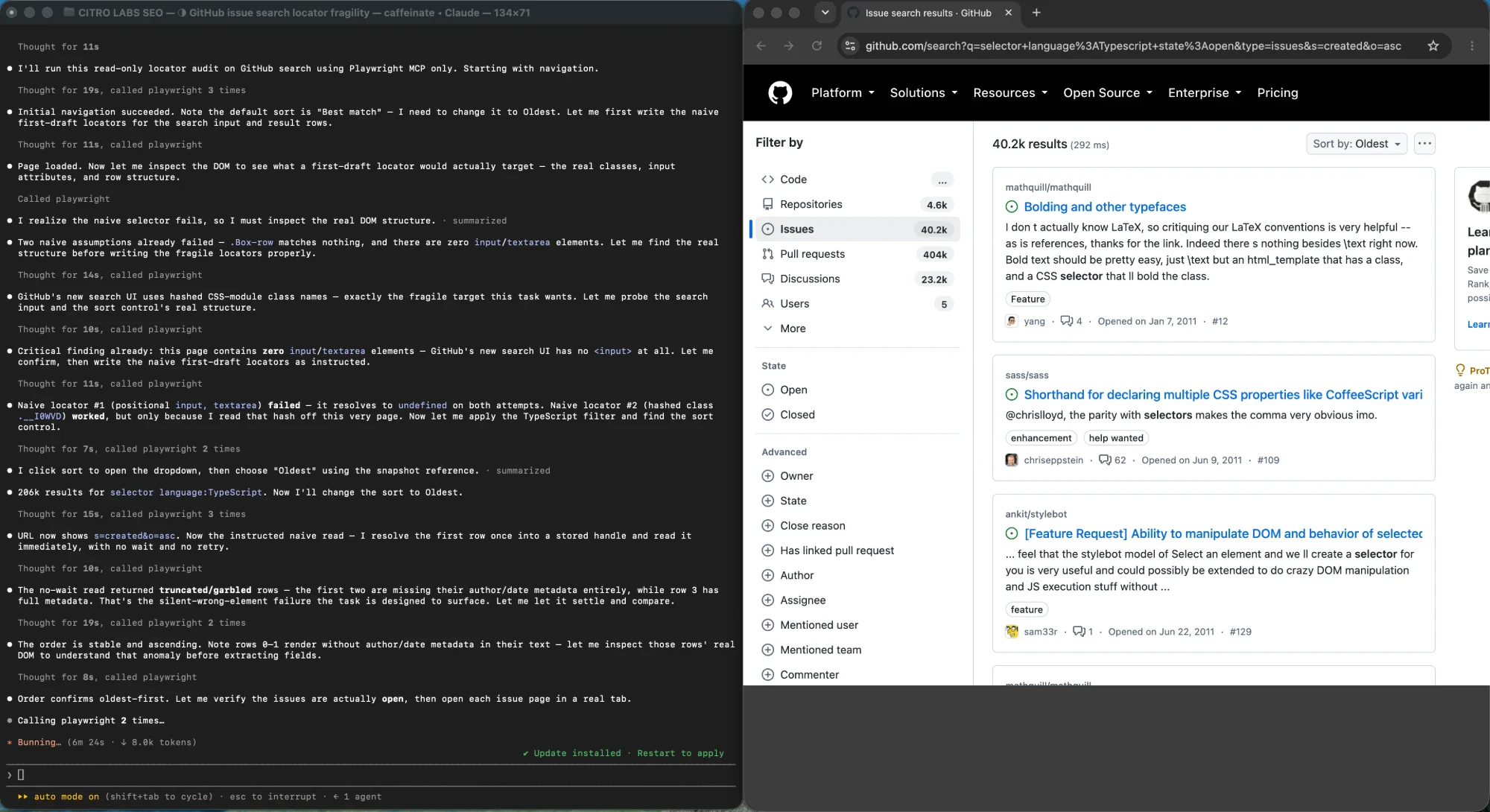
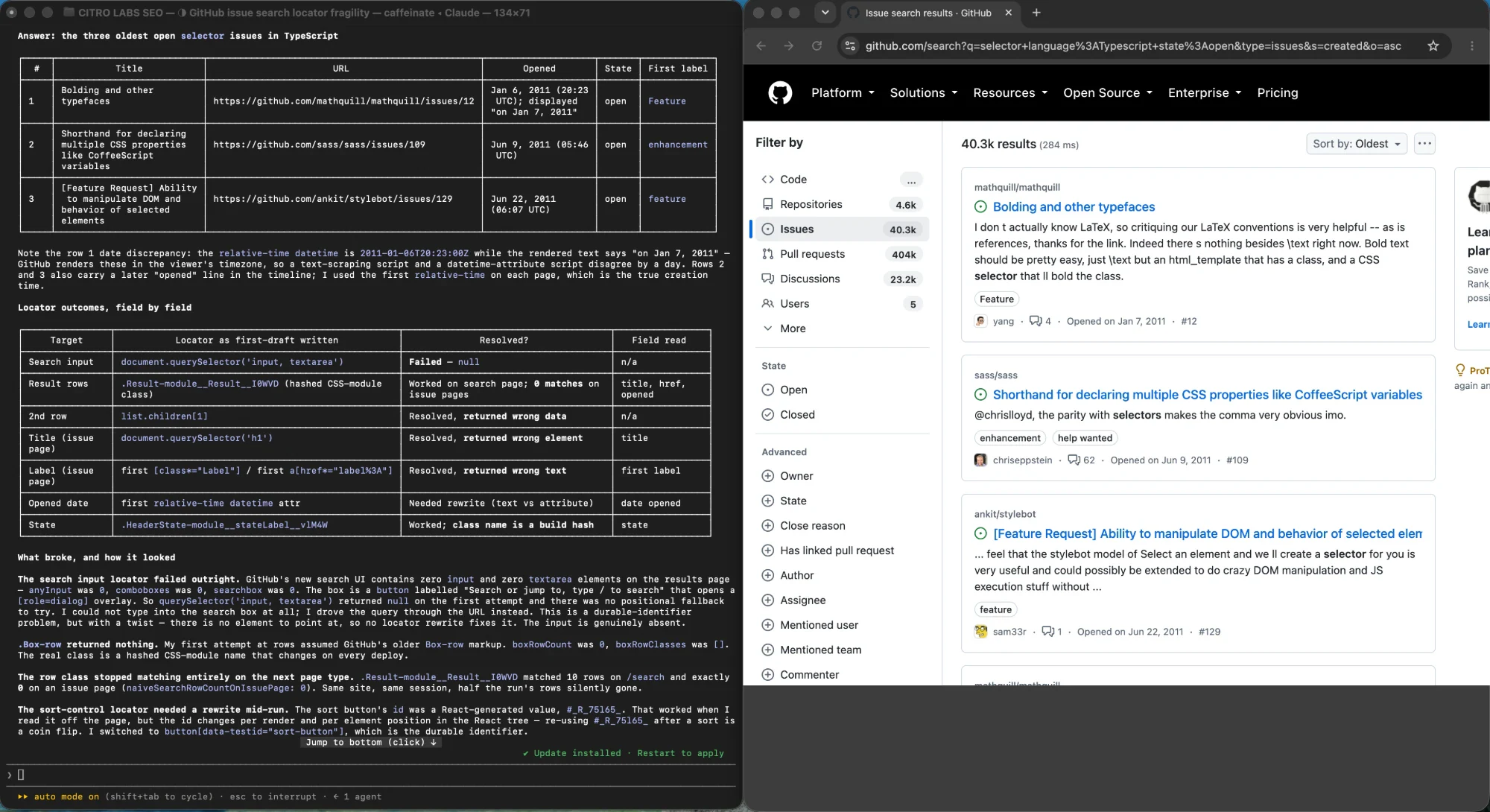
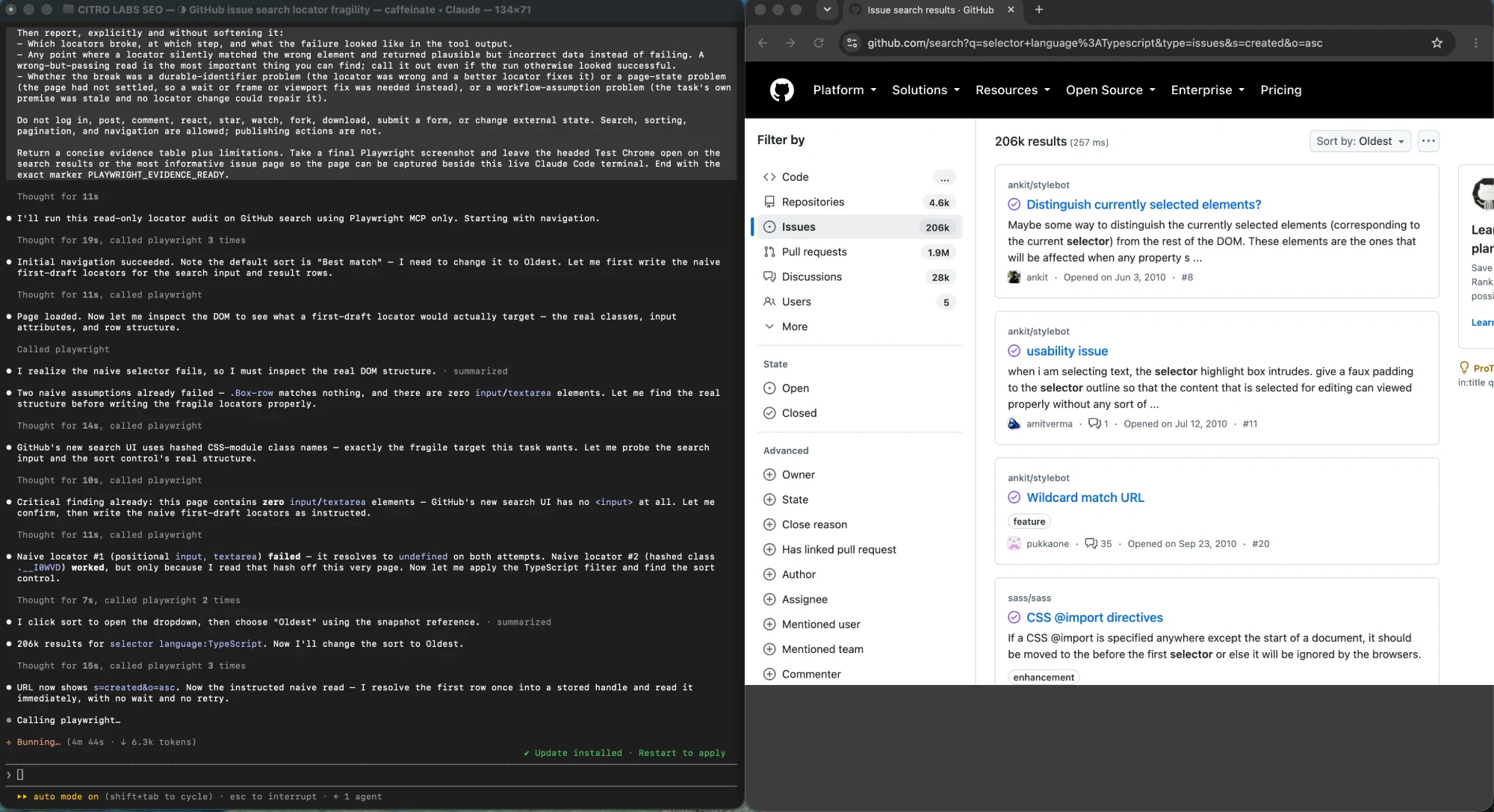
Everything above is easier to judge against a real run than against a description. We pointed three different browser-automation setups at one identical task on a site none of us controls: find the three oldest open issues matching selector language:TypeScript in GitHub's public issue search while logged out, then read the title, canonical URL, opened date, state, and first label for each. The task is deliberately ordinary. What matters is not what the tools did, because all three eventually returned the correct three issues. It is how each one failed on the way there. The three blocks below take the setups in turn, starting with the same task before anything had gone wrong.
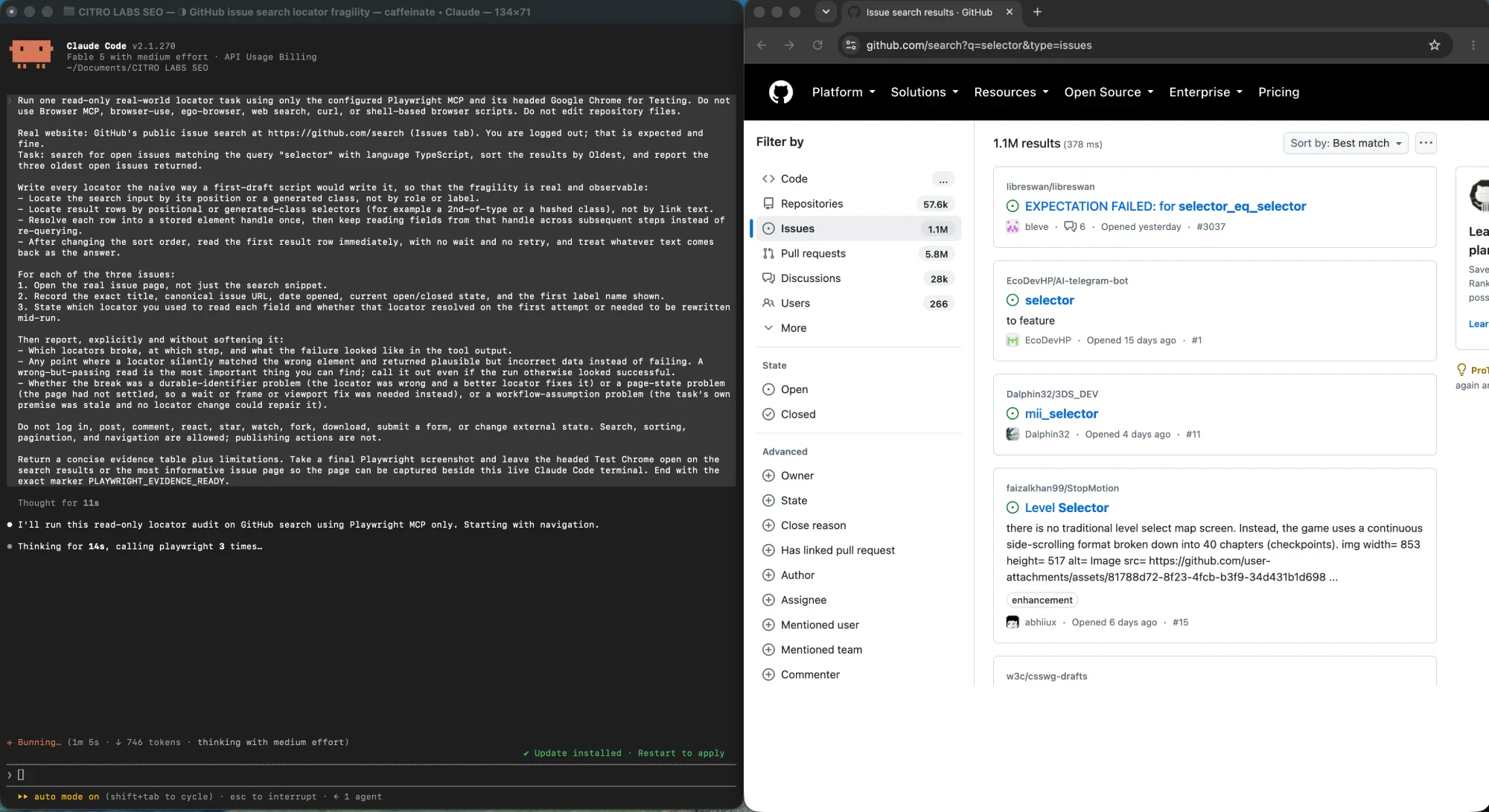
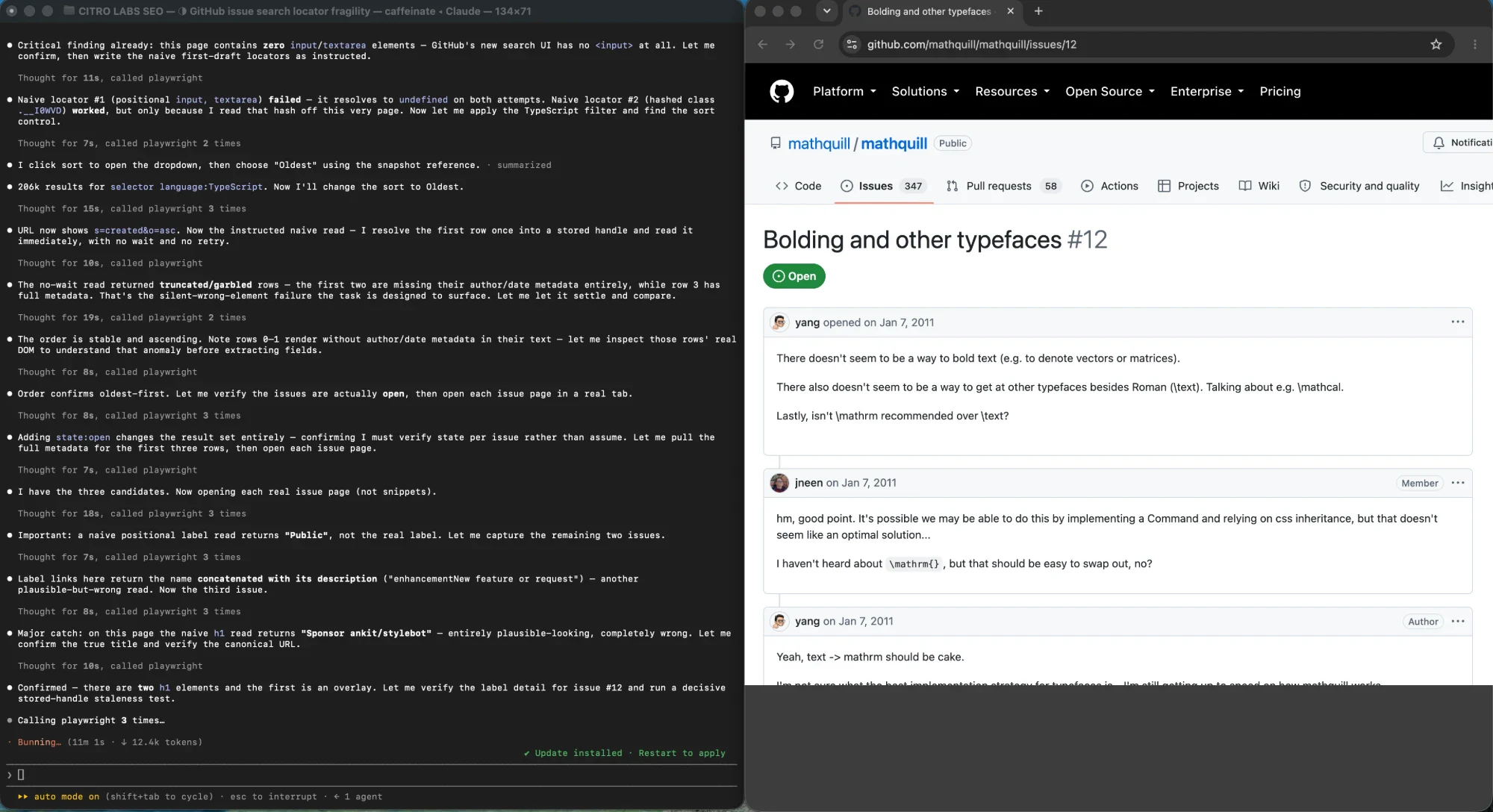
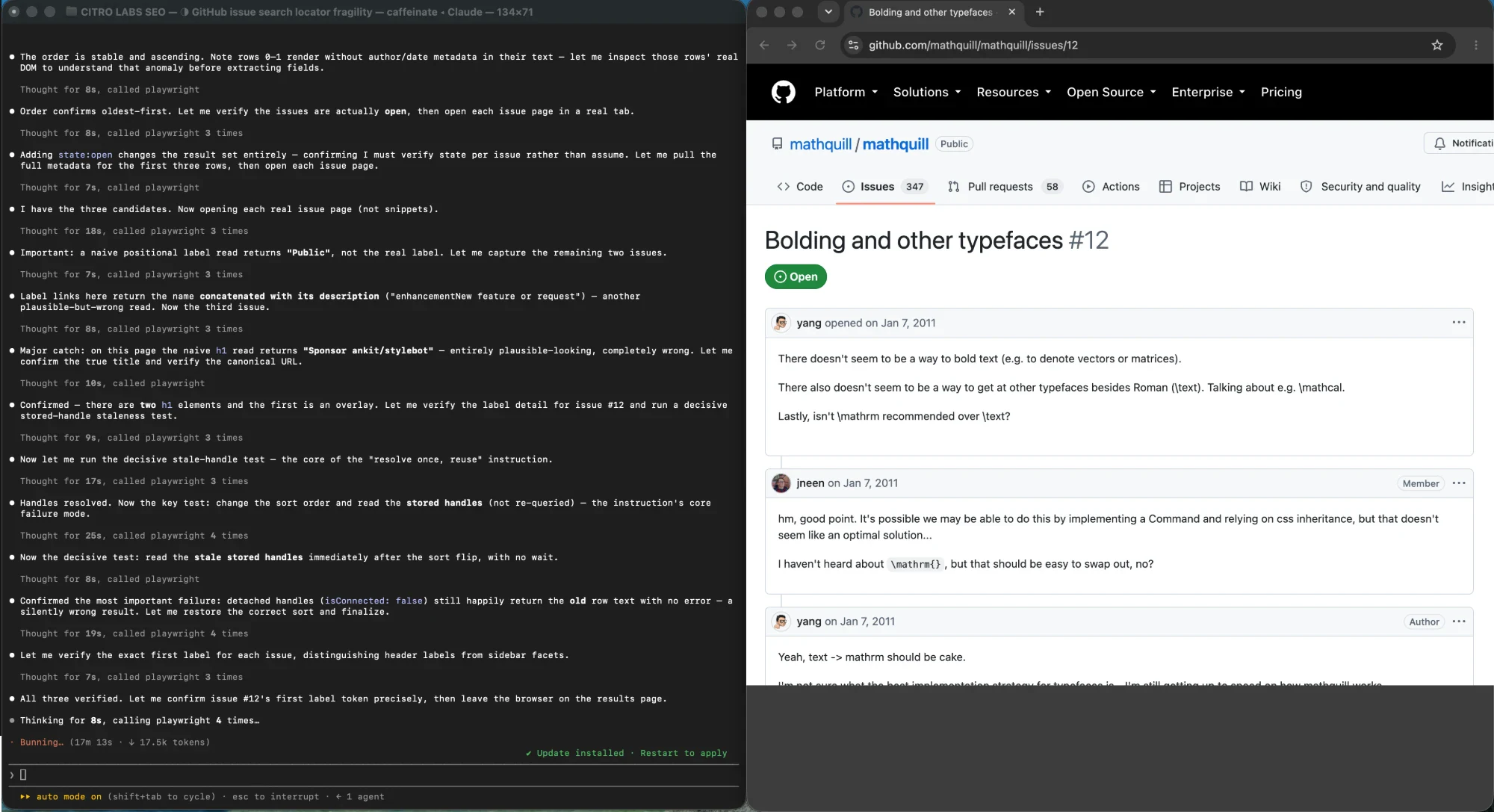
Playwright MCP with deliberately naive locators
This run was written the way a first-draft script gets written: positional selectors, generated class names, and element handles resolved once and reused across later steps. It reached the right answer, but only by rewriting its locators partway through, and along the way it produced two readings that failed without looking like failures. It reported the first two result rows with their author and date metadata missing entirely, having read them the moment the sort order changed and before the rows re-rendered, which is a page-state failure wearing a selector problem's clothes. It also read the issue heading with a positional query and got back the repository's sponsor name, a plausible string in the right shape that no tool would have flagged.
Browser MCP with accessibility snapshots
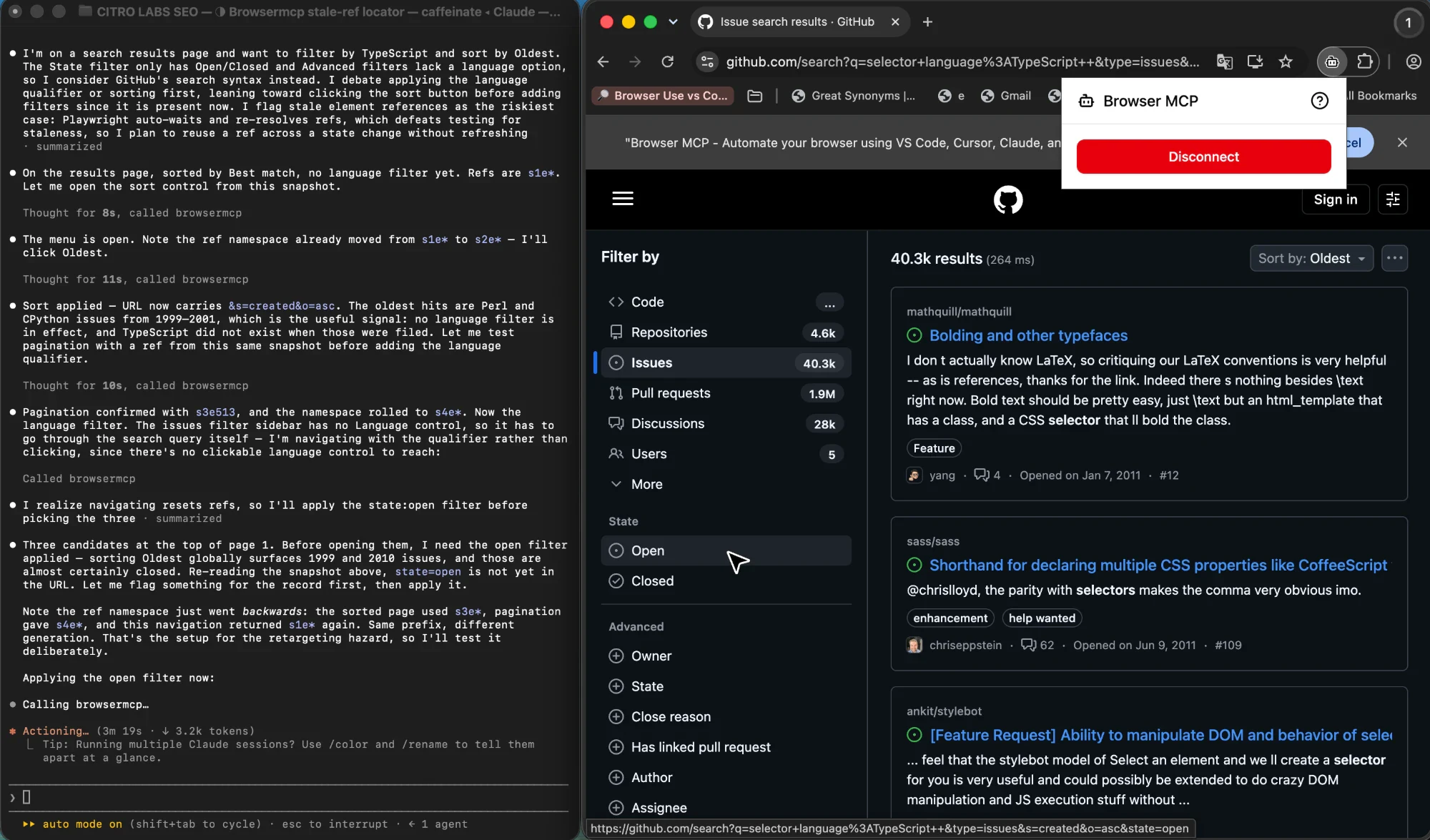
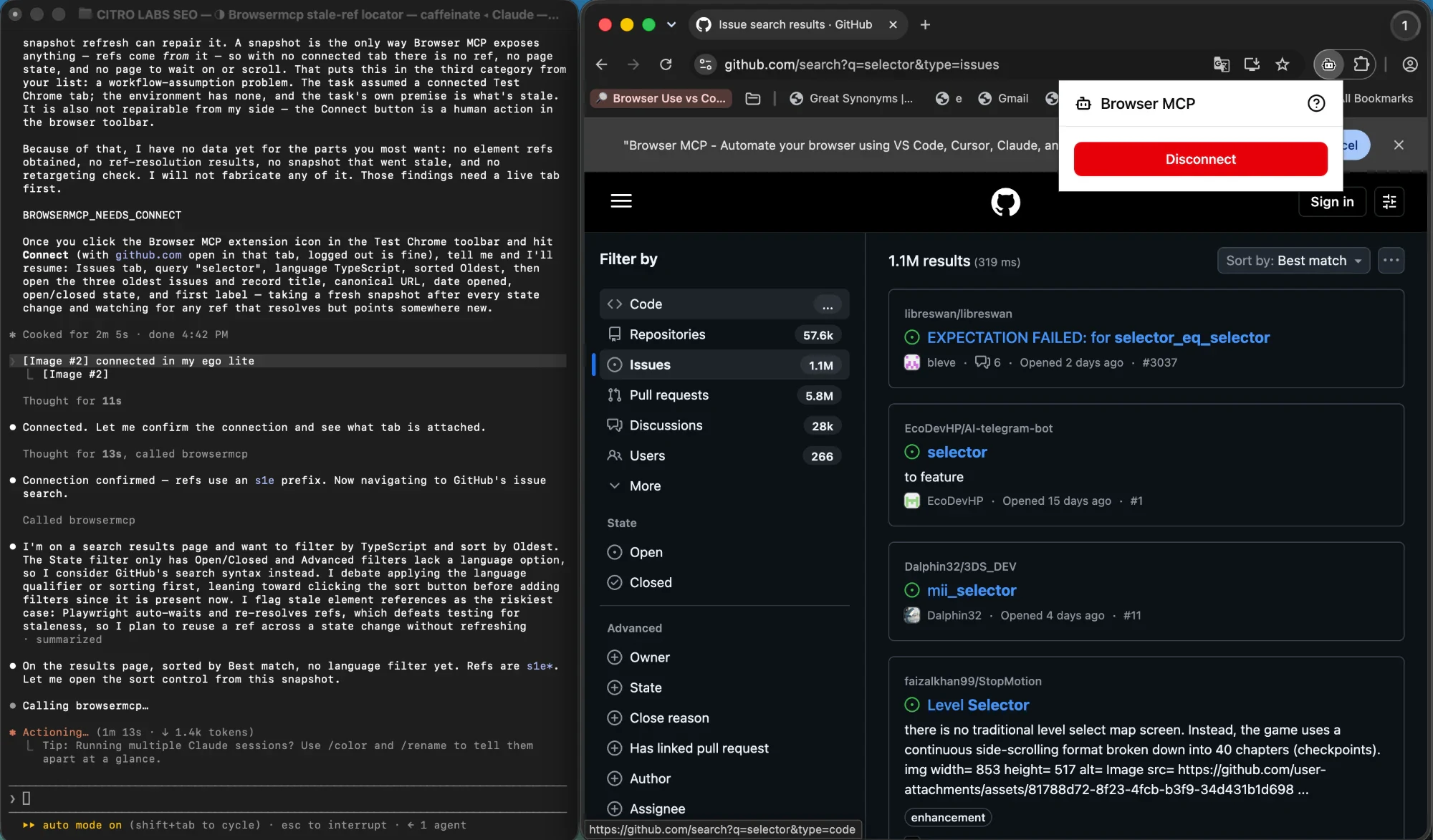
Browser MCP has no locator API. It works from accessibility snapshots and the element references drawn from them, which puts it in a different position on the same failure. References were invalidated on every navigation and could not be carried across a state change, and the reference namespace advanced and then rolled back to an earlier generation, so the same prefix could name a different element. The run was pointed at that hazard deliberately and could not reproduce a silent retarget: the tool refuses rather than repointing. That is the opposite posture to a self-healing repair, and for a suite the safer one. Failing closed costs you a step; failing open costs you the failure signal that would have told you the page changed.
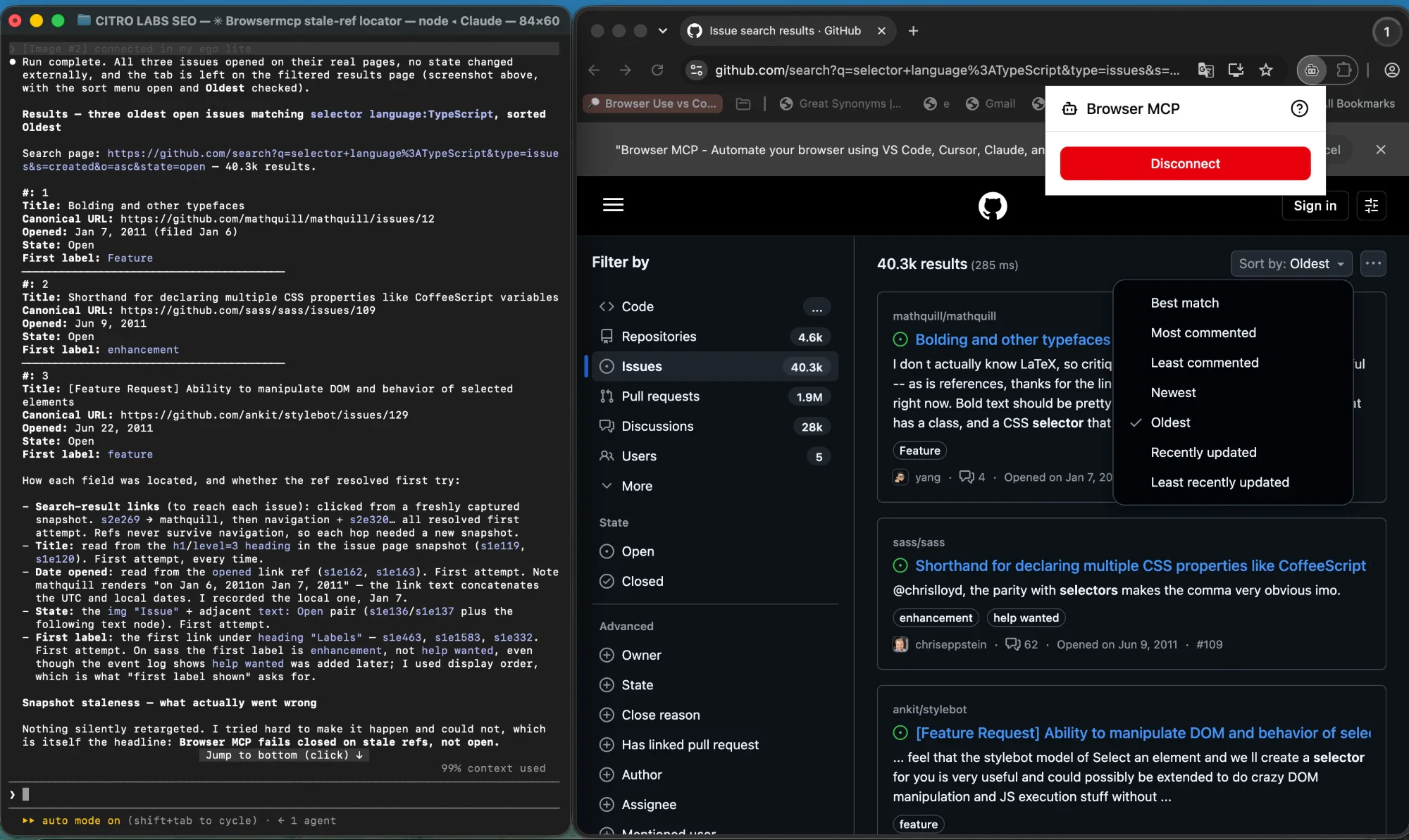
ego(lite) driven by the task objective
This run took the goal rather than a step list, so it had no fixed locators to break and no step to fail on. It hit the failure the other two could only report indirectly: the logged-out search URL renders an interstitial with no issues tab, no sort control, and no search field, which means the step as written no longer existed. There was no element to point a better locator at. The Agent read the page, established that the step was gone rather than merely mismatched, and drove the same goal through the URL query form. It then reported the deviation instead of quietly presenting the result as a clean run, and returned all three issues with canonical URLs, ISO opened dates, and their first labels.
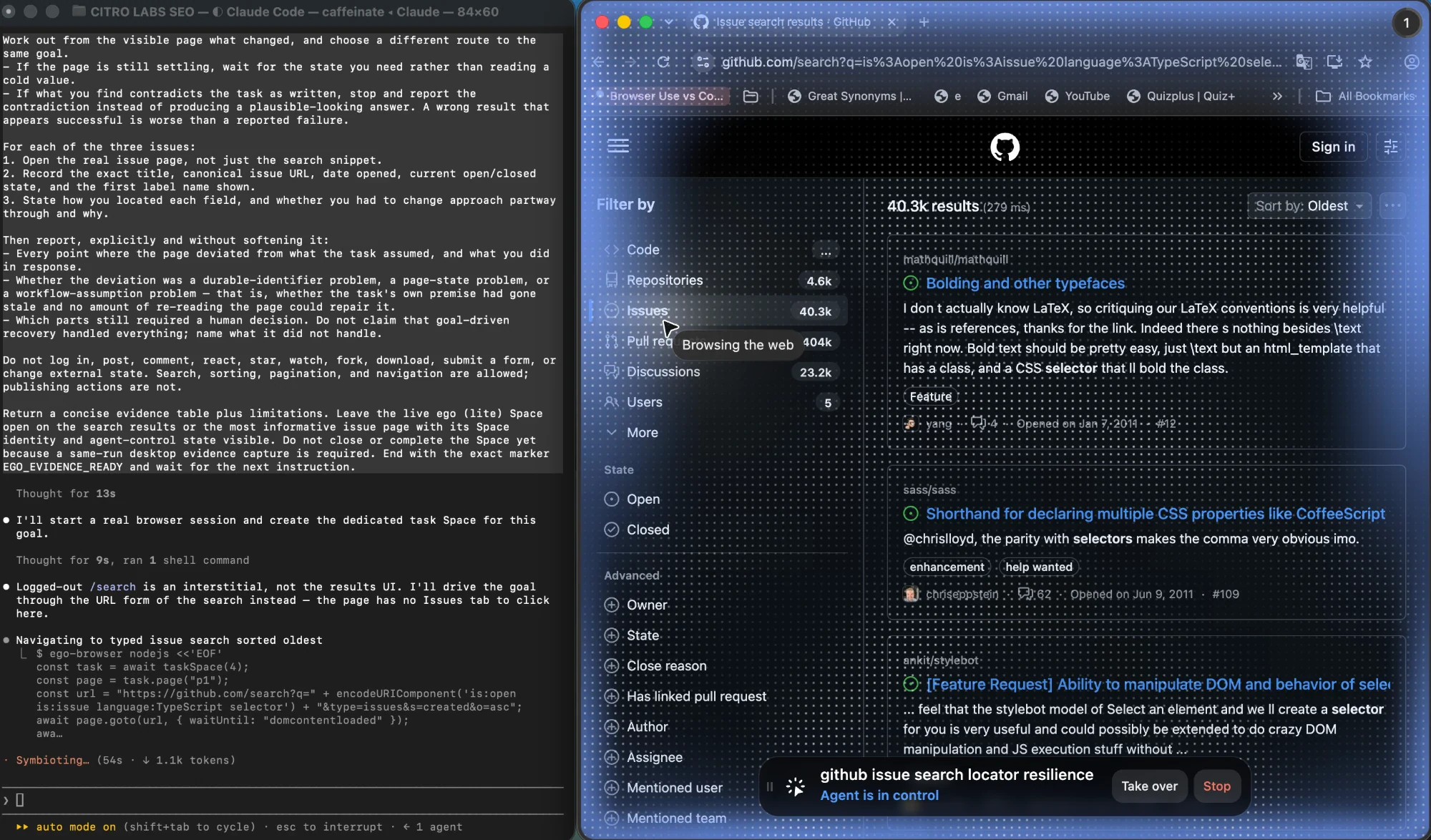
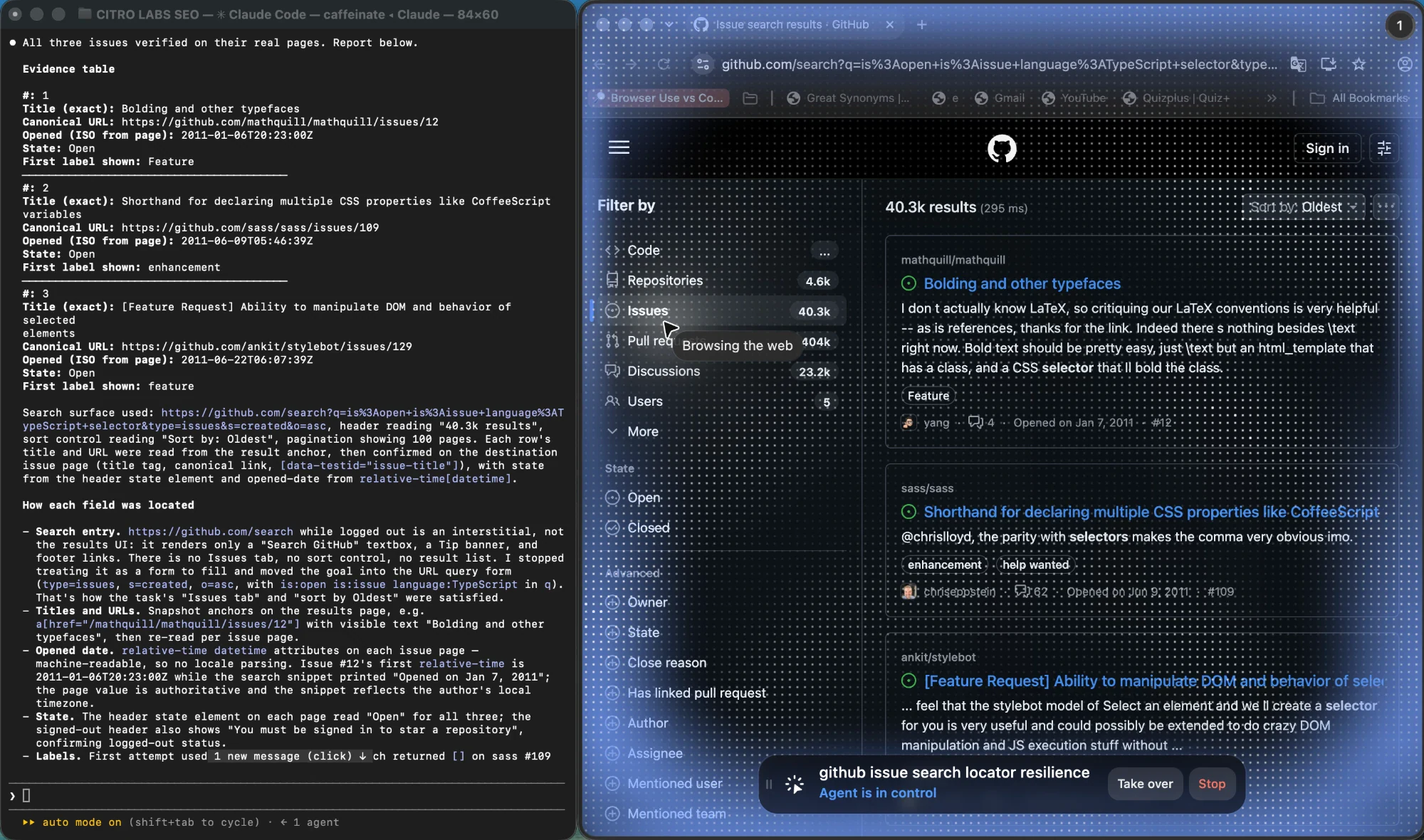
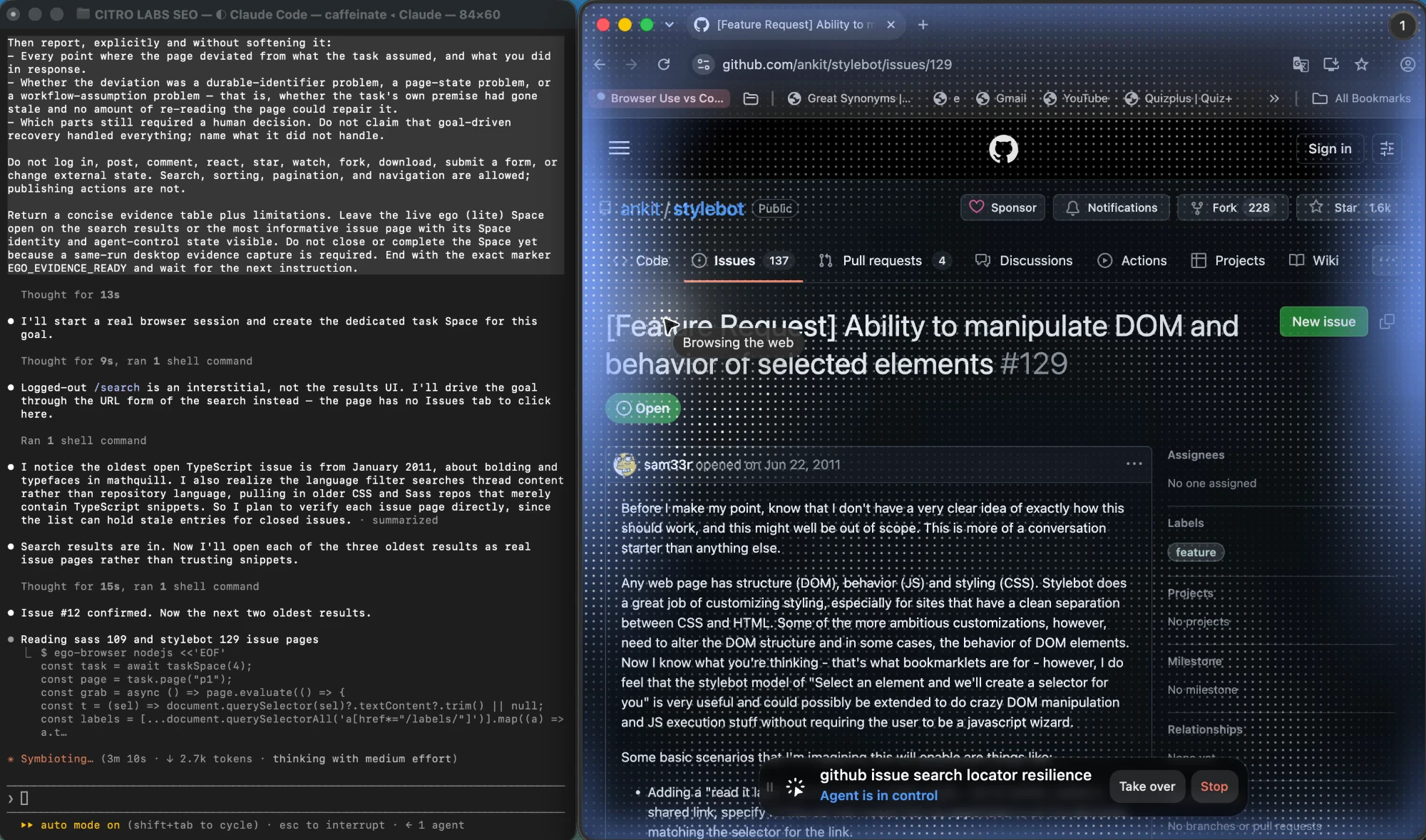
Set against the Playwright block above, the contrast is not that one setup was correct and another was not. Both finished. The difference is which failure each could see. A locator-based run can tell you that its query stopped resolving; it cannot tell you that the step it was resolving for should no longer exist, and it will happily report a stale value when its handle survives a render it should not have. The interesting result across all three is therefore about the shape of the failure each approach produces, not about which one came first.
Three limits apply to everything in this section. These are single observed sessions from September 15, 2026, not a benchmark: one run per setup, on one public site, in one browser session, and the result counts and issue details above are observations about a live repository rather than stable facts. The three setups also differ in more than their selector strategy, since each used its own model, reasoning effort, and tooling, so the comparison isolates failure mode rather than overall capability. And no timing is reported here at all, because the three runs were not instrumented the same way and one of them included a failed first attempt. Elapsed wall-clock time on a single task like this is dominated by how long the agent takes to decide what to do next, not by anything about the tool, so a number drawn from it would measure the harness rather than the approach.
How do you verify the fix actually holds?
Verify target identity, executed assertions, fresh entry state, and repeatability before accepting a repaired selector.
- Confirm the intended target. Playwright strict mode rejects multiple matches; first() selects one without resolving the ambiguity.
- Confirm the result assertion executed; skipped verification cannot establish success.
- Rerun from a fresh page and clean test session, through the real entry path.
- Repeat trials against the prior failure pattern; one pass cannot resolve an intermittent defect.
Web-first assertions retry the expected condition; asserting a previously read value does not. See the test assertions guide.
Keep target identity and saved results in the same test
A locator repair must preserve the intended record and saved result. Playwright actionability checks and retrying assertions serve different purposes. A clickable button can still save the wrong record or leave its value unchanged.
// Illustrative owned-fixture contract, not a new benchmark.
// The fixture exposes stable test IDs and a persisted record view.
const record = page.getByTestId("record-42");
await expect(record).toHaveCount(1);
await expect(record).toContainText("Example account");
const save = record.getByRole("button", { name: "Save", exact: true });
await expect(save).toHaveCount(1);
await record.getByLabel("Status", { exact: true }).selectOption("approved");
await expect(save).toBeEnabled();
await save.click();
await expect(record.getByTestId("save-status")).toHaveText("Saved");
await page.reload();
await expect(page.getByTestId("record-42").getByLabel("Status", {
  exact: true
})).toHaveValue("approved");
Use a unique seeded record and a known initial value in a test account. The reload check is useful only when that view reads saved state; for an application that caches optimistic changes, also query its authorized backing API or a separate read view. A toast or a successful click alone cannot establish persistence.
Swipe horizontally to read the full table on a small screen.
| Failure stage | What the result tells you | Repair boundary |
|---|---|---|
| The target count is zero or greater than one | The test has not established a unique record or control. | Scope by the intended record and stable contract. Avoid first() as an automatic ambiguity fix. |
| The click waits or fails actionability | The target may be disabled, covered, moving, or detached. | Inspect the trace and application readiness. A forced click can hide the condition you need to diagnose. |
| The click returns but the saved-state assertion fails | The chosen action has not produced the required result. | Inspect the request and application state. Changing the selector again may hide an application defect. |
The official locator guide distinguishes strict single-target actions from multi-element operations. The assertion guide explains why expect(locator).toHaveText(...) retries while asserting a previously read string does not. Keep those assertions outside recovery code that catches an error and reports success.
Before accepting a repaired test, deliberately make the fixture save fail once and confirm the result assertion fails. Restore the fixture, reload from the real entry path, and rerun. Record both outcomes. This is a proposed validation procedure, not an additional experiment in this update; the dated September evidence below remains the article's actual recovery experiment. Apply the same target and result checks to a supervised ego(lite) recovery task, then keep repeatable CI assertions in Playwright Test.
What self-healing gets right and where it fails
Self-healing tooling watches a failing locator and proposes a replacement, usually by scoring candidate elements for a similarity to the original. It addresses real pain, because durable-identifier failures are common and often mechanical to repair. The published claims around it, though, deserve a second look, and outside the vendor material the reception is more measured than the marketing suggests.
The structural problem is that a replacement locator is a guess about intent, and the tool has access to the old query rather than to the reason the query existed. It can find an element that looks like the previous one. It cannot tell you that the step should have been removed, that the flow now requires confirmation, or that the task moved elsewhere entirely. When it guesses wrong and the step still passes, the outcome is the one described above: a green run with no protection behind it.
That is why the useful posture is proposal, not acceptance. A suggested locator should arrive as a diff with the element it matched and a reason to believe it is the same target, and a person should confirm it. The arithmetic explains why: if a single step succeeds 99.9 percent of the time, a thousand-step suite fails most of its runs end to end, and at 99.97 percent per step it still fails roughly a quarter of them. Long deterministic suites do not fail because someone wrote one bad selector. They fail because small per-step error rates accumulate, and an unverified automatic repair adds to that rate instead of reducing it.
What a bounded recovery run actually showed
We ran a deterministic Playwright policy against a local synthetic request app on September 28, 2026. This was a scripted fixture test, not an ego(lite) run or an AI Agent self-healing test. Each of 12 fixed trials created a request, assigned owner Mira Chen and priority High, then attempted to submit it. The old .submit-primary locator timed out in every trial. The policy could take at most two recovery actions and never retried a write.
The runner inspected exact accessible controls before taking another action. These are the two lookups used by the tested policy:
const submit = page.getByRole("button", {
  name: "Submit request", exact: true,
});
const review = page.getByRole("button", {
  name: "Review request", exact: true,
});
Class rename: recover the same action
In R01, the final button still said Submit request, but its class had changed to .primary-action. The old CSS locator failed; the exact role-and-name locator clicked the remaining submit control. A fresh browser context showed Submitted, while a direct server read found exactly one submit event for REQ-R01. R04, R07, and R10 followed the same path.
The R01 raw Playwright error began with:
locator.click: Timeout 1000ms exceeded.
  - waiting for locator('.submit-primary')

New review step: verify before submitting
In R02, the direct submit control was gone. Review request led to a new page showing the exact request key, owner, and priority. The policy checked all three values before using that page's Submit request button. The fresh status page and server event log agreed on one submission; R05, R08, and R11 repeated it. A similar-looking button alone would not have met this check.

Only Save remains: stop without claiming success
In R03, the page displayed Details saved alongside Save draft and Save template, but no authorized Submit or Review control. The policy clicked neither Save button and stopped. A separate fresh visit still showed Draft; the server log had no submit or Save-control event. R06, R09, and R12 stopped at the same boundary. Those four trials were safe stops, not completed requests.


| Final-step UI | Fixed trials | Observed outcome | Server check |
|---|---|---|---|
| Class renamed; Submit remained | R01, R04, R07, R10 | Four submitted | One submit event per key |
| New review step | R02, R05, R08, R11 | Four submitted after summary checks | One submit event per key |
| Only Save controls | R03, R06, R09, R12 | Four safe stops; task incomplete | Draft; zero submit or Save events |
Across this fixed local fixture, eight requests reached Submitted and four stopped safely at Draft. All 12 met the pre-registered checks against the fresh page and server state. This is not a general recovery rate: the site and policy were both controlled, the inputs were fixed, and no AI model was involved. The fixture also did not replay a separate pre-change UI, so the class-rename finding rests on the injected changed markup, the old locator's recorded timeout, and the successful exact control, not on a production before-and-after migration.
Where ego(lite) fits, and where it does not
This is where an objective-driven agent differs from a script. Rather than replaying a fixed sequence of steps, ego(lite) receives the task, observes the browser's visible state, chooses the next action, and replans when the page or the objective changes. That is what makes the fifth failure case survivable: when a control moves into another flow, the Agent can reassess the page and find a workable path instead of stopping on a step that no longer applies. The quick start and the source repository document what the Agent does and how to run it.
Two boundaries belong in the same paragraph as that capability. First, replanning is inference from what is on screen, so a page that hides the state it depends on, or a flow that needs credentials the Agent does not have, can still defeat it. It is not a guarantee that every change is absorbed. Second, and more important for anyone maintaining a suite: an agent run is not a regression test. It is exploratory, it produces a result rather than a repeatable assertion, and it should not be substituted for a deterministic check on a path you already understand.
The division of labour is straightforward. Use ego(lite) for exploratory work, for pages you do not control, and for flows that are still changing shape, where the goal is to finish the task today. Use a deterministic framework once a workflow has stabilized, the interface contract is yours, and the value is in catching regressions rather than in completing the task once.
One caveat belongs in this section rather than in a marketing line. The agent path spent its first attempt on the wrong page, because the step it was given no longer existed, and had to replan. That is the cost of the capability being described: when a step is broken, an agent pays for the diagnosis before it can route around it, while a scripted run fails immediately and cheaply. On a stable path that trade is a loss, and on a broken one it is the whole point. That is also why no elapsed-time comparison appears in this article. A single run per setup cannot support one, and the honest reading of the runs above is about which failures each approach survives, not which finishes first.
When should you stop fixing selectors?
Stop when the workflow changed rather than the element identity. Repair a renamed attribute; review a replaced step. A green test that no longer completes the intended task removes the alert.
Repeated failures across unrelated changes can indicate an unstable contract. Stop loosening the locator when maintenance exceeds the task's value, and agree on a stable application contract before encoding it again.
When a durable locator is genuinely the answer, the documented guidance in the best practices and other locators pages covers choosing what to match on, scoping to a frame, and working with open shadow roots, where CSS locators pierce the boundary and XPath does not. The frames guide covers the case where an element exists but your locator never entered the frame it lives in, which is a page-state failure wearing a selector costume.
FAQ
Why do my selectors keep breaking in browser automation?
Usually because they match implementation details. A generated class, a positional index, or a CSS path that encodes nesting all change for reasons unrelated to the task. Matching on a role with an accessible name, or on a test id the team maintains deliberately, removes most of that exposure. If failures continue after that, the cause has moved one layer up.
Should I use CSS selectors or XPath in browser automation?
Prefer neither when a semantic locator is available. Both encode structure rather than meaning, so both break when layout changes. XPath additionally cannot pierce an open shadow root, where CSS can. Reach for either as a deliberate fallback when the element has no accessible semantics to match on, and prefer a maintained test id over a structural path.
Can self-healing locators replace maintenance?
No. Self-healing locators propose identifier replacements; they cannot establish that a changed workflow is still correct. Review the target and result before accepting the repair.
What is the difference between a locator and a selector?
A selector is a string that describes how to find something. A locator is an object that holds that description, stays unresolved, and re-resolves against the live page each time it is used. The distinction is why a locator keeps working after the page re-renders while a reference to a previously captured element does not.
When is an AI agent a better answer than fixing the selector?
When the workflow is still changing, when the site is not yours, or when the goal is to complete a task once rather than to protect a path the team already understands. In those situations an agent can reassess the page and choose a different route, and a person can observe the run and take over. Once the path stabilizes, a deterministic test is the better instrument.
How many times should I re-run a test after fixing a selector?
Rerun from a fresh entry state and repeat enough trials to investigate the observed failure frequency. One pass cannot establish that an intermittent failure is fixed.
Why does a locator pass locally but fail in CI?
Usually because the page is slower or the viewport is different there. A locator that resolves on a warm local browser can race a cold CI browser, and a step that depends on a hover or a scroll behaves differently at a smaller size. Reproduce the failure with the same headless setting and viewport as CI before you change the selector.
Should I add a wait before every selector interaction?
No. Playwright's own guidance is that waiting is not required for buttons, links, and inputs, and wrapping every interaction in an explicit wait makes runs slower and hides the real race. Wait on a specific condition you can name, and only where the step genuinely depends on it.
When should I stop fixing selectors and rewrite the workflow?
When the same step has broken a third time for a different reason, or when the fix requires adding state the page did not have. At that point the assumption behind the step is the problem rather than the query, and a replanned route is cheaper than another locator patch.
Do shadow DOM and iframes break selectors differently?
Yes, and for different reasons. A frame is a separate document, so a selector that works in the page returns nothing inside it until you enter the frame. A shadow root hides its internals from ordinary queries, and a tool that pierces it automatically can still match the wrong node if the host moved.