Stable Playwright locators for dynamic web apps


Stable Playwright locators solve an important problem: when a component re-renders, a new wrapper is added, or the DOM structure changes, they help a test continue finding the same control. For repeatable workflows with clear interface contracts, that stability is essential. A well-designed locator reduces dependence on implementation details and makes a test more resilient to routine frontend changes.
But locator stability is not the same as workflow adaptability. After a re-render, a locator can find the same target again, but it cannot determine whether that target or the original action path is still correct. If the target moves into another flow, the control's name changes, or the task must be completed through a different route, a developer usually still needs to update the test's assumptions and steps.
If the path itself has to be rediscovered rather than replayed, one option is to hand the task in natural language to an agent browser such as ego(lite), which decides the next step from the page it currently sees. Once the workflow is already understood, stable, and ready to be encoded as a deterministic regression test, Playwright is the better fit, and the rest of this article is about making that half hold up.
Firsthand evidence from the same live task
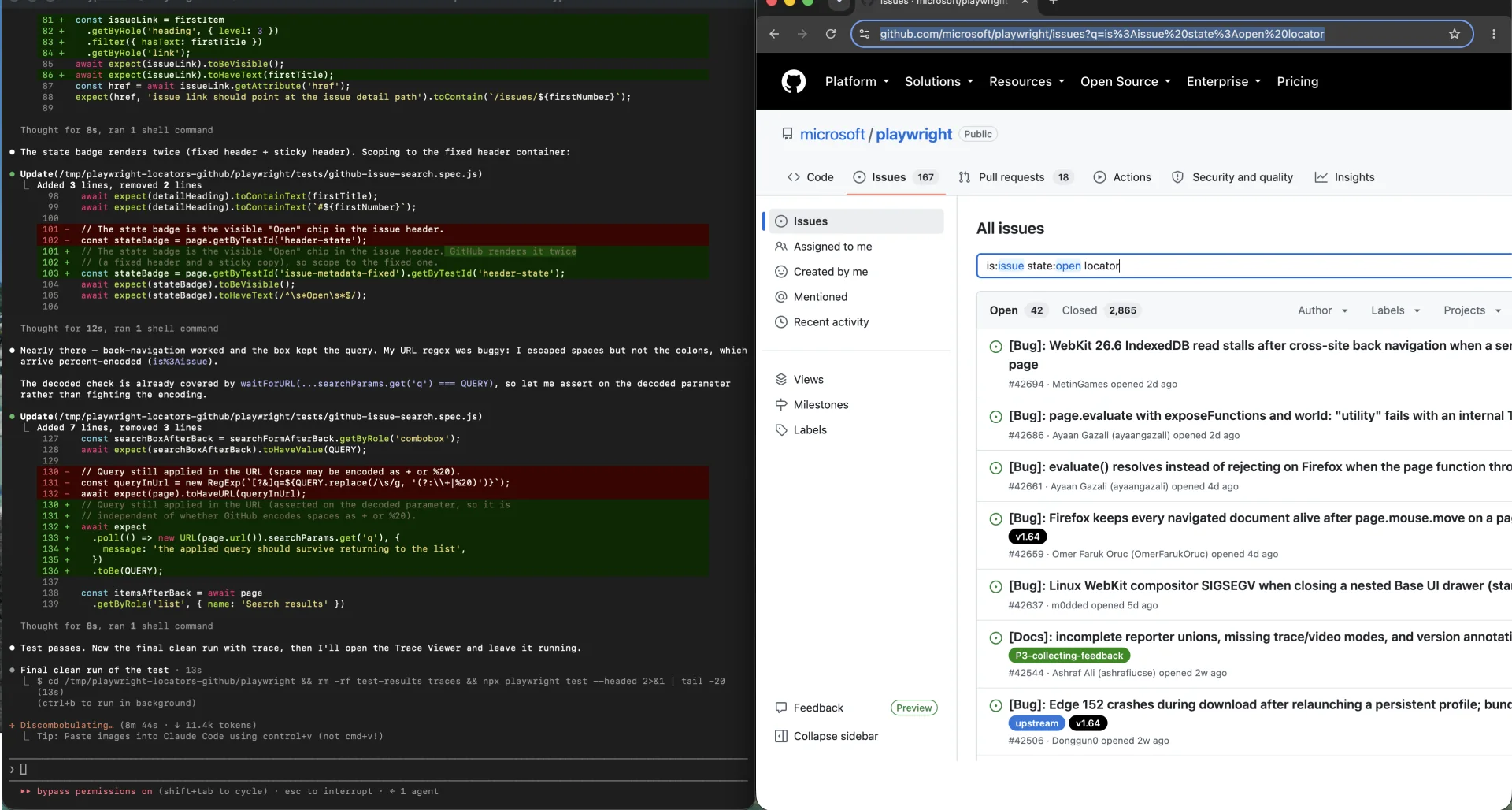
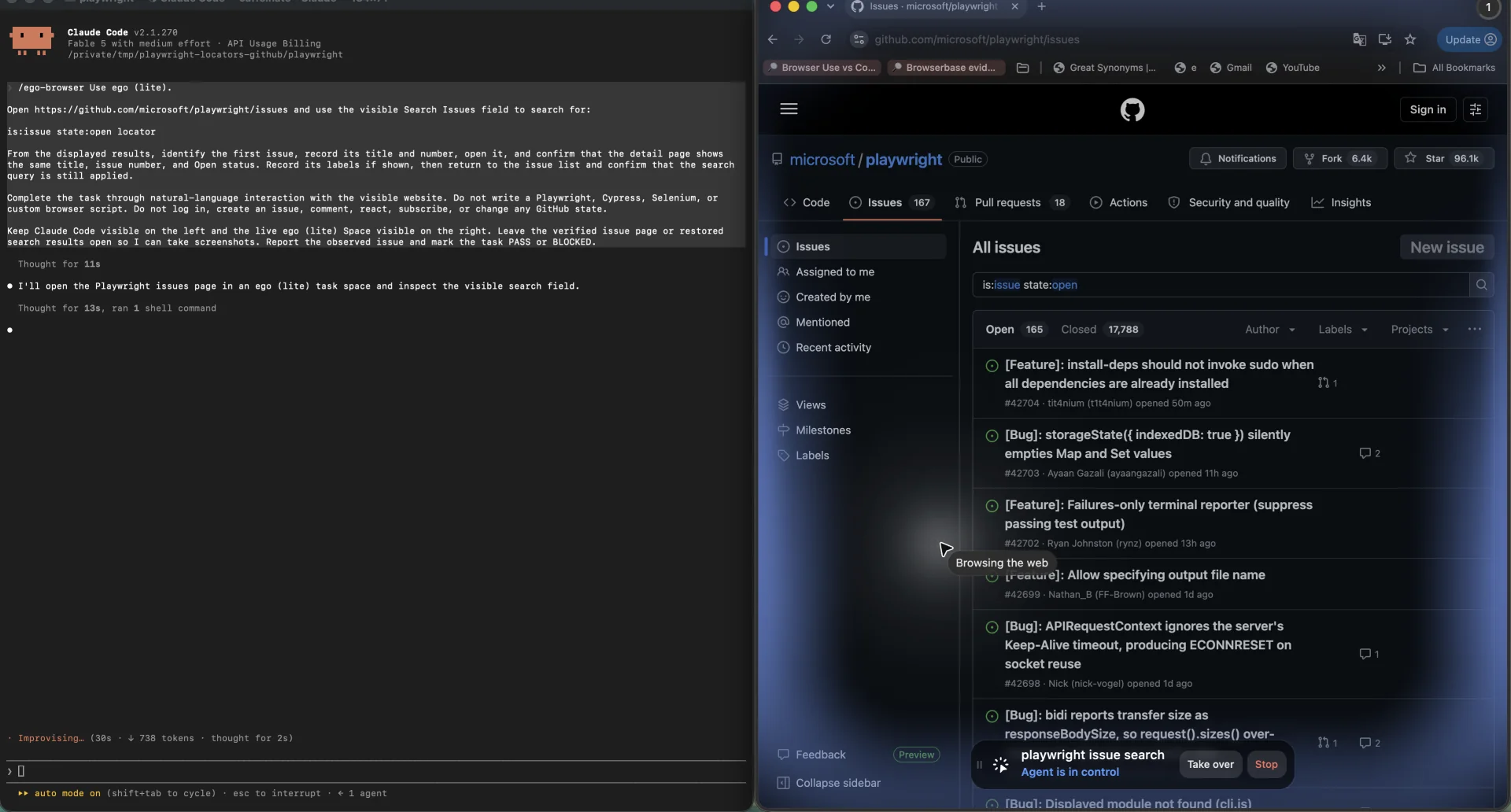
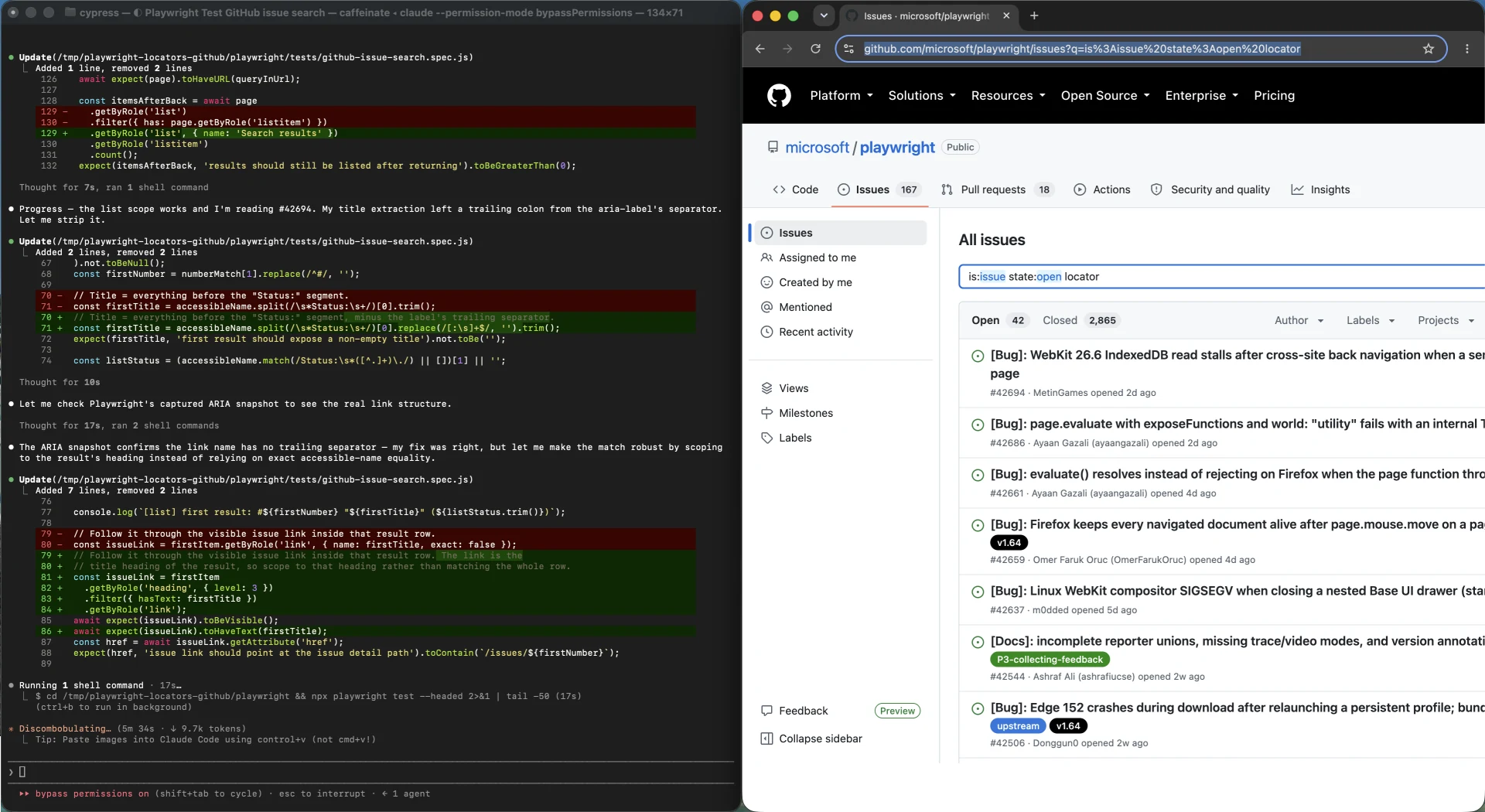
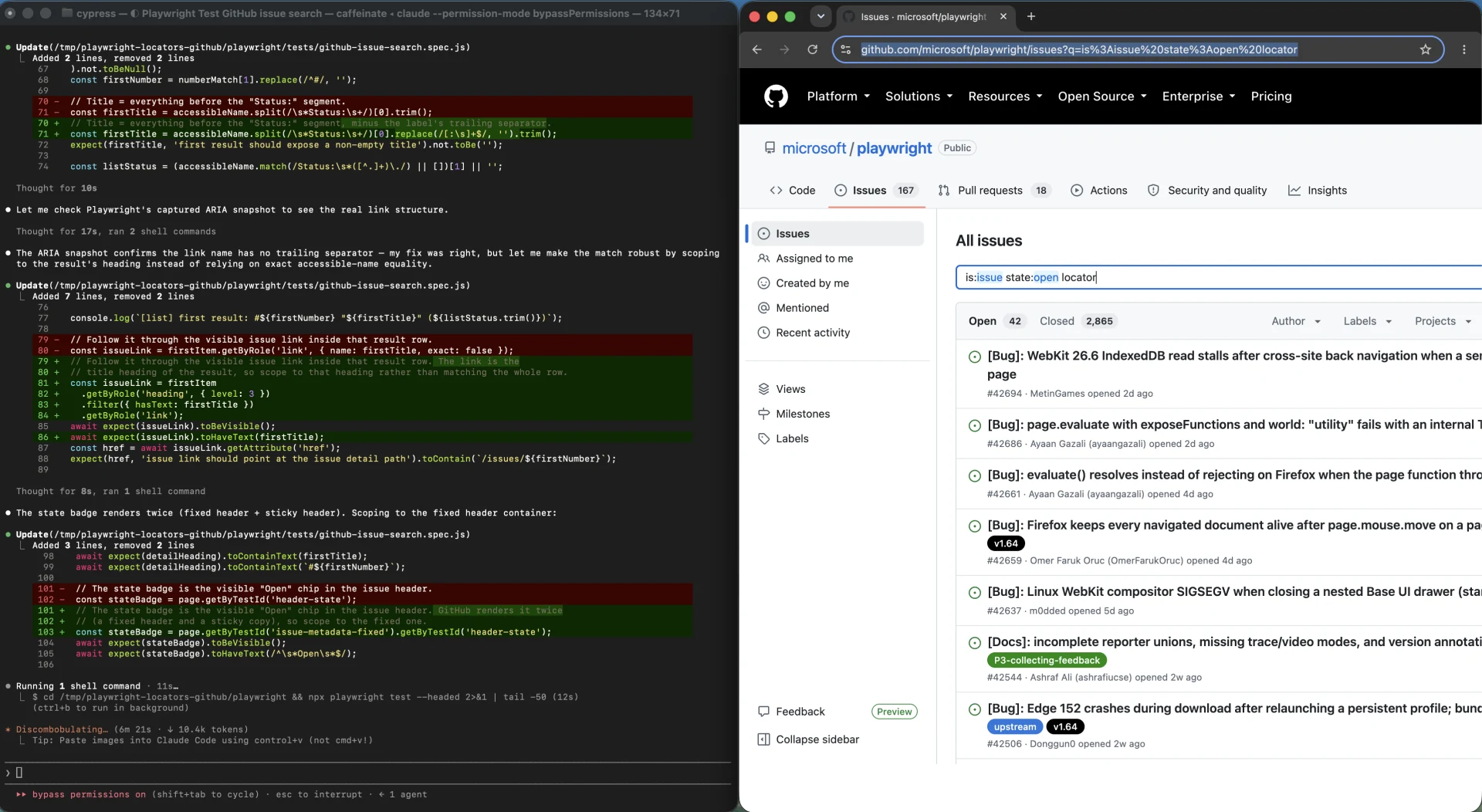
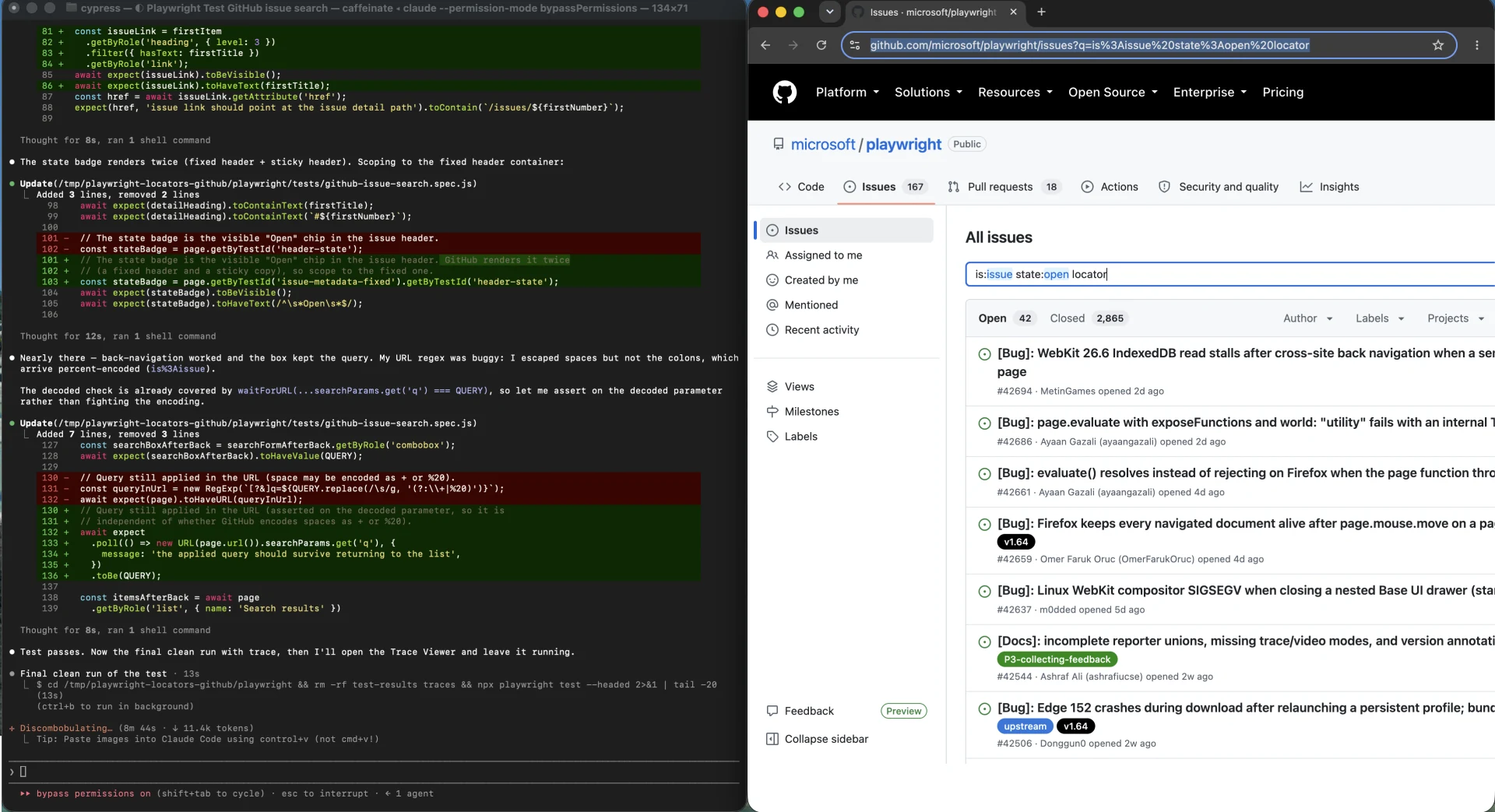
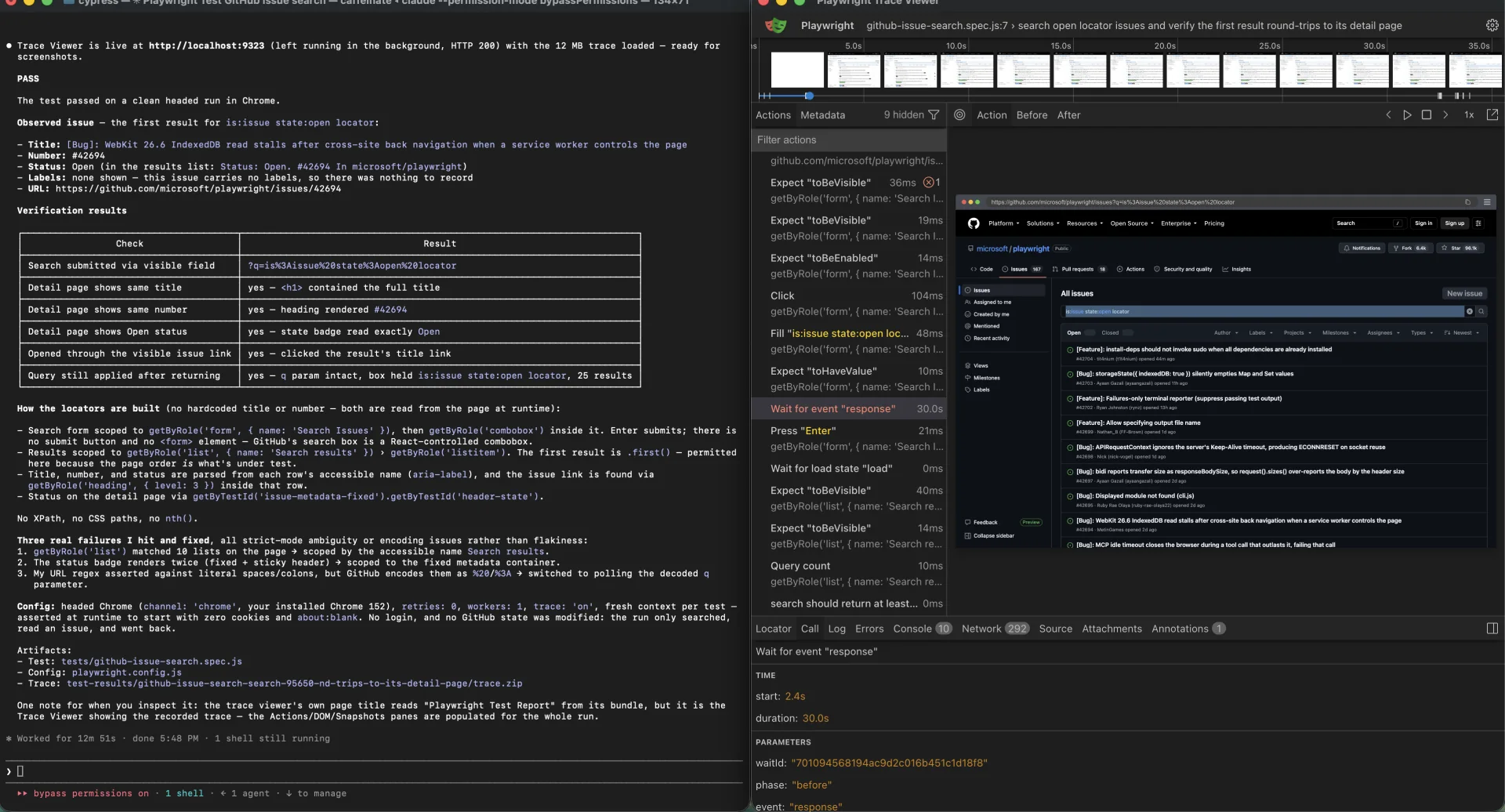
The screenshots below establish both paths before the locator guidance begins. Playwright was authored and debugged against the public GitHub Issues interface; ego(lite) received the same verification task in natural language inside a visible, take-over-ready Space. Later sections explain the failures, outputs, and limits that each frame supports.
How do you choose a stable locator?
Choose the locator whose matching attribute the page owner is least likely to change. If you control the markup, that is usually the accessible role plus the accessible name, with a test id for controls that have no real semantics. If you do not control the markup, it is whichever user-visible property the owner treats as product surface rather than implementation detail.
What a locator is, and why it is not a selector
A locator is a query you describe once and run many times, not a handle you grab and hold. The Playwright documentation calls locators the central piece of its auto-waiting and retry-ability, and states the key property plainly: every time a locator is used for an action, an up-to-date DOM element is located in the page.
That one sentence is the whole reason locators work on a React or Vue application. A hover followed by a click on the same locator locates the element twice, once before each action. If the component re-rendered between those two calls, the second action runs against the new element. There is no stale reference to go bad, because there was never a reference.
This is the difference worth internalizing. A one-shot DOM query hands you a node. Once a framework replaces that node during a re-render, your handle points at something detached from the document, and the failure is confusing because the element is still visible on screen. A locator has no such moment. It re-asks the question.
The trade is cost, not correctness: a locator runs a fresh query per action. That is why locators compose so well, since a child locator resolves within a parent's subtree, and why reaching for a raw DOM handle to improve performance usually trades a real reliability property for a measurement nobody asked for.
The mechanism is documented on the locators guide and the Locator API reference.
Why user-facing semantics survive changes the DOM does not
A designer renames a CSS class. A developer wraps a button in a new layout container. A component library version bump swaps a div for a section. None of these change what the control is to the person using it.
Playwright's guidance follows the same logic. The docs recommend prioritizing user-facing attributes and explicit contracts, and point to role locators as the closest way to how users and assistive technology perceive the page. The reasoning is mechanical: if a control is still a button labeled Save changes, then an accessible-name query still finds it, no matter which wrapper now sits above it or what the class attribute now says.
Role locators are the strongest default because they query the accessibility tree. A role query with an accessible name matches on what the element is exposed as, and Playwright recognizes implicit roles, so a plain button element qualifies with no ARIA attributes added. The documentation is also explicit about the limit: role locators give early feedback on ARIA, but they do not replace accessibility audits and conformance tests. A page with a broken accessibility tree will produce role locators that are just as broken.
Where role locators still fail
Three cases come up constantly. The first is an icon-only control with no accessible name. A button containing only an SVG has the button role and no name, so a bare role query matches it and every other unnamed button on the page. The fix belongs in the application, not in the locator: add an accessible name.
The second is a duplicate accessible name. Two cards each with an Edit button produce two matches, and the role locator is not wrong to report it. The ambiguity is real and the resolution is scoping.
The third is an element that is not exposed to the accessibility tree at all. A custom control that renders a styled div and wires its own click handler has no role unless someone gives it one. A role locator cannot find what the page never declared.
Matching label, text, test id, CSS, and XPath to the job
The built-in locators are not interchangeable, and the docs are specific about when each applies.
Label and placeholder are for form controls. A label query matches an associated label element, an aria-labelledby target, or an aria-label attribute, which makes it the natural query for a field. A placeholder query is the fallback for a field with no label at all. That ordering matters: a placeholder is often rewritten by whoever owns the product copy, while a label is a structural commitment.
Text is for non-interactive content. The docs recommend text queries for elements like div, span, and p, and point back to role locators for buttons, links, and inputs. This trips people up, because text feels like the most human query available. It is human, and on a marketing page it is also the most volatile. Any copy owned by content, translation, or A/B testing makes a text query a moving target. When you must match copy that a content team owns, anchor on an aria-label or a test id instead.
One detail that surprises people: text matching always normalizes whitespace, even with an exact match. If your test depends on a specific double space, it will not see one.
Test ids are the explicit contract. The docs call testing by test ids the most resilient way of testing, on the reasoning that a text or role change will not break it, while noting in the same breath that test ids are not user-facing. The default attribute is data-testid, and it is configurable globally through the testIdAttribute setting or at runtime.
CSS and XPath are the escape hatch, not the strategy. The docs say CSS and XPath are not recommended because the DOM can often change, that these selectors can break when the DOM structure changes, and that a long descendant chain is an example of a bad practice that leads to unstable tests. They remain supported, and both are auto-detected with no prefix required.
If the priority list is not a ranking, what is it?
You will find the same table on a dozen tutorials: role first, then label and placeholder, then text and title and alt text, then test id, then CSS and XPath as a last resort. Treating it as a fixed leaderboard is the most common way to misread it, because the column that actually decides the ranking is not the locator type. It is who controls the attribute.
Ask what you control. If you control the markup and the flow runs in CI, the best locator is the cheapest stable contract you can guarantee, and that is usually a role with an accessible name, with a test id for controls that have no meaningful semantics. If you do not control the markup, the best locator is whichever user-visible property the page owner is least likely to change, and on a third-party page that is frequently text or a stable-looking attribute rather than a role you can rely on.
The unresolved disagreement in the ecosystem makes more sense under that reading. Playwright's docs call test ids the most resilient way of testing, because they survive text and role changes. Community ladders routinely place test ids near the bottom, because a test id is an extra attribute that has to be maintained and can go stale. Microsoft's own Power Platform samples rank test ids in the middle. None of them is confused. They are each answering a different question about who owns the attribute and how long the test needs to live.
Locating inside a re-rendering, component-wrapped DOM
Dynamic content is not one problem. It is several, and they produce different failures.
Asynchronous re-render is the one Playwright already handles, via fresh resolution before each action. What it does not handle is an element that detaches mid-action. If the node is removed while a click is in flight, the action throws rather than silently retargeting. That is the correct behavior, and it usually means your test acted during a transition rather than after it.
Component wrapping is the case that breaks CSS paths. A layout refactor that adds a wrapper element invalidates every selector that traversed the old ancestor chain, while doing nothing to a role or label query.
Lazy mounting is a timing problem wearing a locator costume. A component that mounts its interactive content after a data fetch has no locator problem at all; it has a state problem, and the fix is waiting for a named state rather than a duration.
Component-level state is the subtlest class. A controlled input that renders a native input behind a styled shell can accept a fill and still leave the framework's state empty, because the framework never saw the event. A visually hidden native checkbox behind a styled label can resolve perfectly and never fire the handler. In these cases the locator is correct, the action succeeds, and the test still fails. No locator choice fixes this. Assert on the state the framework actually owns, or interact with the element the way the framework expects.
Shadow DOM earns a specific note. All locators in Playwright work with elements in shadow DOM by default, including CSS, so a plain query reaches into an open shadow root with no special syntax. Two limits are documented: XPath does not pierce shadow roots, and closed-mode shadow roots are not supported. If a target sits inside a shadow root, XPath is the wrong tool regardless of how you write it.
Nested frames are handled with a frame locator, documented on the frames guide, which captures the logic needed to reach the iframe and locate elements inside it. The chain reads top-down, and the get-by calls made on a frame locator return a plain locator, so the frame hop happens once at the start of the chain. Frame locators are strict in the same way regular locators are, which matters when a page hosts more than one iframe.
Narrowing an ambiguous locator to exactly one element
When a locator matches more than one element, the fix is to make it more specific, not to pick one of the matches. Playwright gives you the tools in a clear order.
Scope to a container first. Any locator-creating method is available on a locator, so you can build the parent and then query inside it. The docs show the pattern directly: name the row or card, then act inside it, then assert that the container resolved to exactly one element. Scoping is usually enough on its own.
Filter by what distinguishes the element next. A filter narrows an existing locator and can be chained to filter multiple times. Text filtering is case-insensitive substring matching somewhere inside the element, including descendants. The child and descendant filters take a locator, and the negation variants exist for both.
There is a scoping rule here that people get wrong, and it produces a confusing non-match rather than a clear error. The inner locator passed to a child filter must be relative to the outer locator, and it is queried starting from the outer match, not from the document root. If your inner locator describes an element that sits above the outer match, it will never match. Outer and inner locators must also belong to the same frame, and the inner one cannot contain a frame locator.
Intersect two conditions when you need both. The and operator matches an element only when a second locator also matches it, which is how you express that this is a button and its title is Subscribe. This differs from the or operator, which produces the union. The union can match both alternatives at once and therefore trigger an ambiguity error, which is why the docs pair it with a first call.
What strict mode is actually telling you
Playwright locators are strict by default. Any operation that implies a single target throws if more than one element matches. A bare role query followed by a click on a page with three buttons is not a slow query; it is an immediate exception. There is no project-level switch that turns strictness off.
Multi-element operations are exempt. A count call is documented as working fine when a locator resolves to multiple elements, and so are the collection readers. Strictness applies to the operations where picking the wrong element would be a silent, incorrect action.
The important detail is timing. A strict mode violation fires immediately, before any actionability waiting. That distinguishes it from a timeout, and the distinction matters because they have different causes: a violation means you are pointing at several elements, while a timeout means you are pointing at zero, or at something that never became actionable.
The documented opt-out for strictness is described under strictness in the locators guide: positional methods tell Playwright which element to use when several match. The docs then say not to reach for them, because when your page changes, Playwright may click on an element you did not intend. The recommended alternative is to build a locator that uniquely identifies the target.
Positional locators are a last resort, except when they are not
The blanket rule is the right default. But it is not a law, and pretending otherwise makes the guidance easy to dismiss when someone hits the genuine exception.
Positional selection is defensible when position is the behavior under test. If you have just asserted that a list is sorted by price descending, asserting that the first row is the most expensive is not a brittle shortcut, it is the assertion. The index carries meaning because the test established it.
It is also defensible when the duplicates are functionally identical, such as a long settings page that renders the same save button at the top and the bottom of the form. In that situation the two matches are interchangeable, and either one is correct.
Everywhere else, an index is a bet that the DOM order will not change, placed silently and lost without notice. A row added to a table, a list reordered by a data change, or a responsive variant that renders elements in a different sequence all break it, and none of them produce a failing assertion that points at the cause. Treat positional locators the way you would treat a sleep: acceptable with a comment explaining what makes it safe, suspected everywhere else.
How locators, auto-waiting, and assertion retry work together
These three mechanisms are usually taught separately, which is why people reach for manual waits and then cannot explain why the test is still flaky.
Actionability checks run before actions. Playwright performs a range of checks on the element and only then performs the action. The checks are visible, stable, receives events, enabled, and editable, and each action applies a specific subset. A click waits for the element to be visible, stable, meaning the same bounding box for at least two consecutive animation frames, not obscured by another element, and enabled. A fill waits for it to be visible, enabled, and editable, but not stable. If the required checks do not pass within the timeout, the action fails with a timeout error.
The per-action check matrix is documented on the actionability page.
Assertions retry independently. Web-first assertions re-fetch the element and check the condition repeatedly until it passes or the assertion timeout is reached. The default assertion timeout is 5 seconds, which is shorter than the default timeout for actions and navigation, and that asymmetry is worth knowing: if your own harnesses show a mix of defaults, a slow application can produce an assertion failure in a place where an action would have waited longer.
Your own reads do not retry, and this is the failure mode that produces most of the flakiness blamed on locators. Reading a value into a variable and asserting on that value resolves it first and hands a string to a non-retrying matcher. Nothing is left to retry, so the assertion evaluates once, at whatever moment the read happened. The retrying form keeps the locator in the assertion and lets Playwright keep asking.
The matcher list and the default timeout are on the assertions page.
Locators also do not remove the need to know what you are waiting for. They remove the need to guess how long to wait. A locator that resolves instantly against a page that has not loaded its data will happily let your test click the wrong thing. Wait for a named state: hydration finished, the row visible, the button enabled.
Diagnosing a locator that stopped working
Start by classifying the failure, because the three classes have almost nothing in common.
| Failure | What it looks like | What to change |
|---|---|---|
| Ambiguous match | An immediate violation error naming the elements that matched | Scope to a container, then filter by what distinguishes the target |
| No match | A timeout while resolving, with nothing found | Check page state, frame boundary, shadow root, and the attribute you target |
| Found but never actionable | The element resolves, then the action times out | Look for a covering overlay, a disabled control, or an animation that never settles |
Then check three things that are not locator problems at all. Test data drift is the most common: a record renamed in staging turns a semantic locator into a non-match, and it looks exactly like a broken selector. Duplicate content is the second, where a layout renders the same control twice and your previously unique locator quietly becomes ambiguous. A frame boundary is the third, and it is invisible in the failure output unless you know to look for it.
The tooling is designed for exactly this. The best practices guide covers the generator and the trace viewer. The built-in test generator looks at the page and produces the best locator it can, prioritizing role, text, and test id, and if it finds several matching elements it refines the locator to identify one uniquely. The inspector lets you step through a run, edit a locator live, and watch which elements match. The trace viewer shows each action with the locator that was used and before-and-after DOM snapshots, which is how you catch the case where the DOM was not what you assumed. If you only adopt one, adopt the trace viewer: the before-and-after snapshot answers the classification question directly.
One more trap belongs in this list. A bare CSS text pseudo-class matches the body element and every ancestor of the element you meant, which turns a precise-looking selector into a match on the whole document. Filtering on the element you already scoped is the safe form. The distinctions between the selector engines are documented under other locators.
What did a real GitHub Issues run expose?
The useful test was not whether one locator could find one button. We searched the public microsoft/playwright issue tracker for is:issue state:open locator, read the first result from the page at runtime, opened its visible title link, checked that the detail page kept the same title, issue number, and Open state, then returned and verified that the query and result list survived. No issue title or number was hardcoded.
The run passed, but only after three corrections. None was random flakiness. Each failure exposed an assumption that looked reasonable in the test and was false in the live accessibility tree or URL.
| Observed failure | What was actually wrong | Stable correction |
|---|---|---|
| getByRole('list') matched 10 lists | The role was correct, but the page contained several legitimate lists | Scope to getByRole('list', { name: 'Search results' }) before locating list items |
| The Open state badge matched twice | GitHub rendered the same metadata in fixed and sticky headers | Scope the state test to the fixed issue-metadata container instead of choosing the first match |
| The return-state URL regex failed | GitHub percent-encoded colons, so the string-level URL expectation was wrong | Read URL.searchParams.get('q') and compare the decoded value with the original query |
The first result still used first(), and that was intentional. The task asked for the first result, so page order was part of the behavior under test. The unstable choice would have been using first() to silence the 10-list or two-badge ambiguities, because position had no meaning in either of those cases.
const results = page
  .getByRole('list', { name: 'Search results' })
  .getByRole('listitem');

const state = page
  .getByTestId('issue-metadata-fixed')
  .getByTestId('header-state');

await expect
  .poll(() => new URL(page.url()).searchParams.get('q'))
  .toBe(query);
The clean headed run used a fresh context with no cookies, one worker, retries disabled, and tracing enabled. The retained 12 MB trace records the action list, DOM snapshots, network activity, console output, and the final result state. It is more useful than a passing checkmark alone because a reviewer can see exactly which locator resolved and what the page looked like at that moment.
When should you stop tuning locators?
There is a point in this workflow where more locator work stops paying for itself. Recognizing it is worth as much as any of the technique above.
Playwright locators are built for deterministic, repeatable execution. That is their strength, and it comes with a maintenance cost that scales with how much the target moves. When a page changes under someone else's release schedule, that cost keeps being paid, and the honest answer is that no locator strategy makes it go away. You need abstraction, monitoring, and a named owner for the breakage, and you should budget for it.
ego(lite) sits at a different point on the same problem. You hand a task in natural language to the agent you already use, and it works in a visible browser window. A full Chromium meets real sites as they render now, so dynamic re-renders, cross-origin iframes, and shadow DOM stay in reach, and the agent decides its next step from the page it sees, not from a selector written correctly in advance.
What happened when we gave ego(lite) the same task?
We gave Claude Code the same GitHub Issues task as a natural-language request and told it to use ego(lite), keep the live Space visible, and avoid writing a Playwright, Cypress, Selenium, or custom browser script. The right side of the session remained visibly agent-controlled, with Take over and Stop available throughout. The artifact from this path was the verified result and its visual evidence, not a reusable test specification, which is the trade you accept when the goal is an answer rather than a test.
The run searched for is:issue state:open locator, observed 42 open results, and opened issue #42694, [Bug]: WebKit 26.6 IndexedDB read stalls after cross-site back navigation when a service worker controls the page. The detail page matched the title, number, and Open state; no labels were shown. After returning, the search field still held the full query and the first result was unchanged. These issue details and counts are observations from September 14, 2026, not stable facts about the live repository. No login, issue creation, comment, reaction, subscription, or other GitHub state change occurred.
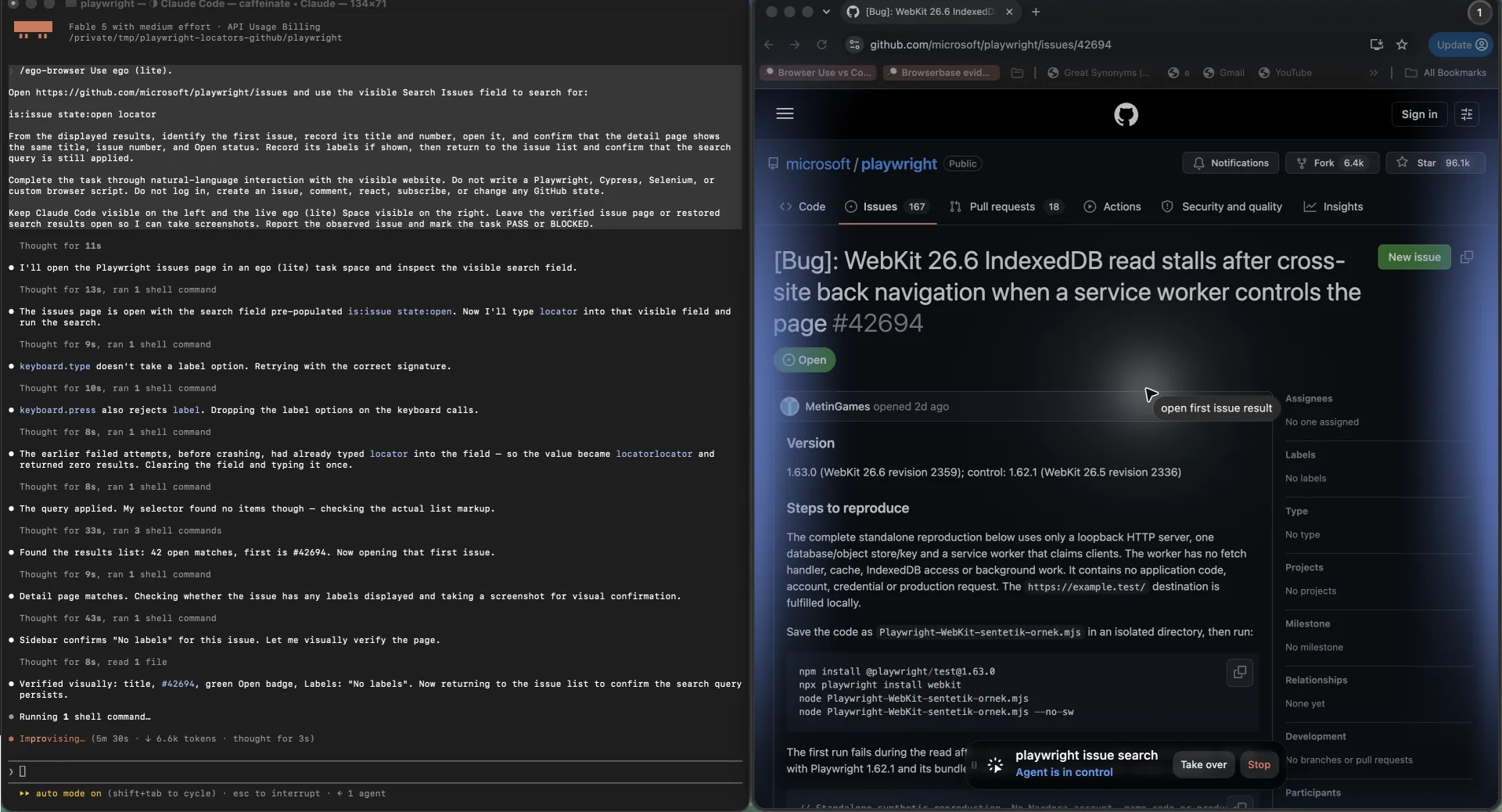
The ego(lite) session reported completion in 8 minutes 39 seconds. The Playwright authoring and debugging session for the same task took 12 minutes 51 seconds, then left a versionable test and a 12 MB trace. Those two observed sessions are too small and too environment-specific to rank the tools. They do show the practical trade: for this one-off investigation, the agent path reached the answer without asking us to maintain locator code; for a repeated CI check, the Playwright artifact is the valuable output.
| Goal | Better fit | What you keep |
|---|---|---|
| Explore or verify a one-off live task | ego(lite) | A supervised result in a visible, take-over-ready Space |
| Gate changes with a repeatable check | Playwright | Versioned locators, assertions, traces, and CI execution |
That matters for the exploratory end of this task. When the job is a one-off, when you are still discovering what the page does, or when the value is in the outcome rather than in a repeatable artifact, writing and then maintaining a locator is often the expensive way to get there. Describing the task and supervising the result is a reasonable choice, and it does not commit you to a selector you will have to keep alive.
The ego(lite) quick start shows the shape of that workflow, and the public repository documents how the agent tooling is wired. Neither source claims that UI changes stop mattering for an agent, and this article does not either.
The transition goes both directions, and this is the part worth remembering. Playwright is still the right home for work that has stabilized. Once a task becomes a critical regression path, gets run on every change, or has to produce the same result unattended at scale, it belongs in a Playwright test, where a deterministic locator and a repeatable result are the entire point.
Use ego(lite) to find out what the work is, especially when the task is exploratory or behind a login. Encode it in Playwright once you know.
What ego(lite) is not the right tool for
A deterministic regression suite that gates CI is a Playwright job, and moving it to an agent adds variance without adding coverage. Unattended execution at scale with reproducible results is also a Playwright job. If your requirement is that the same input produces the same output on every run and a failure blocks a merge, you want a test framework, not an exploration tool.
FAQ
Why did my locator suddenly match multiple elements?
Because the page now renders more than one element for that query. A layout change, a responsive variant, or duplicated content are the usual causes. Read the violation message to see what was matched, then scope the locator to a container or add a filter that distinguishes the intended element from the rest.
Is a positional fix acceptable for a strict mode violation?
It resolves the symptom and hides the cause. The documented guidance is to build a locator that uniquely identifies the target. Positional selection is defensible when position is the thing under test or when the matches are genuinely interchangeable, and nowhere else.
Should I use getByTestId or getByRole?
Use a role with an accessible name when the control has real semantics, because the locator also confirms the control is described correctly. Use a test id when the control has no meaningful semantics, when you cannot change the markup, or when the visible text is owned by content or translation and will change.
Why does my CSS selector break after a refactor but my role locator does not?
A CSS path encodes the DOM structure, so adding a wrapper or renaming a generated class invalidates it. A role locator encodes what the element is and what it is called, which a layout refactor normally leaves alone.
Does Playwright handle re-rendering automatically?
Yes, for selection. A locator resolves a fresh element before every action, so a re-render between two actions is handled. It does not rescue an element that is removed mid-action, and it does not know whether the page's data is ready.
Will a longer timeout fix a flaky locator?
Only if the element genuinely appears later than your timeout allows. If the failure is an ambiguity error, a longer timeout changes nothing, because the violation is raised immediately. If the failure is a non-retrying assertion reading a value too early, the fix is a retrying assertion, not a longer timeout.
Can I use XPath to reach elements inside a shadow root?
No. XPath does not pierce shadow roots. CSS and the other locators do, for open shadow roots. Closed-mode shadow roots are not supported at all.
Locator work pays for itself when the flow is deterministic, owned, and run repeatedly. It stops paying when the target moves faster than you can maintain it, and at that point the useful move is to change what you are building rather than which selector you are using.