Browser Use vs Browserbase: cloud browser comparison


The short answer: Browser Use and Browserbase are not a clean either-or choice. Browser Use still leads with the agent that decides what to do in a browser. Browserbase still leads with managed cloud browsers, observability, and fleet operations. Both products have expanded into the other's territory, and Browserbase documents a direct Browser Use integration.
Choose Browser Use when your missing layer is an open agent loop or a local browser-control workflow. Choose Browserbase when your missing layer is hosted browser capacity, remote persistence, or production operations. Use them together when you want Browser Use to make decisions inside Browserbase sessions. When you would rather keep browser state on your own machine than hand it to a hosted environment, a free Chromium browser like ego(lite) is the shorter path.
We tested the setup boundary on August 25, 2026. The useful finding was not a synthetic speed score. It was the exact point where a local run worked without a vendor account, and where Browserbase required cloud credentials.
How do Browser Use and Browserbase overlap now?
The old brain-versus-building shorthand is still useful, but it is no longer the whole product map. Browser Use's MIT-licensed Python library supplies an autonomous agent loop, while its current product also includes a CLI and Browser Use Cloud browsers. Browserbase supplies hosted browser sessions, Contexts, proxies, and session inspection, while its current platform also includes Agents, a model gateway, and the Stagehand SDK.
The cleanest comparison is their primary job:
| Question | Browser Use | Browserbase |
|---|---|---|
| Primary job | Decide and execute browser actions | Host and operate browser sessions |
| Open-source surface | MIT Python agent library | Stagehand SDK and related tooling |
| Hosted surface | Cloud agents and cloud browsers | Browsers, Contexts, observability, Runtime, and Agents |
| Can they work together? | Yes. Browser Use can connect to a Browserbase session through CDP. | |
The pairing is not just theoretical. Browserbase's official integration guide describes Browserbase as the browsing capability underneath Browser Use. If the closer question is agent-loop design versus Stagehand's primitives, see our Browser Use vs Stagehand comparison.
What did the hands-on setup reveal?
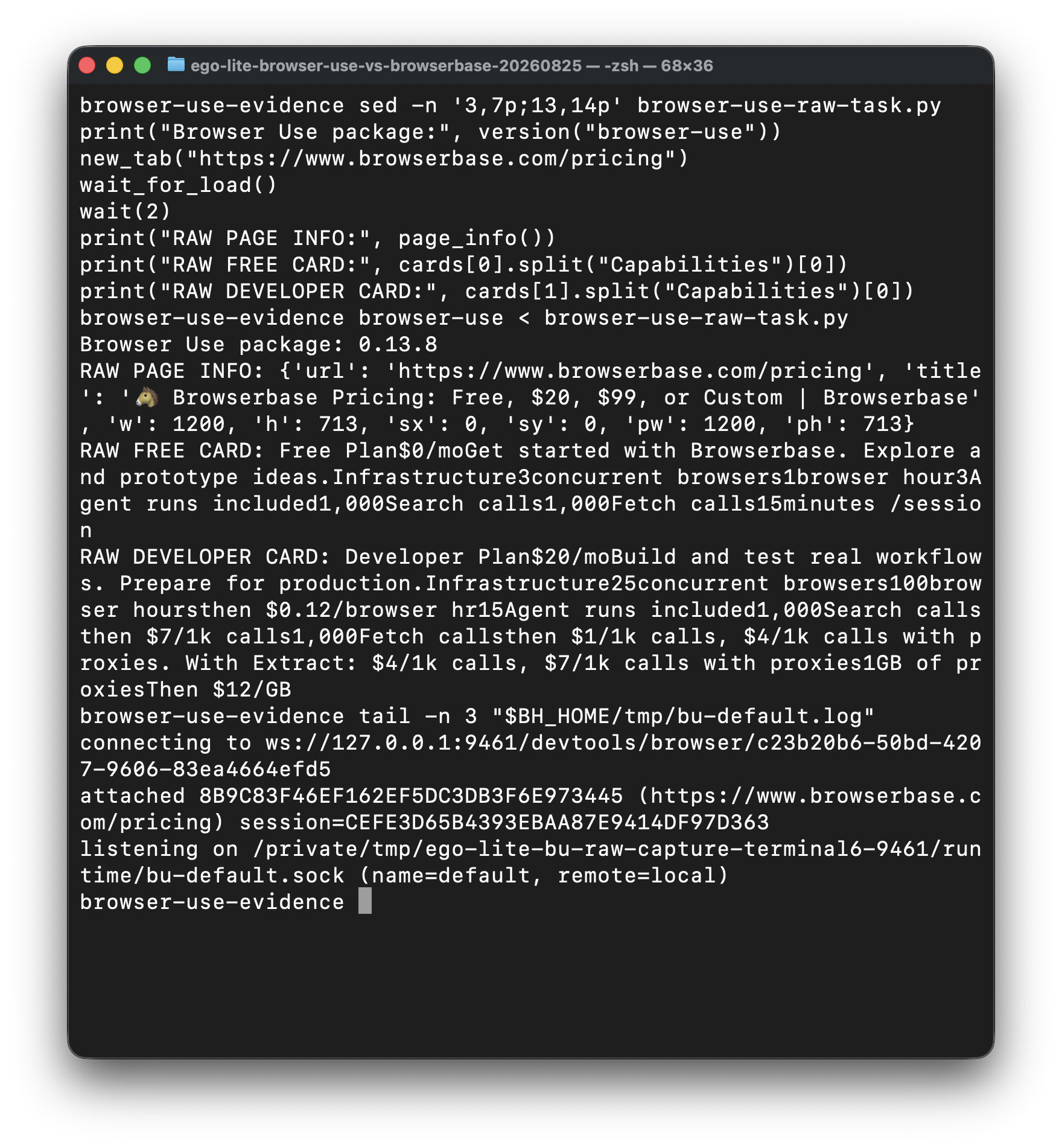
We used one read-only task: open Browserbase's pricing page and return the Free and Developer plan limits. No login, form submission, CAPTCHA, purchase, or account change was involved. The machine was a Mac running Chrome 151, Python 3.12.13, Browser Use 0.13.8, and the Browserbase Python SDK 1.17.0.
| Run | Observed result | What it means |
|---|---|---|
| Browser Use, default local connection | Failed: it attached to a TodoMVC tab left by another browser task. | A shared local Chrome or daemon needs task isolation when multiple agents run at once. |
| Browser Use, isolated Chrome on port 9461 | Succeeded: the CLI loaded the pricing page and returned both plan blocks. | Local execution can be account-free, but the browser connection still needs deliberate ownership. |
| Browserbase SDK session creation | Blocked before a session was created: no Browserbase API key was present, and both available browsers were signed out. | This establishes the account and credential boundary. It does not measure Browserbase reliability or speed. |
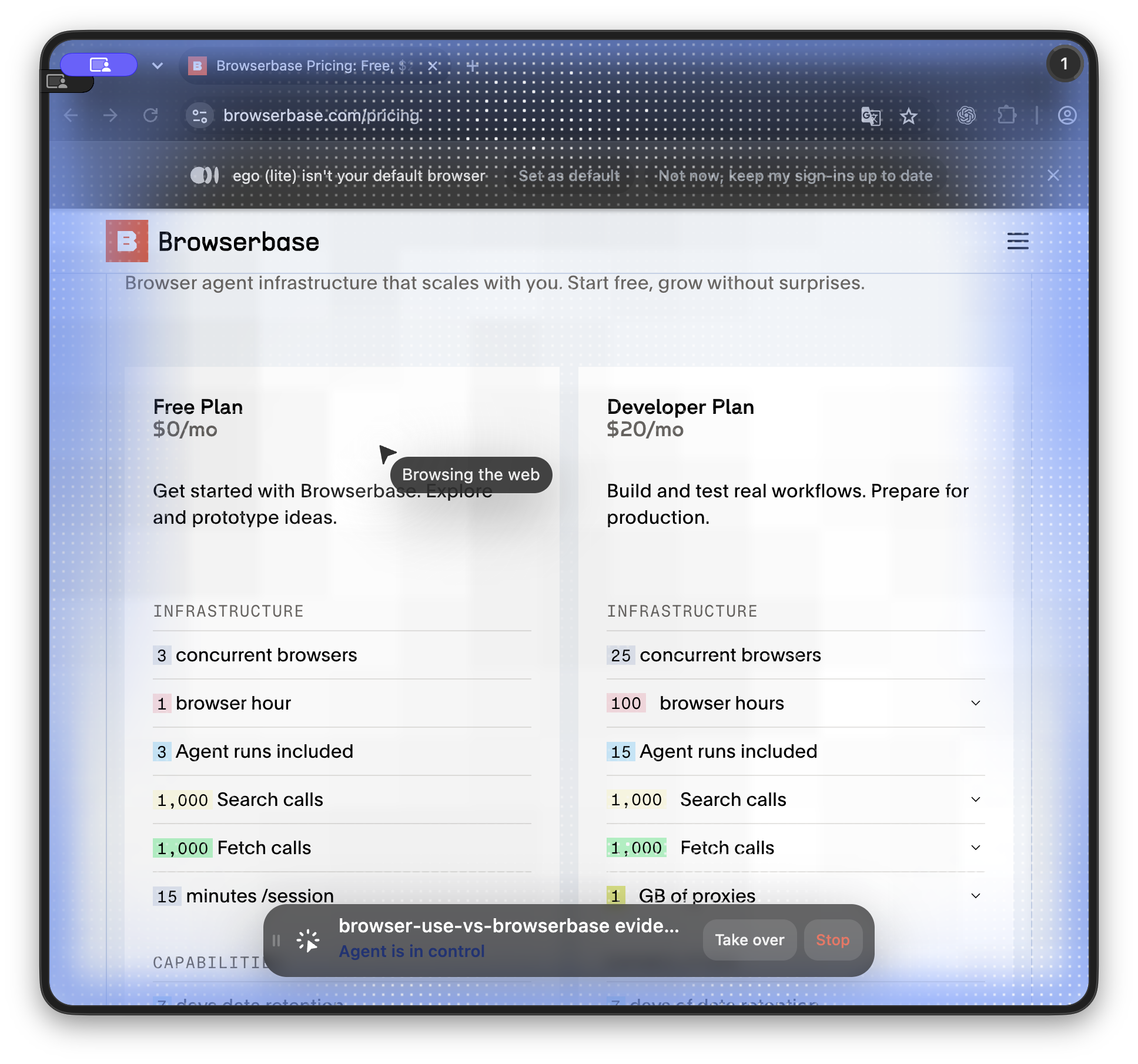
| ego(lite) Space | Succeeded: the same page loaded in a live Space with agent control and takeover controls visible. | A local shared-browser workflow can keep execution visible without handing the task to a cloud session. |
When is Browserbase worth it?
Browserbase is worth adding when browser operations, rather than agent logic, are the part you do not want to own. Four conditions matter most.
1. Concurrency beyond one workstation. A laptop can handle a few interactive tasks. It is the wrong scheduler for tens or hundreds of simultaneous sessions, especially when the work must keep running after the laptop sleeps.
2. CI, server, or scheduled execution. A remote job needs a browser endpoint that is available without a person keeping a desktop session alive. Browserbase supplies that runtime and a connection URL for the controller you choose.
3. Session inspection and operational tooling. Live View, recordings, logs, proxies, and plan-dependent CAPTCHA handling can be more valuable than browser minutes. They reduce the infrastructure and debugging work a team would otherwise build itself.
4. Cloud-managed persistence. Browserbase Contexts can persist cookies, localStorage, IndexedDB, service workers, and other browser data across sessions. You still need to establish or import that cloud-side state. It is not automatically the session already living in your everyday local browser.
Do cloud extensions also move your logged-in browser?
Cloud extension support and authenticated browser state are separate choices. Browser Use and Browserbase document extension upload and login persistence as separate configurations. Check the extension package, the agent entry point, and the saved website session separately.
Swipe horizontally to read the full table on a small screen.
| Execution route | Extension setup | Website login state |
|---|---|---|
| Browser Use API V4 | Upload a Manifest V3 ZIP with manifest.json at its root; pass up to three IDs at browser creation. Agent runs use browserSettings.extensionIds. | Pass a profileId for saved cookies and local storage. Local-cookie sync is a separate transfer into the cloud. |
| Browserbase | Upload a ZIP with manifest.json at its root; pass its extensionId when creating the session. | Use a Context ID. Set persist: true to save changes when the session closes; wait for synchronization before reusing it. |
Browser Use does not automatically tell its agent which extensions are installed. If the task needs an extension page, provide its chrome-extension:// URL. Its current V4 guide excludes Zero Data Retention projects and rejects some permissions, including debugger and proxy; an uploadable ZIP is not a promise that every extension will work. Session follow-ups inherit the initial extension list, and changing that list returns an error.
# Documentation example, not a cloud account test
from browser_use_sdk.v4 import BrowserUse

client = BrowserUse()
run = client.runs.create(
    "Read the authorized dashboard; report if login is required",
    browser_settings={
        "extensionIds": ["YOUR_UPLOADED_EXTENSION_ID"],
        "profileId": "YOUR_APPROVED_PROFILE_ID",
    },
)
Verify the extension on a page where it should change behavior, then verify the website account independently. A loaded password-manager extension does not prove that its vault is unlocked or that the website session survived a move. Browser Use explicitly says cookie sync does not import a password manager or guarantee that a site accepts a moved login.
The contracts above were checked on October 23, 2026 in the Browser Use agent extension guide, cookie-sync guide, Browserbase extension guide and Context guide. No new cloud extension or cross-provider reliability test was run for this update.
When can authenticated Fetch replace a browser session?
Browserbase Authenticated Fetch adds a read-only path for content available with saved login cookies. Complete an authorized login in a browser session using the intended Context with persist: true, then end the session to save its state. A later Fetch request can supply that contextId and return raw content, Markdown or schema-directed JSON.
This is useful for recurring order-status or statement reads when the server returns the required content without JavaScript rendering. A Context ID is not evidence that the login is current: a new Context needs a completed saved session, and an expired login needs an authorized refresh. Browserbase says Fetch uses the last saved cookies and does not write updated cookies back to the Context.
Choose the route by the operation the page requires, rather than by whether it is described as authenticated. This table follows Browserbase documentation read on October 29, 2026; it is not a measured comparison of either cloud provider.
| Reader task | Suitable route | Verification required |
|---|---|---|
| Read a server-rendered page using saved cookies | Authenticated Fetch with the intended Context | Final page identity, account, source status and required fields. |
| Refresh an expired login or save cookie changes | Authorized browser session with persistence | End the session and confirm the refreshed state is available before reuse. |
| Render JavaScript or obtain JavaScript-generated auth tokens | Full browser session | The requested data is actually visible after the page is ready. |
| Click through pages or submit a form | Interactive browser workflow | Correct account, authorized action and independent result check. |
When a page needs JavaScript rendering, JavaScript-generated authentication tokens, a click, pagination interaction or a form submission, use the full browser workflow. JSON extraction can structure fetched text, but it does not make Fetch an interactive agent and does not prove the extracted fields are correct.
A saved Browserbase Context is remote browser state, not automatically the session already open on your machine. ego(lite) fits a visible task in the selected signed-in browser environment when the operator needs to inspect the source and continue interacting. Keep a documented API or Fetch pipeline for suitable repeatable reads; do not add a browser interaction layer when a verified read already completes the job. No paid authenticated Fetch or cross-provider login trial was run in this update.
Read the authenticated Fetch workflow
Check the cookie-writeback and JavaScript limits
Review the current Fetch documentation
When is local enough?
Stay local when the workload is low-volume, a person is near the machine, and the useful state already exists there. That is common for checking a few supplier portals, reviewing an internal dashboard, or doing a one-off research task during the workday.
Browser Use can run locally, but our first attempt exposed an important practical detail: one shared Chrome and one shared daemon can leak tab selection across simultaneous tasks. An isolated profile and CDP endpoint fixed the run. Local is not the same as isolation unless you configure ownership deliberately.
ego(lite) is designed for the other local requirement: a free Chromium browser where you and your agent each get your own Space, so the task stays visible and available for takeover. Our screenshot proves that control surface on this task. If authentication is the deciding factor, read the deeper guide tohow agents use an existing logged-in browser session.
Local is a poor fit when the job must run continuously, scale independently of one computer, or satisfy centralized retention and observability requirements. In those cases Browserbase's operational layer is the feature, not overhead.
What does each stack cost?
Separate the meters. The Browser Use open-source library is free under MIT, but an autonomous run still consumes model tokens. Browser Use Cloud's browser API listed browser sessions at $0.02 per hour when rechecked on August 25, 2026, with model and proxy costs handled separately.
Browserbase's current pricing page lists a $0 plan with three concurrent browsers, one browser hour, and a 15-minute session cap. The $20 monthly Developer plan lists 25 concurrent browsers and 100 browser hours, then $0.12 per browser hour. Proxy, Search, Fetch, model, and Agent usage have their own allowances or overages.
| Your actual need | Start with | Why |
|---|---|---|
| Open-ended browser agent logic | Browser Use | The agent loop is the main requirement |
| Hosted browser fleet and operations | Browserbase | The browser runtime is the main requirement |
| Browser Use decisions on hosted sessions | Browser Use plus Browserbase | Each product fills a different primary layer |
| A few local tasks with an existing desktop session | ego(lite) | The task stays local, visible, and available for takeover |
Which stack is more reliable in production?
Reliability comes from the layer you operate. Browser Use owns an agent loop and local browser connection, so you own process supervision, browser isolation, retries, and evidence capture. Browserbase owns the hosted browser lifecycle, session persistence, observability, and concurrency, but your controller, credentials, model calls, and application-level assertions still need monitoring. Neither product guarantees that an agent will complete an arbitrary workflow.
For a production pipeline, define a success contract before choosing the vendor: expected URL and fields, maximum steps, timeout, retry class, screenshot or trace artifacts, and a human escalation path. Keep deterministic checks in code and use the agent for the judgment-heavy part; that makes a cloud outage or a changed page a visible failure instead of a plausible empty result.
How much control does the agent have?
Browser Use gives the model an autonomous loop that decides the next action from page state. Browserbase gives that loop a remote browser and operational APIs; Stagehand or your own controller can provide a more explicit act/extract/observe boundary. ego(lite) is the better fit when the loop can run a multi-step sequence as one piece of in-page JavaScript instead of one tool call at a time.
Whichever layer you choose, restrict actions by domain and purpose, require confirmation before submissions or account changes, and log the input and output of each step. More autonomy is useful for exploration; it is a liability when the agent can send messages, purchase, delete, or export data without a review point.
Where do no-code workflows fit?
No-code tools are a good first step when one person needs a recorded flow for a stable site and the output is easy to review. They trade programming effort for re-recording effort when a layout, login popup, or data field changes. Browser Use and Browserbase are better when you need a programmable agent, reusable infrastructure, or a controller that can branch on page state.
A practical hybrid is to prototype the happy path in a no-code recorder, then graduate high-value steps into deterministic code with explicit assertions and a bounded agent fallback. Keep credentials in the approved vault or browser context; do not export them into a hosted recorder just to avoid writing a connector.
How do dynamic sites and anti-bot rules change the choice?
For SPAs, virtualized tables, and pages that load data after navigation, wait for a meaningful application signal and capture the rendered evidence you used. Browser Use can reason over the current page, Browserbase can provide a stable remote runtime, and local ego(lite) can inspect a permitted rendered page; none of them should assume that an internal API, hidden JSON, or a missing element is safe to use.
Cloudflare, CAPTCHA, rate limits, and robots rules are access controls, not an engineering puzzle to defeat. Do not select a product for stealth, fingerprint spoofing, CAPTCHA solving, or proxy rotation. If a permitted run is challenged, pause, record the URL and visible status, and let an authorized person choose an approved API, manual step, or a different source.
What are the privacy and security trade-offs?
Local execution keeps page content and browser state on a machine you control, but you must secure that machine, profile, logs, and model connection. Browserbase centralizes more operational work and can offer retention controls and session inspection, but page content, cookies, and traces now cross a vendor boundary. Browser Use can run in either environment, so the agent library alone does not answer the data-residency question.
Before production, classify the data, set retention and deletion rules, restrict domains and credentials, redact screenshots, and verify the vendor's logging and subprocess behavior. Never place refresh tokens or raw cookies in prompts, issue trackers, or benchmark artifacts, and require a human approval for exports containing personal or regulated data.
FAQ
Can I use Browser Use with Browserbase?
Yes. Browser Use supplies the agent logic and can connect through CDP to a Browserbase session. Browserbase supplies the hosted browser and its operational features.
Are they still different layers in 2026?
Their centers of gravity are different, but the product surfaces overlap. Browser Use now offers local CLI control and cloud browsers. Browserbase now offers Agents and Stagehand in addition to browser infrastructure. Calling them pure non-competitors is too absolute.
Can Browserbase stay logged in?
Yes. Browserbase Contexts can persist authentication and browser storage across cloud sessions. That state must be created or imported in Browserbase, so it is different from automatically using the session already present in your daily local browser.
Is Browserbase free?
It has a $0 plan for evaluation, with one browser hour, three concurrent browsers, three Agent runs, and a 15-minute session cap as of August 25, 2026. Production plans add capacity and features.
What failed in the firsthand test?
The first Browser Use local attempt attached to another task's tab, and the first isolation port was already occupied. A unique Chrome profile, harness home, and CDP port fixed it. Browserbase session creation stopped at the missing API key, so this article does not claim a completed Browserbase cloud run.
Which option should I try first?
Start with the smallest environment that matches the job. Use Browser Use for agent logic, Browserbase for hosted browser operations, both when you need both layers, or a local shared-browser workflow when the task is small and depends on your desktop session.
Next, compare ego(lite) vs Browserbasefor the local-versus-cloud decision.