ego (lite) is just a browser, ego is your personal agent across devices.
Join waitlist
Automated test automation for web apps

Automated web testing with AI agents for free

Use ego (lite) with Codex or Claude Code to turn a plain-English test brief into real test automation. Your Agent opens your app in a real browser, follows the flow you specify, records what happened, and gives you a clear result you can review — without taking over the tabs you are using.

Download for Mac(yes, free)

Trusted by developers from

OpenAIAnthropicGoogleMetaNVIDIACursorPerplexity
SpaceXTeslaNotionFigmaStripeNetflixAirbnb

How to automate web testing with an AI agent

Use this four-step test automation process for a local, staging, or production-safe web app you are authorized to test. Describe the browser flow in plain English, including the starting state, actions, assertions, test data, and stop conditions. The Agent works in a separate browser Space, so you can watch a run, take over when a human decision is required, and keep your normal tabs clear.

1

Install ego (lite) for automated application testing

Download ego (lite), then choose the browser context you want to use. For tests with real side effects, point the Agent at localhost, a test account, or a staging environment — the same safety boundary you would use for a manual check.

2

Describe the test scenario and expected result

Tell the Agent which URL to open, the user journey to follow, the data or account it may use, and what success looks like. A precise brief can cover a login flow, form validation, cart, checkout sandbox, search, dashboard, or any other repeatable browser task. Name visible labels and outcomes instead of tying the brief to fragile CSS selectors; the Agent can inspect the rendered page and ask when the intent is ambiguous.

What should it test?

3

Let the Agent execute the test in a separate Space

The Agent opens the app in its own ego (lite) Space and performs the test automation steps in a real browser. You can inspect the rendered page, console state, and progress while the test runs, without losing the tabs you were already using. For visual smoke checks, ask it to verify the visible control, text, or layout region rather than hard-coding a selector that changes with every redesign.

4

Review the automated test report and rerun what changed

Ask for a concise report with the route tested, steps completed, expected versus actual result, screenshots or source references where useful, and a clear failure point. Save the prompt and report as the test case, then send the same test automation prompt again after a fix or before a merge instead of relying on memory.

Why use ego (lite) for automated test automation?

ego (lite) gives your coding Agent a real, visible browser for software automated testing. Instead of a black-box test runner, you get separate Spaces, an observable test path, and an outcome that tells you what actually happened on the page.

Finish browser tests faster

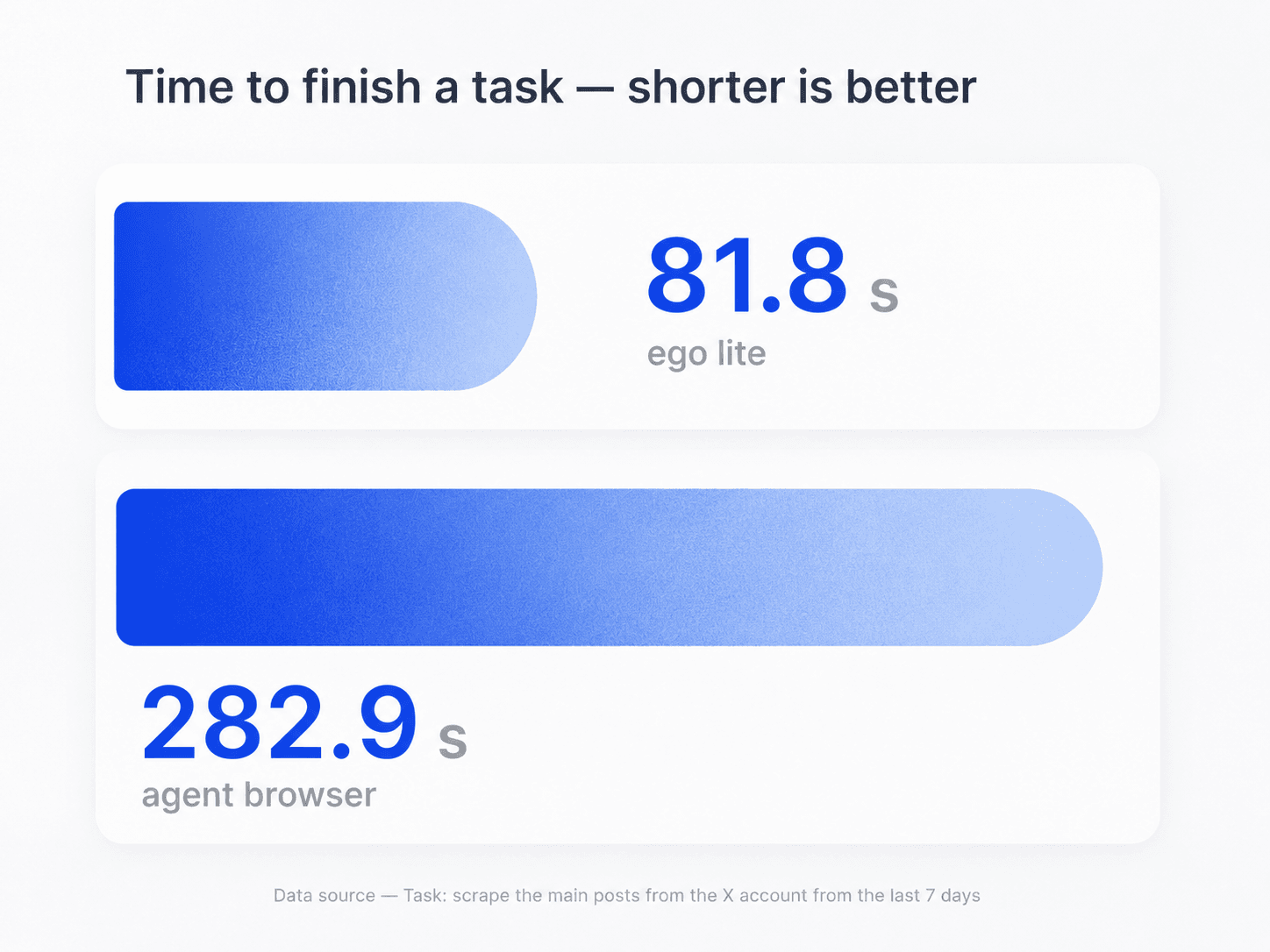
Every browser step adds to the time between your test brief and the result. In the task shown here, ego (lite) finished in 81.8 seconds, compared with 282.9 seconds for an agent browser. Actual time varies by website, workflow, and network conditions.

Real ego (lite) browser running automated application testing

Keep each automated test execution isolated

Use a separate Space for each feature, account role, viewport, or regression scenario. Test automation stays organized instead of mixing state across a pile of browser tabs, and you can return to the exact Space where a run stopped.

Parallel ego (lite) Spaces for separate automated web test scenarios

Watch an automation tester work and take over

Open any Space to see the current page and the step the Agent is trying to complete. If a workflow reaches MFA, a payment confirmation, a destructive action, or another decision that should stay human, take over the browser and decide what happens next.

Use the test context you authorize

Reuse a browser context you choose for roles or test accounts that need a signed-in flow, rather than handing credentials to a test-automation service. Your app's access controls, MFA, rate limits, and permission checks remain in effect; ego (lite) does not bypass them.

ego (lite) Chrome context import for authorized automated web testing

Run the same critical flow across client sites

For agency or freelance work, keep one test brief per client and run it against each authorized staging URL in its own Space. Record the site, account role, browser version, and fixture in every report so a broken form or checkout failure is attributable instead of being mixed into one generic pass rate.

Repair flaky checks with evidence, not blind self-healing

When a test fails, ask the Agent to capture the URL, screenshot, console error, network status, and the element or text it expected. It can suggest a more stable locator or a changed step, but keep the proposed change under review and rerun the original assertion; automatic selector healing can hide a real regression if the expected behavior changed.
Claude Code · ego lite
>/ego-browser Add the first product to the cart, then check checkout loads
Bash(
ego-browser nodejs <<'EOF' await openOrReuseTab('localhost:3000') await click('.product-card') await click('.add-to-cart') await click('a[href="/checkout"]') cliLog('checkout loaded') EOF
)
Output:
[t=4480ms] checkout loaded
Done. Both steps work.
─── 1 tool call · 1.1k tokens ───
Claude Code · Playwright MCP
>Add the first product to the cart, then check checkout loads
playwright - browser_navigate (MCP)(url: "localhost:3000")
Page Snapshot
… +224 lines (ctrl+o to expand)
1.6k tokens sent so far
Storefront rendered. Opening the first product.
playwright - browser_click (MCP)(ref: "e18")
Page Snapshot
… +198 lines (ctrl+o to expand)
3.1k tokens sent so far
Product page is up. Now the Add to cart button.
playwright - browser_click (MCP)(ref: "e42")
Page Snapshot
… +205 lines (ctrl+o to expand)
4.9k tokens sent so far
Added. Heading to checkout.
playwright - browser_navigate (MCP)(url: "localhost:3000/checkout")
Page Snapshot
… +231 lines (ctrl+o to expand)
6.8k tokens sent so far
Refs are stale after the navigation. Taking a fresh snapshot.
playwright - browser_snapshot (MCP)
Page Snapshot
… +238 lines (ctrl+o to expand)
9.2k tokens sent so far
Now waiting for the payment form to render.
playwright - browser_wait_for (MCP)(text: "Payment")
Page Snapshot
… +229 lines (ctrl+o to expand)
11.2k tokens sent so far
Confirming the form is actually there.
playwright - browser_evaluate (MCP)(expression: "!!document.querySelector('form#payment')")
Page Snapshot
… +25 lines (ctrl+o to expand)
13.6k tokens sent so far
─── 7 tool calls · 13.6k tokens ───
AI agent diagnosing a flaky browser test with screenshots and console evidence

Use AI checks before a pull request is merged

Point the Agent at a local preview or staging deployment for a targeted pre-merge smoke test. Return a blocked result when the environment, fixture, MFA, or permission is unavailable; do not make a green-looking report by skipping a failed check. Keep deterministic unit, integration, accessibility, and security suites in CI alongside the browser run.

Time to finish a task, shorter is better
81.8 sego lite
282.9 sagent browser
Data source - Task: scrape the main posts from the X account from the last 7 days
AI agent running a pre-merge browser smoke test against a pull request preview

What automated test automation can and cannot do

ego (lite) helps an Agent execute the test procedure you define in a browser context you authorize. It can inspect a web flow and report its outcome, but it does not make an unsafe test safe, infer a product requirement you did not state, or bypass your app's access controls.

What your Agent can test

Repeatable web application paths you authorize it to open and inspect.

  • Navigation, search, forms, validation messages, dashboards, and role-based flows visible to the selected browser context
  • Expected page state, buttons, text, URLs, client-side errors, and visible network failures
  • A list of test steps, expected versus actual result, screenshots or source references, and a clear pass, fail, or blocked status
  • Several independent tests in separate Spaces when the test data and side effects are safe to run in parallel
  • A targeted smoke or regression check against each authorized client staging site, with the site and fixture recorded in the report

What needs your judgment

Unsafe, irreversible, private, or ambiguous actions remain under your control.

  • Charging a real card, placing a live order, sending email or messages, deleting data, or changing production account settings
  • Entering passwords, completing MFA, accepting legal terms, CAPTCHA challenges, or another access-control decision
  • Proving an unstated product requirement, security property, legal compliance claim, or full accessibility audit from one browser run
  • Bypassing permissions, rate limits, bot protections, environment restrictions, or other application controls
  • Treating an AI-suggested selector repair as safe without reviewing the changed assertion and rerunning the original check
  • Using production credentials or private customer data when a test account, fixture, or staging environment is available

Read the ego (lite) quick-start guide

Give your Agent a test automation job it can show its work for

Start with one safe user journey, state the expected result, and let Codex or Claude Code execute it in an observable ego (lite) browser Space. You get a test result you can inspect, rerun after a fix, and turn into a more reliable release habit.

Try the test automation workflow

Automated test automation FAQ

Test automation in software testing is the use of software to repeat a defined test procedure and compare the observed result with an expected result. For a web app, that can mean opening a page, completing a form, checking validation, signing in with a test account, or confirming that a checkout sandbox loads. The useful part is not simply clicking faster: the test must state what it checked and report what actually happened.

An automatic test is a repeatable check run by software instead of being performed entirely by hand. In browser testing, it starts from a known state, takes a defined action, checks an expected result, and records whether the check passed, failed, or could not continue. A single automatic test is usually one part of a wider test automation process.

Give Codex or Claude Code a clear test brief, a safe URL, and the expected outcome. The Agent opens the app in a separate ego (lite) Space, carries out the browser steps, and returns a report of completed checks, visible errors, and any point where it was blocked. You can inspect the Space or take over at any time.

Software automated testing can cover repeatable checks at different levels, from small code-level tests to browser-level user flows. This ego (lite) workflow focuses on the browser layer: rendered pages, navigation, forms, authenticated test flows, visible client errors, and network failures. It complements rather than replaces unit, integration, security, performance, or accessibility testing that needs a dedicated method.

The need for automation in software testing grows when the same important paths must be checked after many changes, across account roles, or before every release. Automation reduces repetitive setup and makes the result more consistent, while people keep ownership of unclear requirements, exploratory judgment, and any step with real-world consequences. Start with stable, high-value paths rather than trying to automate every click at once.

An autotest check is one explicit condition an automated test evaluates. A useful definition names the starting state, action, expected result, and evidence to retain. For example: “Using the staging buyer account, add the first item to the cart; the cart count becomes 1 and the checkout page loads without a console error.” Clear checks make automated test execution reviewable and repeatable.

You do not need to write a test framework to begin, but you do need a clear scenario. Start with one stable user path, safe test data, and a sentence that says what should happen. Then add the URL, numbered actions, expected results, and a rule to stop before any real charge, message, deletion, or account change. This is a practical foundation for test automation development.

An automation tester defines the useful checks, prepares safe test data, reviews failures, and decides what should run next. An AI Agent can carry out the browser procedure, collect evidence, and help investigate a failure, but it does not replace the person who understands the product requirement and release risk. The strongest workflow keeps those roles explicit.

Not quite. An automated test evaluates a specific expected result, such as whether a form blocks an invalid email address. Automation assessments are a broader review of what is worth automating, whether the scenario is stable, what data it needs, and whether its side effects are safe. Use that assessment before adding a workflow to your recurring test automation set.

Yes, when you use a browser context and test account you are authorized to use. Prefer a staging environment and isolated test data for logged-in flows. The Agent can work with the session the browser is allowed to use, but it does not bypass MFA, permissions, CAPTCHA, rate limits, or other access controls. If a human-only step appears, inspect or take over the Space yourself.

An Agent can run the browser test, inspect the evidence, and help investigate or change code when you authorize that work. Keep the test and verification explicit: after a proposed fix, rerun the same scenario and compare the new result. For production systems, review code changes and use your normal test, review, and deployment controls before shipping.

A test automation framework runs scripted checks you write and maintain in code, usually inside a CI pipeline. With ego (lite), you describe the scenario in plain English and a coding Agent performs the steps in a real, visible browser, so you can create or change a check without editing a test script. The two approaches complement each other: keep coded suites for fast, deterministic CI runs, and use an Agent-driven run when you want a quick, observable check of a user journey or a one-off investigation.

Yes, for browser-level checks. Save the test automation prompt for a critical path — sign-in, search, checkout sandbox, or a core dashboard view — and send the same prompt again after each change as a smoke or regression check. Because the brief, the steps, and the expected results are written down, each rerun tests the same path the same way, and the report shows exactly where a regression appeared.

Do not automate a path that can create an irreversible real-world effect unless you have a safe fixture, sandbox, or explicit approval step. Avoid using a production customer account for orders, billing, messages, deletion, permission changes, or sensitive data. Also keep exploratory product judgment separate from a pass/fail procedure: an Agent can gather evidence, but a vague requirement still needs a human decision.

Yes. Describe the flow in plain English with a URL, starting state, visible actions, expected results, and a stop rule. The Agent can inspect the rendered page and use accessible labels or visible text, but review the run and convert stable, high-value checks into coded tests when you need deterministic CI coverage.

It can run independent checks in separate ego (lite) Spaces when you have permission for each site and safe fixtures. Keep each client's URL, account role, expected result, and report separate; never mix credentials or assume that one site's selectors, consent, or checkout behavior applies to another.

Treat self-healing as a suggestion, not an automatic approval. Capture the failure evidence, review the proposed locator or step, confirm the product requirement is unchanged, and rerun the original assertion. A test that turns green by following a different control can hide a real regression.

Run the changed app in a local preview or staging environment, give the Agent a targeted smoke-test brief, and require pass, fail, or blocked status with evidence for every assertion. Keep unit, integration, accessibility, security, and deterministic browser suites in CI; an Agent-driven browser check is an additional review signal, not a replacement for them.

Use two safe test accounts with different roles, attempt the protected route directly, and assert both the visible response and the network or API status. Confirm that an unauthorized account receives the expected 401/403 or redirect and cannot read another account's data. Keep credentials, MFA, and any destructive step human-approved.